You are here:
Example: Quote Transition from Submitted to Approved
This example shows how an admin can configure conditions to transition a quote from Submitted to either Approved or Underwriter Review.
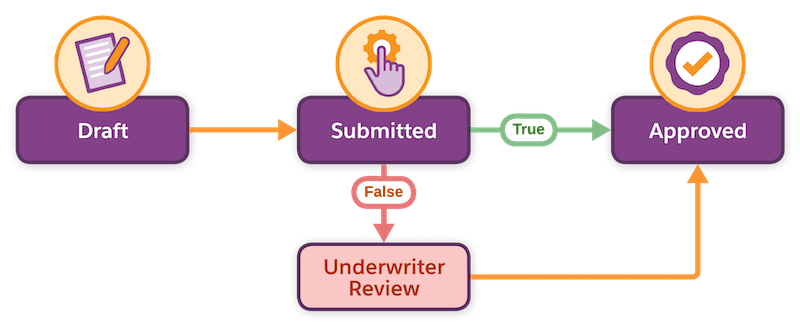
To turn on the transition from Submitted to Approved, the admin sets up a rule with these conditions on the Auto Vehicle product. The admin can use Business Rules Engine or the Constraint Rules Engine to define the rule.
| Engine Type | Stage Transition | Product Criteria | Action |
|---|---|---|---|
| Business Rules Engine | Submitted to Approved | Driver Accidents Less than 3 AND Risk Category Equals High |
True evaluation: Move the quote to the Approved stage and send email. False evaluation: Move quote to Underwriter Review stage. |
| Constraint Rules Engine | Submitted to Approved | Constraint model evaluates: Driver Accidents < 3 AND Risk Category = High |
True evaluation: Move the quote to the Approved stage and send email. False evaluation: Move quote to the Underwriter Review stage. |
When insurance reps trigger the product underwriting rule:
- If the product meets the criteria and satisfies the condition logic for the rule group, the quote transitions to the Approved stage. The rule triggers the confirmation email to users.
- If the product doesn't meet the criteria, the rule initiates a flow that transitions the quote to the Underwriter Review stage.
Both the rule engines produce the same outcome. While Business Rules Engine uses the inline condition builder, the Constraint Rules Engine uses rules in the constraint model.
