You are here:
Product Underwriting Rules for Insurance
Decide the criteria for transitioning a quote to a target stage. Define stage definitions and configure stage transitions, and then create underwriting rules to define the transition criteria for those stages. Run automated actions when the underwriting rules succeed or fail.
Required Editions
| Available in: Lightning Experience |
| Available in: Enterprise, Unlimited, and Developer Editions with Digital Insurance Platform |
| Permission set license | Description |
|---|---|
| Digital Insurance Product Administration | Allows users to create underwriting rules. |
| Industries Stage Management Addon |
| User Permissions Needed | |
|---|---|
| To access objects and interfaces required to configure underwriting rules | Fulfilment Designer |
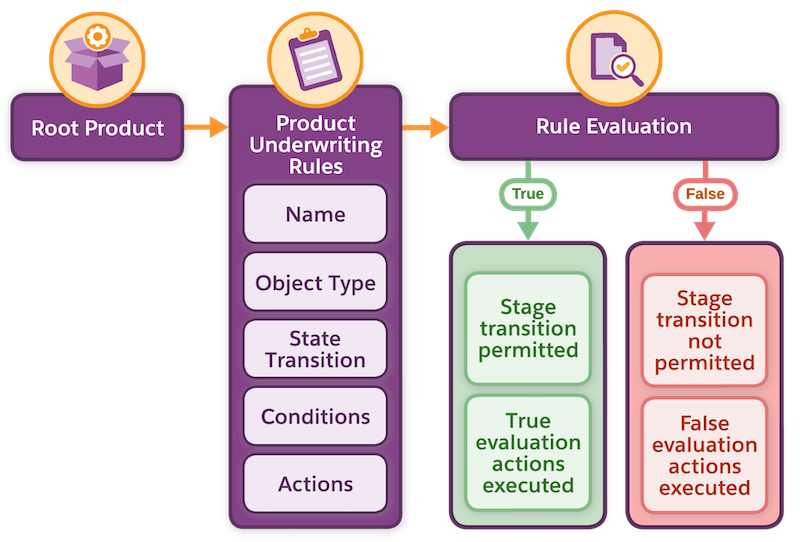
Underwriting rules apply conditions and actions at different stages of a quote and evaluate whether the quote can move to a target stage. Depending on the evaluation outcome, the quote record moves to the target stage or remains in its current stage.
When you configure underwriting rules, specify actions for both true and false outcomes. For example, create a rule to move a quote from Submitted to Underwriter Review stage if the Risk Category for the Auto Driver product is High. Then, specify an action that notifies the underwriter through email when the rule outcome is true.
Use the Business Rules Engine or Constraint Rules Engine as the evaluation engine for underwriting rules. For Business Rules Engine, specify up to five compound conditions, with each condition evaluating expressions for up to five fields or attributes of the root product. For Constraint Rules Engine, define your underwriting rule in the constraint model for the root product by using the constraint modeling language (CML).
Considerations for Using Underwriting Rules
- Use underwriting rules to define conditions for a specific root product, rather than for an entire object type such as Quote. While rules configured in Stage Management apply to transitions across all quotes, product underwriting rules apply to a single root product.
- Use Stage Management to define stage definitions and configure stage transitions. Use underwriting rules to define criteria and actions for those stage transitions.
- An underwriting rule group includes all the rules defined for a particular stage transition, such as Draft to Submitted. All the rules in a rule group must use the same evaluation engine. A rule group doesn’t support a configuration where some rules use the Business Rules Engine and others use the Constraint Rules Engine.
- In multi-root quotes, the underwriting rules for every root product must use the same evaluation engine for a specific quote stage transition.
- Set Up Underwriting Rules
Before creating underwriting rules, set up stage management, configure rule library, and add the Underwriting Rules component to the Product details page. - Configure Sharing Rules for Customer Community Users
Sharing rules give customer community users access to records that are relevant for using underwriting rules. - Create an Underwriting Rule
Create underwriting rules to control quote stage transitions. The quote progresses to the target stage if the root product meets the specified criteria. Define underwriting rules that use Business Rules Engine or Constraint Rules Engine for their evaluation. - Underwriting Rule Groups
Underwriting rules are organized into groups based on object type and transition step. All rules in a group use the same engine type: Business Rules Engine or Constraint Rules Engine. - Example: Quote Transition from Submitted to Approved
This example shows how an admin can configure conditions to transition a quote from Submitted to either Approved or Underwriter Review. - Evaluation of Underwriting Rules
You can evaluate the underwriting rules at runtime for a quote record by using the Insurance Invoke Underwriting Rules connect API. - Track the Results of Underwriting Rule Evaluations
View the history of underwriting rule execution on the Stage Transition Underwriting Evaluations page.
