Example: Create a Custom Flow for Underwriting Rule Evaluation
Set up a flow to trigger underwriting rule evaluation. This flow uses an Apex class to
call the Underwriting Rules Invoke API directly from the Quote record.
Required Editions
Available in: Lightning Experience
Available in: Enterprise, Unlimited, and Developer
Editions with Digital Insurance Platform
This example shows the basic approach to executing underwriting rules. You can customize
the flow and API behavior based on your business needs.
Create an Apex class to send the Quote ID and To Stage values from a flow to the
Insurance Underwriting Rules Invoke API. This class sends a POST request to the
Underwriting Rules Invoke API, and returns the underwriting rule API names and their
execution status.
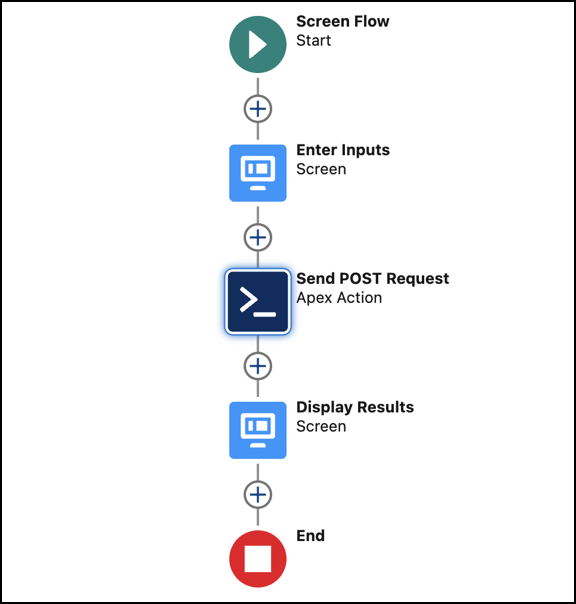
Create a custom screen flow to take user inputs and evaluate underwriting rules.
Element Type
Element Name
Components
Description
Screen
Enter Inputs
Text Input: Quote ID
Text Input: To Stage
Collects user inputs for the flow.
Action
Send POST Request
-
Calls the Apex class to send a POST request to the Insurance Underwriting
Rules Invoke API.
Screen
Display Results
Display Text: Underwriting Rule Details
Shows the API response from the Action element, which includes underwriting
rule API names and their execution status.
For rules that use Constraint Rules Engine, the API response also includes line item
IDs and product details for items where the rule executed successfully.
Create a custom button for the Quote object.
From the Object Manager, link the custom button to the flow.
After product admins create a custom button and configure the custom flow, insurance
reps can click the custom button and enter the required input to launch the
flow.
Did this article solve your issue?
Let us know so we can improve!
Loading
Salesforce Help | Article
Cookie Consent Manager
Cookie Consent Manager
General Information
Required Cookies
Functional Cookies
Advertising Cookies
General Information
We use three kinds of cookies on our websites: required, functional, and advertising. You can choose whether functional and advertising cookies apply. Click on the different cookie categories to find out more about each category and to change the default settings.
Privacy Statement
Required Cookies
Always Active
Required cookies are necessary for basic website functionality. Some examples include: session cookies needed to transmit the website, authentication cookies, and security cookies.
Functional Cookies
Functional cookies enhance functions, performance, and services on the website. Some examples include: cookies used to analyze site traffic, cookies used for market research, and cookies used to display advertising that is not directed to a particular individual.
Advertising Cookies
Advertising cookies track activity across websites in order to understand a viewer’s interests, and direct them specific marketing. Some examples include: cookies used for remarketing, or interest-based advertising.