Loading
Ongoing maintenance for Salesforce HelpRead More
Feature degradation | Gmail Email delivery failureRead More
Insurance
Table of Contents
Select Filters

          No results
          No results
          Here are some search tips

          Check the spelling of your keywords.
          Use more general search terms.
          Select fewer filters to broaden your search.

          Search all of Salesforce Help
          Update Existing Extended Attribute Definitions

          Update Existing Extended Attribute Definitions

          Prior to the Summer '25 release, AttributeNameOverride was used to look for an object in the record picker. If you have extended attribute definitions created prior to that release, check them to be sure the Code field of the attribute definition is set to the object's API name.

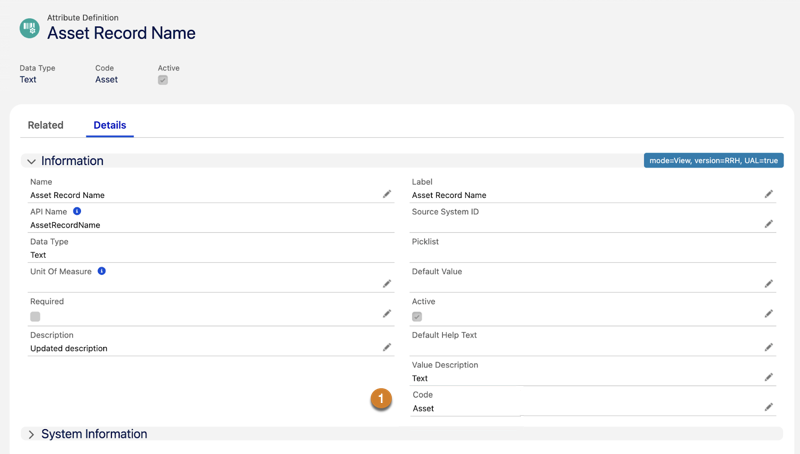
          1. Find the existing attribute definition for all the existing extended attributes, such as Asset Record Name or Contact Record Name.
          2. Update the Code field (1) to the referred object’s API name, for example Asset.
          Example
          Example
          Example of changing the Code field on an attribute definition to match the object's API name, in this case Asset.

          Be sure to test your change using the configurator.

           
          Loading
          Salesforce Help | Article