You are here:
Add Group Classes and Associate them with Large Group Plans
Group classes describe a group of plan subscribers who all receive similar or the same benefits. You can add them to plans on large group quotes. Users can associate plans in a quote with a Group Class from within the large group quoting UI.
On the Large Group Quote Lightning web component, users can select the eligible group classes for each quote line item. Only the primary members (and their families) whose group class falls in the selected eligible group classes are rated.
The Group Class object identifies a group of members that all receive similar benefits when different classes of members receive different benefits. Example classes include Executives, Union, and Office workers.
To view details about the Group Class object, review the Fields & Relationships shown for Group Class in Object Manager.

- Select a plan on the Large Group Quote LWC.
-
Click Assign.
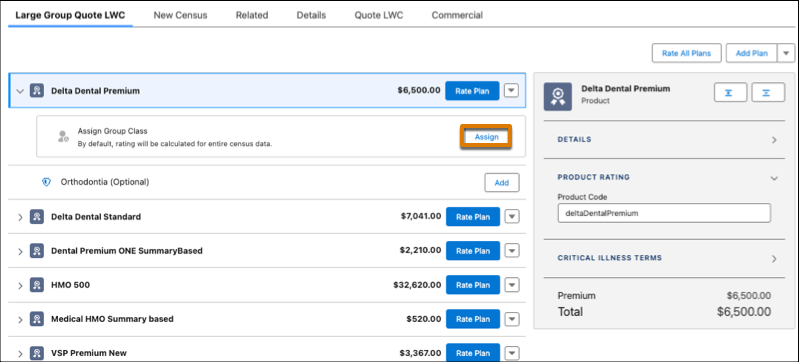
- A dialog box appears. Select a group class and then click Save. The group class appears as a group associated with the plan.
