You are here:
Attributes in Context
Insurance products and health plans you sell are made up of collections of attributes. Coverage specs, insured item specs, insured party specs, and rating fact specs are all comprised of lists of attributes. Attributes also attach to root product specs. Vlocity uses the values of attributes that users input to rate out insurance products and health plans.
Eligibility rules use attributes to qualify or disqualify a prospective customer from an insurance product or health plan. Underwriting rules use attributes to determine whether a quoted insurance product will require review by an underwriter.
Here's the flow for creating and using product attributes:
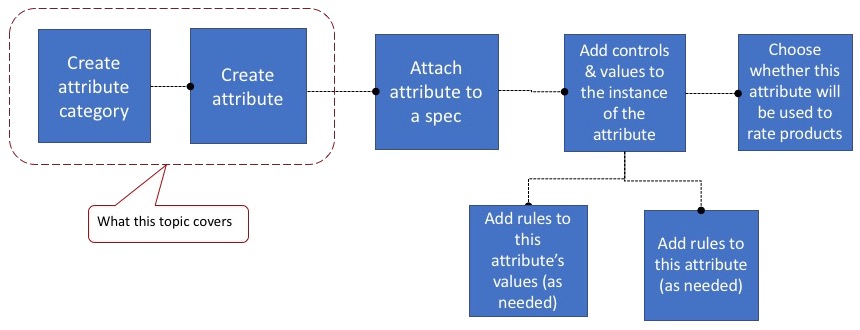
When you create attributes, first you define attribute categories that make attributes easier to find later on. For auto insurance attributes, you can create a category for Insured Item (the car), a category for Insured Party (the driver), and a category for Coverages. Then you define the attributes in each category, giving them names and codes and making other choices about how each attribute will work.
When you first create an attribute, you don't add any controls, values, or rules to it. Think of the initial attributes you create as headers for the attributes that will be attached to product specs.
One exception is the Attribute Group Type, which lets you configure attributes that will be used for large group insurance products such as health and dental plans.
Another exception is power attributes, which let you configure metadata such as Attribute Class and Attribute Scope that will be used by the system to administer claims.
You add values to attributes when you attach them to specs or products. That's also where you add controls (such as picklist or single value or text field with no value) to attributes, and where you determine whether this attribute will be used in rating the product.
You can then add rules to the attributes themselves, and to individual values of attributes.
To learn how to attach attributes to specs and products and to set up their values and other options, see Child Specs for Root Products.
Power Attributes
Power attributes are special. They include extra configuration that lets Vlocity track them through policy administration, claims creation, and all claims processing activities.
Use power attributes to track limits, deductibles, copays, coinsurance, and out of pocket maximums.
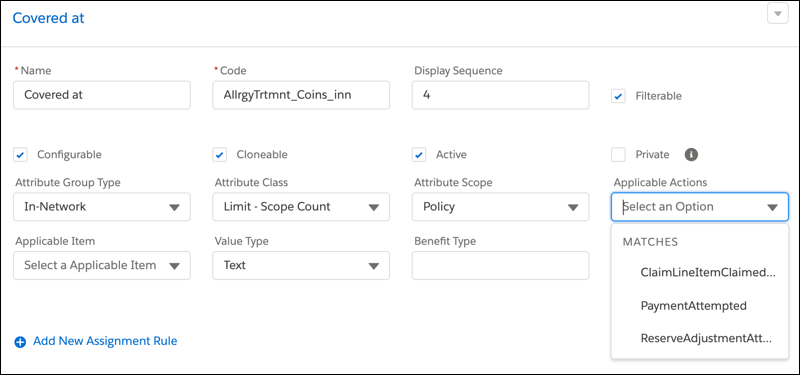
When you configure a power attribute, you choose an Attribute Class. Each Attribute Class has its own set of valid Applicable Actions.
You can use these classes to create a set of attributes that are flexible enough to be used across multiple insurance products. But they have specific configurations that Vlocity Insurance can use to track them for claims.
For most insurance products, you'll use multiple power attributes. But not all Attribute Classes are meant to work together. Here are a few guardrails to keep in mind when you're creating and using power attributes:
-
Copay and Coinsurance can never be used together on the same coverage spec or root product spec
-
You can use Out Of Pocket Max on a coverage spec or root product spec only if it also has either Copay or Coinsurance
-
You can use Deductible, Copay, and/or Coinsurance with no Out Of Pocket Max
-
You can use Copay and Coinsurance with or without Deductible
Power attributes can each have a different Attribute Scope, which tells Vlocity what part of a claim the attribute applies to.
-
Policy: This power attribute applies to whole policies aggregated across multiple claims.
-
Policy Coverage: This power attribute applies to a policy coverage aggregated across multiple claims.
-
Claim: This power attribute applies on a single claim.
-
Claim Coverage: This power attribute applies to per-person limit use cases.
Most power attributes have Applicable Item = Any.
The only time this isn't true is when you're creating attributes that will become part of a split-limit attribute.
For example, an auto insurance coverage spec includes a Bodily Injury Property Damage (BIPD) limit attribute of 100/300/50. This breaks down to three limits for BIPD:
-
100,000 property damage limit per claim coverage
Applicable Item = Property
-
300,000 property damage limit per claim
Applicable Item = Property
-
50,000 bodily injury limit per claim
Applicable Item = Person
Benefit Type can be used to define a set of power attributes that let product modelers create coverage specs that include several different limits. Later on, a claims adjuster will be able to choose from a Benefit Type picklist when creating claim line items.
Be sure to plan out what Benefit Type values you want available on picklists on claim line items and use only those values when you're setting up power attributes.
Duration Type describes the time period during which the use of a power attribute accumulates.

Duration type is valid for Policy and Policy Coverage attribute scopes only.
Duration Type options are:
-
Calendar Year: From January 1 through December 31, with a reset each January 1.
-
Policy Term: From the effective date to the expiration date of the policy, with a reset at the beginning of the next policy term, if the policy is renewed. The Duration Type defaults to Policy Term if you don't specify anything.
-
Lifetime: For as long as the policy terms are in force, including after midterm adjustments and renewals.
-
Rolling time period: A number of days or months with a reset at the beginning of the next period.
A familiar example of Duration Type is a calendar year deductible, where an insured pays down the deductible over the course of a calendar year. Whether or not the deductible is met by December 31, it resets on January 1, and accumulation of deductible payments starts over again. Even so, the amount that accumulates on a current policy rolls over into a new policy version. So if the policy with a calendar year deductible is renewed mid-year, the deductible accumulated in the first part of the year carries forward into the deductible on the renewed policy. The same rollover logic applies to power attributes with a Duration Type of Lifetime or Rolling time period.
Vlocity recommends that you plan out the power attributes you'll to use for all your coverages and insurance product models in advance. Then create power attributes you can use when you model your coverages and products.
Want to know more about how power attributes work as policy terms? See Policy Terms as Power Attributes.
