You are here:
Auto Quote OmniScript
Look under the hood of the Auto quote process with details of the quote OmniScript.
For details of the quoting flow for Commercial Auto products, see the Commercial quoting flow.
All our screenshots are currently in Lightning style. Your spin may look different because it's using the Newport style in the Broker Portal and Customer Portal.
The name of the auto quote OmniScript is:
-
List name: auto/Quote
-
OmniScript Name: Auto Quote
You can launch this OmniScript from the following applications, where it can be accessed by the types of users described:
-
Broker Portal (Newport)
For use by brokers and agents
-
Interaction Console (Lightning)
Internal insurance agent
-
Vlocity Admin Lighting Experience (Newport)
-
Internal insurance agent
-
Vlocity admin
-
The Auto Quote OmniScript calls two other OmniScripts. The first of these is the ReusableDriverInput OmniScript.
The second OmniScript called by the Auto Quote OmniScript is the ReusableVehicleInput OmniScript. I
How It Works
This section describes how someone who goes through the Auto Quote OmniScript to create a quote will see and interact with it.
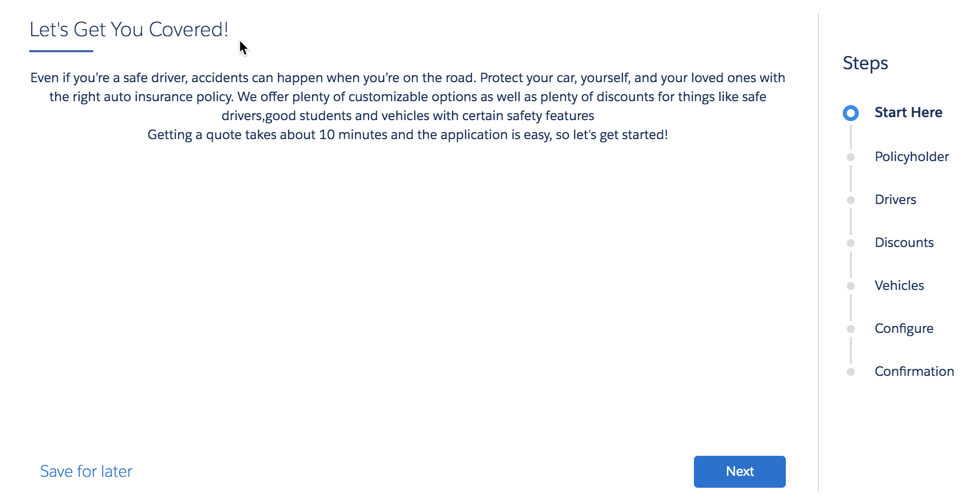
The Auto Quote OmniScript starts with an intro page:
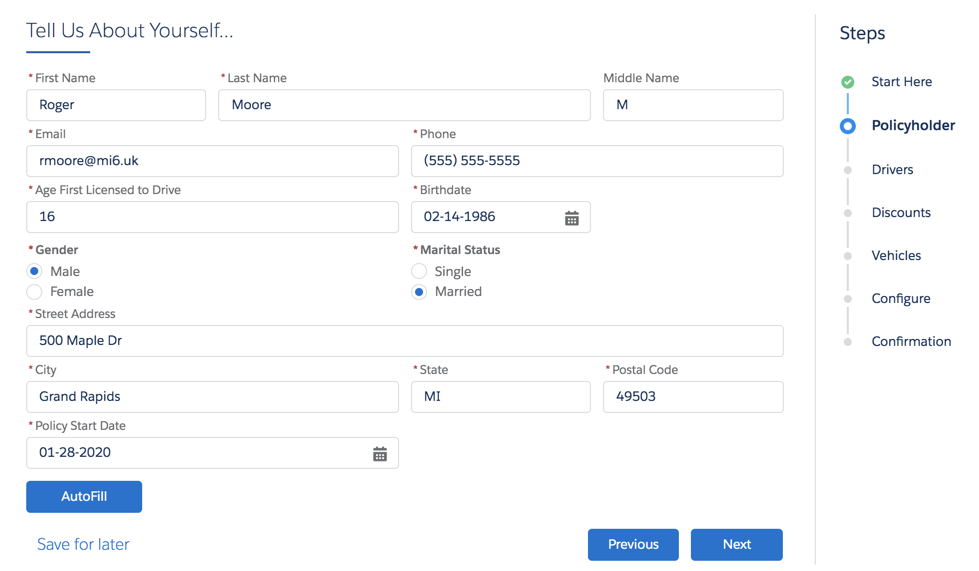
First, we gather information about the driver(s) who'll be insured. The fields in the form correspond to attributes in the insured party spec in the product model.
You can click AutoFill to fill out data quickly to test and learn about this flow.
The Policy Start Date defaults to today's date.
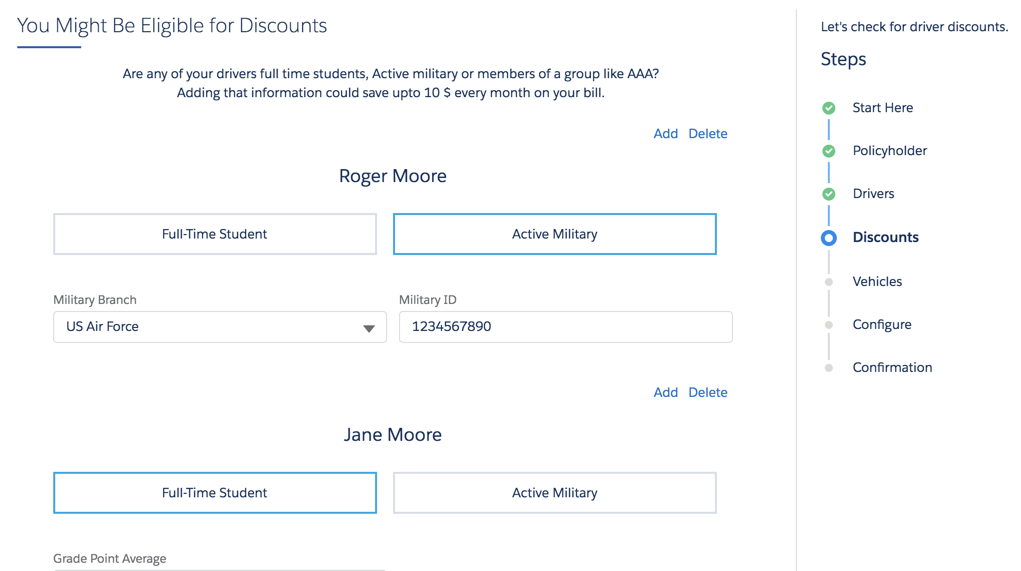
In addition to basic info about each driver, we ask a couple of questions that could lead to a discounted rate. These questions also correspond to attributes on the insured party spec.
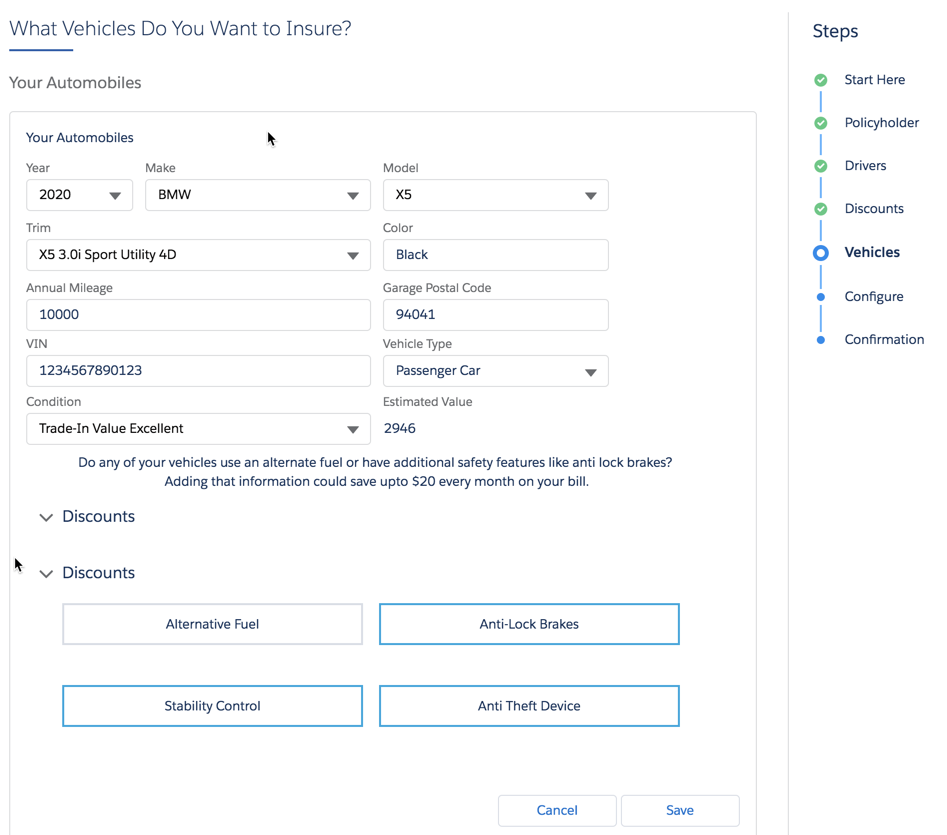
The next step gathers information about the vehicle(s) to be insured. The fields and choices here correspond to attributes on the insured item spec in the product model.
This OmniScript integrates with the Kelly Blue Book service, which takes in some of the data the user enters here and returns an estimated value (price) for the vehicle.
After all the info about drivers and vehicles is complete, the OmniScript merges the insured items and insured parties with an integration procedure. Then it transforms the data to get it into the right format for the InsProductService:getRatedProduct service to use.
The insOsMultiInstanceGrandchildren Vlocity Lightning Web Component calls this service, then returns the rated insurance product. The user sees each vehicle, with the quoted price.
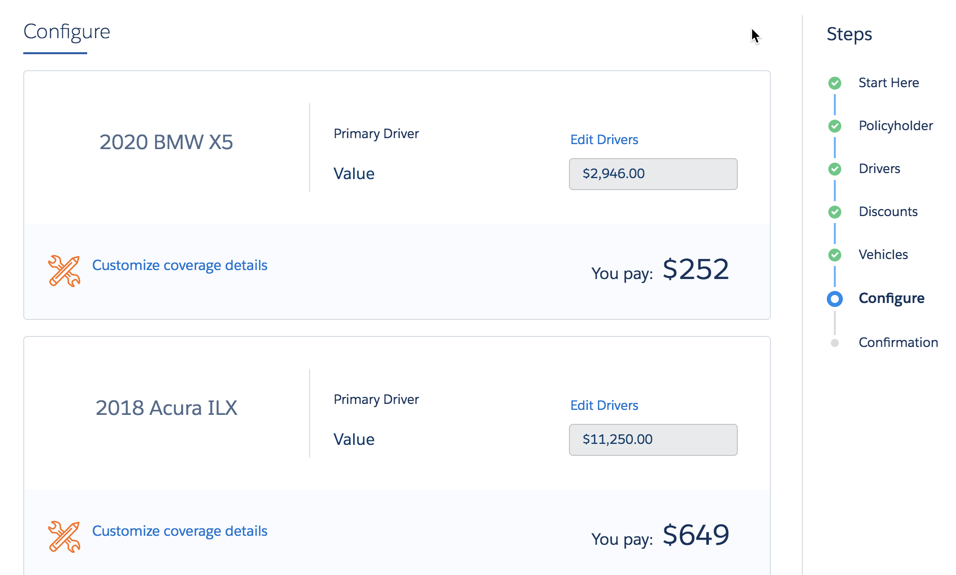
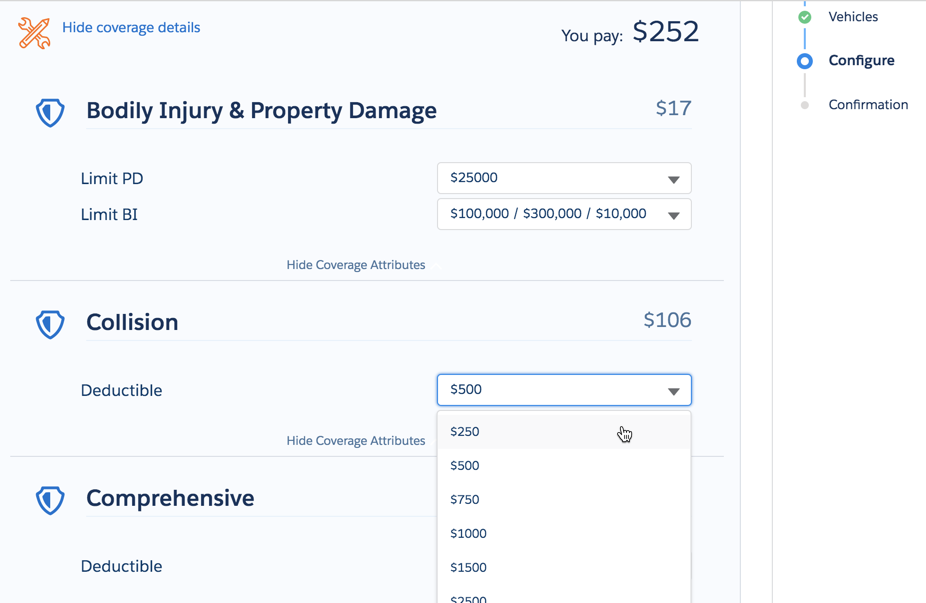
On this page, users can open each vehicle and configure attribute values on coverages. Each time a user changes an attribute value, the quoted price for the vehicle is dynamically updated.
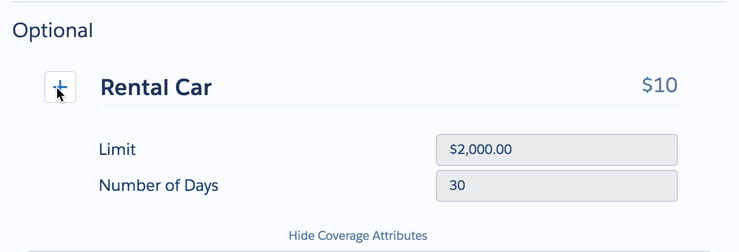
Still on the same page, users can select (and deselect) optional coverages.
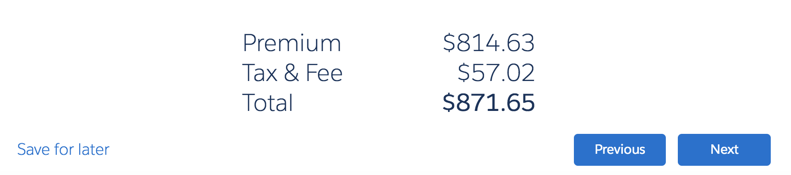
At the bottom, this page shows the total price for the quote. The price changes dynamically every time the user makes a change to an attribute value or an optional coverage.
After you've finished, the OmniScript uses the InsQuoteService:createUpdateQuote service to generate a quote.
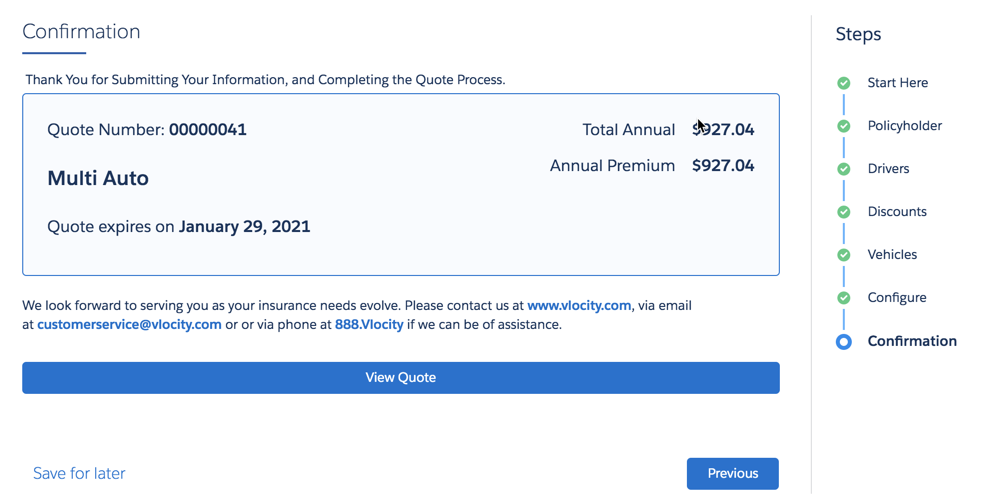
Finally, it displays a quote confirmation, which includes the quoted premium price.
What's In It
The Auto Quote is LWC Enabled.
This is the complete structure of the Auto Quote OmniScript:
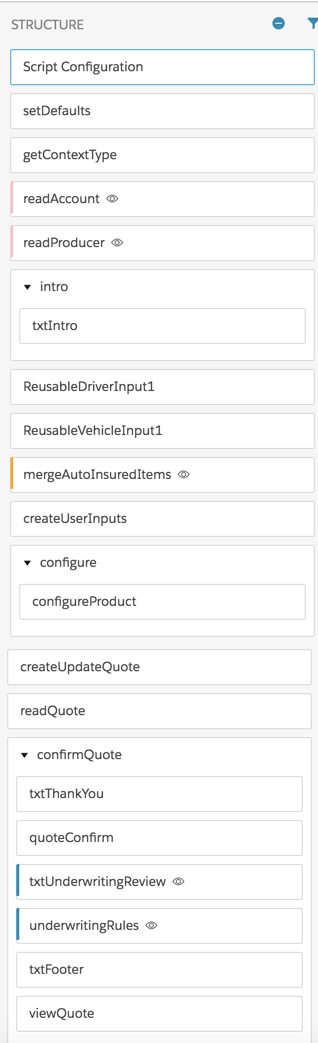
Here's a look at each component of the Auto Quote OmniScript, including the component type, the purpose of the component, and what the component calls:
-
Set Defaults
-
Component type: Set Values
-
What it does: Sets default values
-
Calls: None
-
-
getContextType
-
Component type: Data Mapper Extract Action
-
What it does: Extracts account Id, contact Id, and RecordType
-
Calls: auto_ExtRecordType Data Mapper
-
-
readAccount
-
Component type: Data Mapper Extract Action
-
What it does: Extracts an account Id
-
Calls: auto_ExtrPersAcctDetails_QuoteOS Data Mapper
-
-
readProducer
-
Component type: Data Mapper Extract Action
-
What it does: Extracts a producer Id
-
Calls: auto_ExtrProducer_QuoteOS
-
-
intro
-
Component type: Step > Text Block
-
What it does: Shows users intro text about auto insurance
-
Calls: None
-
-
ReusableDriverInput1
-
Component type: OmniScript
-
What it does: Gathers information about each driver to be insured
-
Calls: auto/ReusableDriverInput OmniScript
-
-
ReusableVehicleInputNoServiceIntegration1
-
Component type: OmniScript
-
What it does: Gathers information about each vehicle to be insured
-
Calls: auto/ReusableVehicleInput
-
-
AutoInsuredItems
-
Component type: Integration Procedure Action
-
What it does: Merges the data about the drivers and vehicles
-
Calls: Auto_MergeInsuredItems Integration Procedure
-
-
createUserInputs
-
Component type: Data Mapper Transform Action
-
What it does: Formats the data JSON so that the InsProductService:getRatedProducts service can take it as input and rate the insurance product(s)
-
Calls: auto_TransForGetRatedProducts_QuoteOS
-
-
configure > configureProduct
-
Component type: Step > Custom LWC
-
What it does: Provides a UI that lets the user configure the insured items, insured parties, and coverages on the rated product.
-
Calls: vlocity_ins__insOsMultiInstanceGrandchildren LWC
-
-
createUpdateQuote
-
Component type: Integration Procedure Action
-
What it does: Creates a quote record.
-
Calls: Auto_CreateUpdateQuote Integration Procedure
-
-
deCryptQuote
-
Component type: Remote Action
-
What it does: Decrypts the data, if necessary.
-
Calls: decryptIfNecessary
-
-
readQuote
-
Component type: Data Mapper Extract Action
-
What it does: Extracts data from the quote record just created.
-
Calls: auto_ReadQuote_QuoteOS Data Mapper
-
-
confirmQuote
-
Component type: Step, which contains six components
-
What it does: Several things, listed step-by-step below
-
Calls: None at the Step level
-
txtThankYou
-
Component type: Text Block
-
What it does: Posts text thanking the user for getting a quote
-
Calls: None
-
-
quoteConfirm
-
Component type: Custom LWC
-
What it does: Displays information about the quote to the user
-
Calls: vlocity_ins__insOsConfirmation LWC
-
-
txtUnderwritingReview
-
Component type: Text Block
-
What it does: Tells the user that an underwriter needs to review their information before a quote can be given.
-
Calls: None
-
-
underwritingRules
-
Component type: Custom LWC
-
What it does: Runs the underwriting rules on the quote data to determine whether this quote needs to be reviewed by an underwriter.
-
Calls: insOsProductRulesReviewExtended LWC
-
-
txtFooter
-
Component type: Text Block
-
What it does: Gives the user contact info for the insurer.
-
Calls: None
-
-
viewQuote
-
Component type: Navigate Action
-
What it does: Lets the user navigate to see the full details fo the quote.
-
Calls: None
-
-
