You are here:
Batch Load Attribute Value Rules
An attribute value rule is a rule you assign to one specific attribute value.
The only rule type that's valid for attribute values is Hide. In the UI, an attribute value rule looks like this:
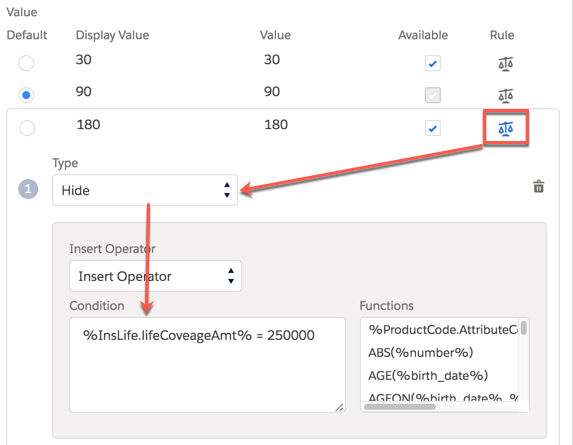
For example, you have a coverage on a health insurance product with a Copay attribute. On one or more health insurance products, you've listed values for the Copay attribute of $10, $20, $25, and $100. You can attach a rule to any of these specific values. For example, on the Outpatient Surgery coverage in a health plan, you can attach a rule to the $10 copay that specifies that if Deductible < = $1000, the rule evaluates to true and the $10 copay is hidden from the user.
Attribute value rules are stored in the AttributeAssignment__c.ValidValuesData__c field. For any value that has an attached rule, a rule node is stored in the field.
We
recommend that you use "value":"thisattributevalue" to
identify values to attach rules to. The "id":"idvalue" varies per
coverage and product, and isn't a reliable hook to use to batch load the correct rules
to the correct attribute values.
-
PCI IDs (for product child level rules ) or Product IDs (for spec level rules) for all coverages you want to add attribute value rules to on coverages, insured items, and insured parties
or
Product IDs for all coverage specs, insured items, and insured parties you want to add attribute value rules to
-
Product IDs for all root products with product-level attributes with values you want to add rules to
-
AttributeUniqueCodes for the attributes that have values you want to add rules to
-
Values the rule will apply to
-
Definition of each rule
When
you create your script, make sure that the attribute value rule data is stored in the
AttributeAssignment__c.ValidValuesData__c field.

Attribute Value Rule Structure
For all attribute value rules, the following information is stored in the
AttributeAssignment__c.ValidValuesData__c field:
[{
		"isAvailable": true,
		"id": 0,
		"displayText": "30",
		"value": "30",
		"isDefault": false,
		"showRules": false,
		"rules": []
	},
	{
		"isAvailable": true,
		"value": "90",
		"isDefault": true,
		"displayText": "90",
		"id": 1,
		"showRules": false,
		"rules": []
	},
	{
		"isAvailable": true,
		"value": "180",
		"isDefault": false,
		"displayText": "180",
		"id": 2,
		"showRules": true,
		"rules": [{
			"ruleType": "Hide",
			"messageType": {},
			"expression": "%InsLife.lifeCoveageAmt% = 250000",
			"messageText": ""
		}]
	}
]