You are here:
Cancel Policy OmniScript
You can launch this OmniScript from the following applications, where it can be accessed by the types of users described:
-
Broker Portal (Newport)
Brokers and agents
-
Customer Portal (Newport)
End customers who own insurance policies
-
Interaction Console (Lightning)
Internal insurance agents and call center reps
-
Vlocity Admin Lighting Experience (Newport)
-
Internal insurance agents
-
Vlocity admins
-
These OmniScripts now write to the native Financial Services Cloud Insurance Policy object instead of the Asset object. For more information, see Financial Services Cloud Integration.
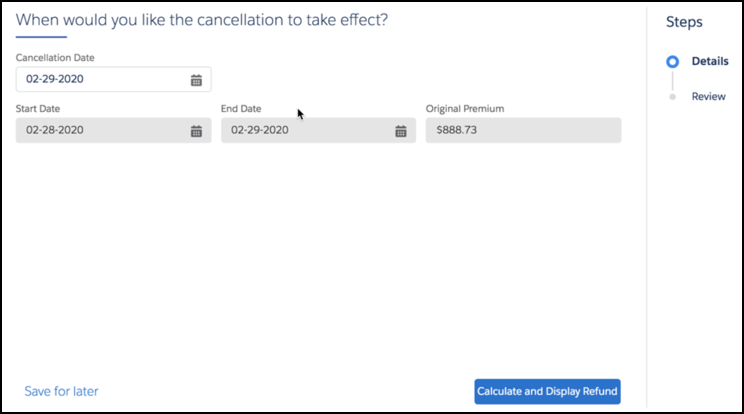
The OmniScript takes a policy Id and uses the InsPolicyService:getPolicyDetails service to retrieve data about the policy to be canceled. The OmniSript displays information about the policy and asks for a cancellation date.
The OmniScript calls the InsPolicyService:prepareToCancelPolicy service, which calculates the refund owed to the customer upon cancellation. It displays information about the cancellation and provides a button the user can click to cancel the policy.
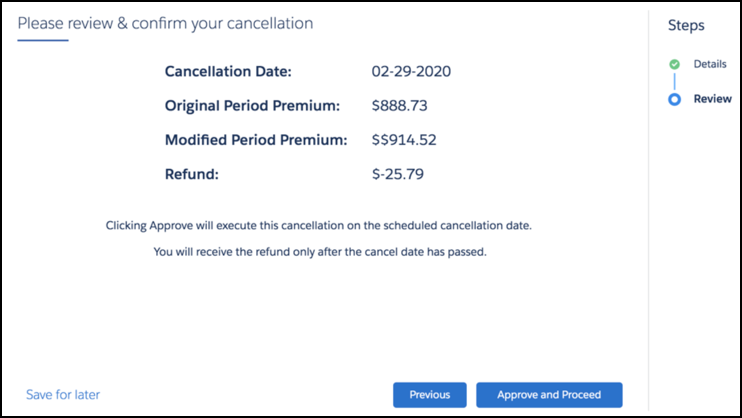
After the user clicks the button, the OmniScript calls the InsPolicyService:cancelPolicy service. The policy is canceled.
