Loading
Insurance
Table of Contents
Select Filters

          No results
          No results
          Here are some search tips

          Check the spelling of your keywords.
          Use more general search terms.
          Select fewer filters to broaden your search.

          Search all of Salesforce Help
          Choose an Upgrade Path for Insurance

          Choose an Upgrade Path for Insurance

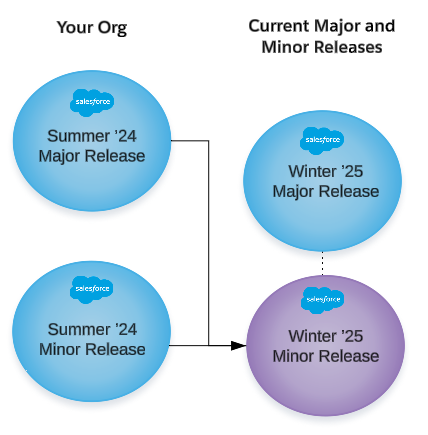
          Insurance releases are cumulative. That is, the Winter ’25 major release contains everything from the Summer ’24 major release and all of the contents of the Summer ’24 minor releases. Plus, it has all of the new features and enhancements for Winter ’25.

          The same goes for minor releases. For example, the latest Winter ’25 minor release contains everything in the Winter ’25 major release plus all the enhancements made for all the Winter ’25 minor releases.

          Tip
          Tip If you're upgrading from one major release back, we recommend that you install just the latest minor release, if one's available. By doing it this way, you get all the features of the latest major release plus all the features of all the minor releases built on the latest major release.

          Example: Upgrade From One Release Back

          If you've been keeping up with major release updates, your upgrade path is simple. Install the latest available release, even if it's a minor one. All releases are cumulative, so you get all the latest features.

          Current Org Next Major Release Available Versions Upgrades To Do
          Summer ’24 (major or minor release) Winter ’25 Winter ’25 major release and minor releases Winter ’25 (latest minor release)
          Important
          Important If you're upgrading from just one major release back (or a minor version of it), don't upgrade to the major release first, and then to a minor release. Skip the major release entirely and upgrade directly to the latest minor release.
          Diagram that shows upgrade from one release back

          Example: Upgrade From a Winter ‘22 or Earlier Release

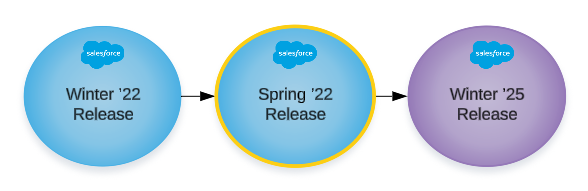
          If you've skipped several major release upgrades, don't jump straight to the most recent release. First, upgrade to the Spring ‘22 major release, then install the latest available version of the new release.

          Important
          Important You must install the Spring ‘22 release before you upgrade to the latest available release. There are important configuration processes delivered in the Spring '22 release.
          Current Installed Release Release You Want to Upgrade To Upgrades To Do
          Winter ‘22 (major or minor release)

          Winter ’25

          1. Spring ’22 (major release). Complete all the Installation Assistant Tasks labeled for Spring ‘22.
          2. Winter ’25 (major release or latest minor release, if one is available). Complete all the Installation Assistant Tasks labeled for Summer ‘22. (There haven't been any new tasks since the Summer ‘22 release).
          Diagram that shows upgrades from several releases back.
           
          Loading
          Salesforce Help | Article