You are here:
Claim Workflow Rules
In this Application Suite, Claim workflow rules (which are created in the Underwriting Rules section of the Rules tab on the root product spec) automate some of the tasks for creating a claim record at runtime. These rules tell the system to open claim coverages and open claim line items on those claim coverages.
The Auto Claim workflow rules use the Claim Processing state model. This state model includes the Vlocity Actions and states used by these rules.
Here's what the rules look like on the Rules tab in the product model:
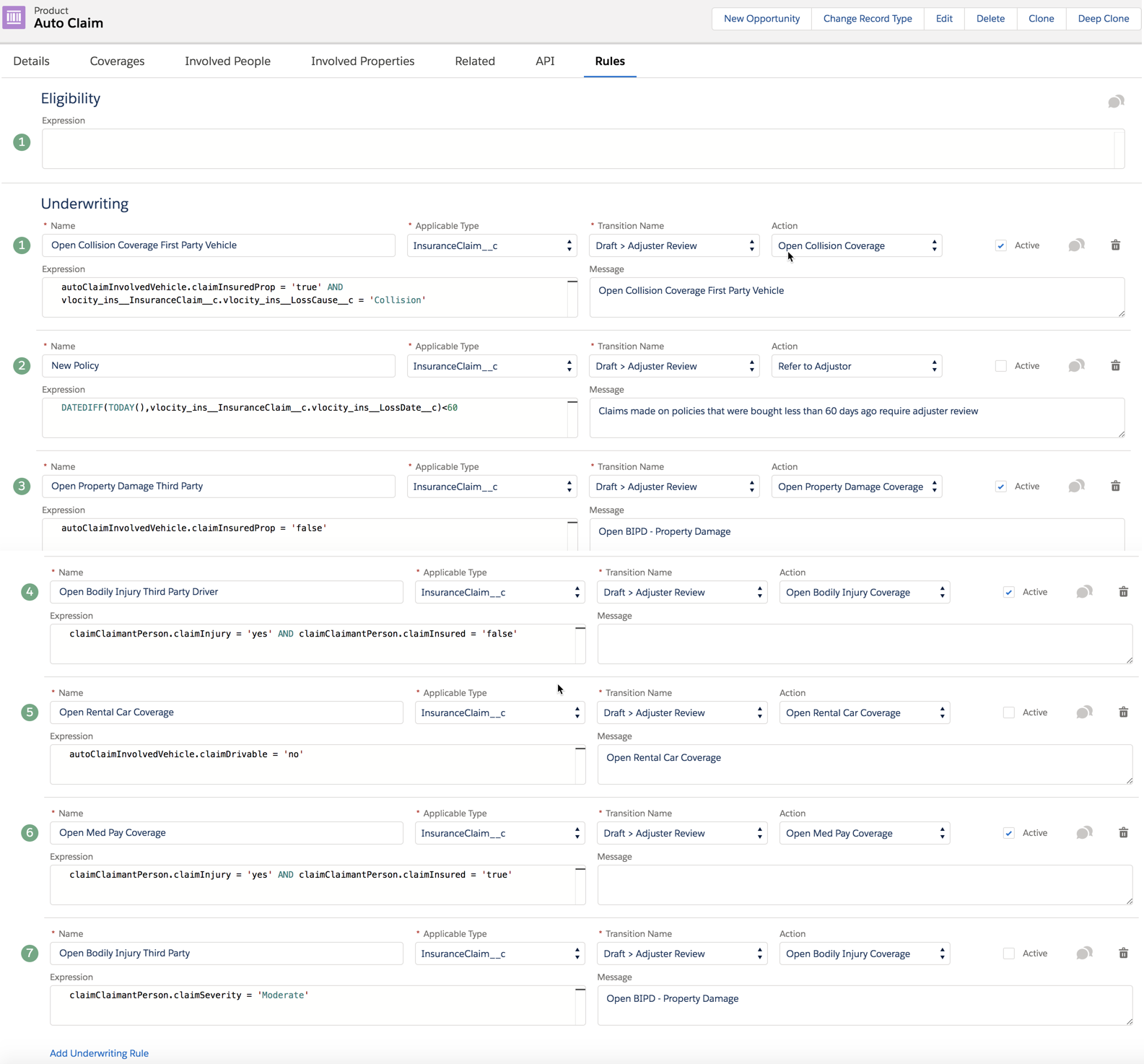
Let's take a look at each of these rules and what it does:
-
Open Collision Coverage First Party Vehicle
If the in-force policy includes Collision coverage and one of the insured vehicles is damaged, this rule evaluates to true.
When this rule evaluates to true, two things happen:
-
The Action specified opens a claim coverage against the Collision coverage.
-
The state transition specified moves this claim from Draft state to Adjuster Review State. This transition makes this claim available on the Adjuster Workbench.
-
-
New Policy
Looks at the claim date and the policy effective date. If the claim is filed less than 60 days after the policy effective date, the rule evaluates to true.
When the rule evaluates to true
-
The Action specified refers the claim to a claims adjuster.
-
The state transition specified moves this claim from Draft state to Adjuster Review State. This transition makes this claim available on the Adjuster Workbench.
-
-
Open Property Damage Third Party
Looks to see if a car (or other property) that's reported as damaged in the claim is or isn't an insured item on the in-force policy.
When the rule evaluates to true (which actually means that the vehicle or property is not an insured item on the policy), two things happen:
-
The Action specified opens a claim coverage against the Bodily Injury & Property Damage coverage.
-
The state transition specified moves this claim from Draft state to Adjuster Review State. This transition makes this claim available on the Adjuster Workbench.
-
-
Open Bodily Injury Third Party Driver
Looks at an involved party to determine if they were injured in the accident, and whether they are a claimant on the claim.
When this rule evaluates to true (yes the person was injured but no they're not an insured party), two things happen:
-
The Action specified opens a claim coverage against the Bodily Injury & Property Damage coverage.
-
The state transition specified moves this claim from Draft state to Adjuster Review State. This transition makes this claim available on the Adjuster Workbench.
-
-
Open Rental Car Coverage
Looks at whether the damaged vehicle that's insured by the in-force policy is driveable or not.
When this rule evaluates to true (car's not driveable), two things happen:
-
The Action specified opens a claim coverage against the Rental Car coverage.
-
The state transition specified moves this claim from Draft state to Adjuster Review State. This transition makes this claim available on the Adjuster Workbench.
-
-
Open Med Pay Coverage
Looks at whether the involved person is injured, and whether the involved person is a claimant on the claim.
When this rule evaluates to true (the involved person is injured and a claimant), two things happen:
-
The Action specified opens a claim coverage against the Medical Payment coverage.
-
The state transition specified moves this claim from Draft state to Adjuster Review State. This transition makes this claim available on the Adjuster Workbench.
-
-
Open Bodily Injury Third Party
Looks to see how severely a claimant has been injured in the accident.
When the rule evaluates to true (severity of the injury is moderate), two things happen
-
The Action specified opens a claim coverage against the Bodily Injury & Property Damage coverage.
-
The state transition specified moves this claim from Draft state to Adjuster Review State. This transition makes this claim available on the Adjuster Workbench.
-
The claim workflow rules set up on the Auto Claim product run near the end of the Auto claim FNOL OmniScript. After the claim record has been created and updated with information about the claim, the rules run and any that evaluate to true open claim coverages and create claim line items.
The OmniScript calls the InsClaimService:invokeProductRules service to run the rules.
