You are here:
Commercial Auto Rating
When we quote and endorse Auto products, our pricing services use the product model data, product rating procedure, and pricing formulas. The services use these components to price the coverages, vehicles, and total premium.
The service does the following to price the product:
-
Pulls data from the Commercial Auto product model to form the rating input data.
-
Calls the rating procedure and rating input data to calculate the coverage prices.
-
Takes the coverage price data returned by the rating procedure, then inserts it into the product model.
-
Rolls up the coverage prices to the vehicles using the vehicle pricing formula.
-
Rolls up the vehicle prices to the total (quoted) premium price.
The rating procedure we use is the CommercialAutoRating Integration Procedure. It calculates the coverage prices for the Commercial Auto product. Any time a broker or customer service rep generates a quote for a potential customer, the quote business process calls this rating procedure to calculate the price for that quote.
To learn the basics about Vlocity Insurance rating procedures for pricing insurance products, see Rating Procedures.
Rating Input
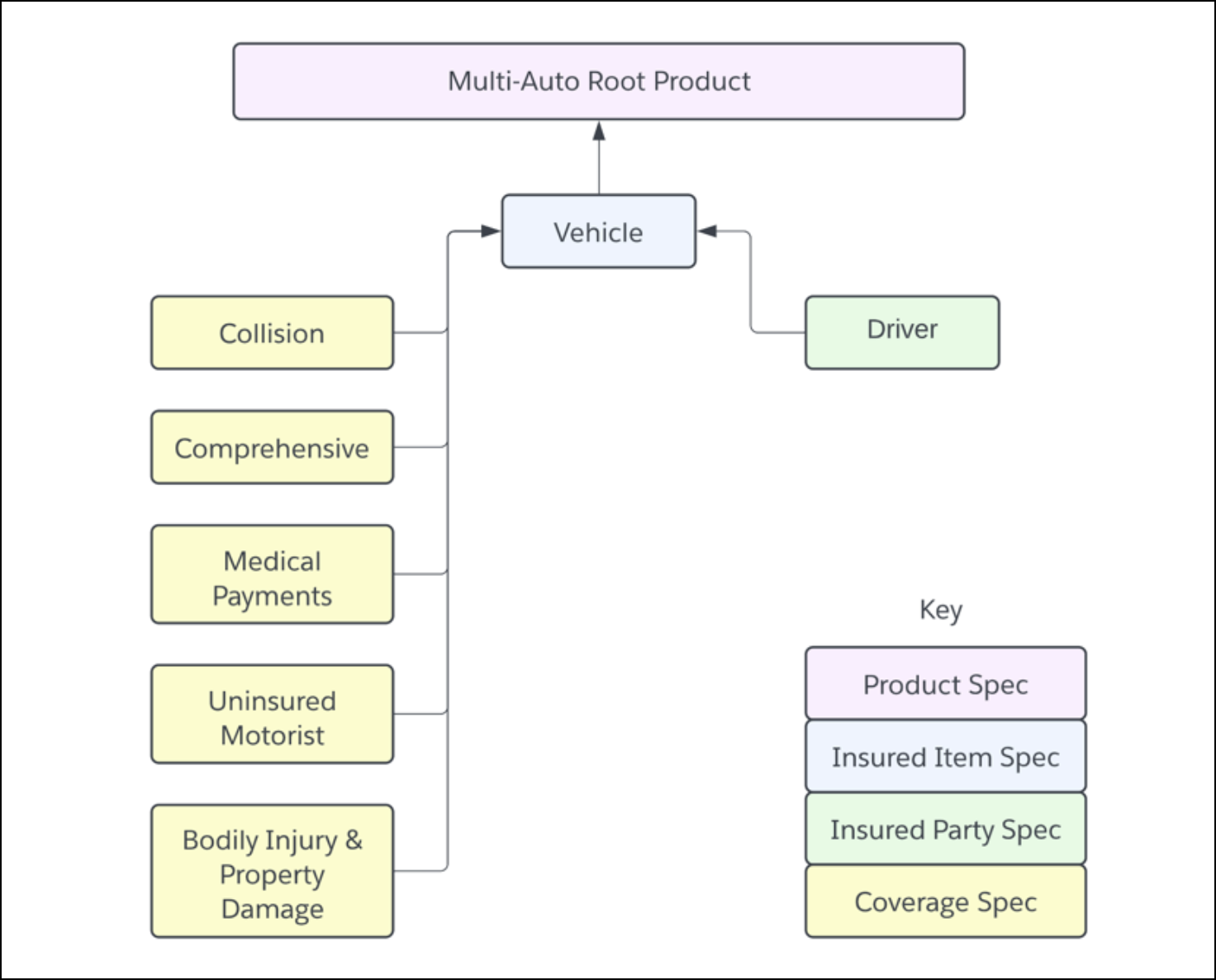
To understand the construction of the rating procedure, you need to understand the form of the input data passed into the procedure. The Commercial Auto product includes a Vehicle insured item spec as the primary multi-instance item that auto policies will insure. You can create quotes for multiple vehicles.
The Driver insured party spec is a child of the Vehicle Insured Item spec, which lets a vehicle have multiple drivers.
All coverages in the model are children of the Vehicle insured item spec. This way, each vehicle quoted can have its own separately configured coverages.
Rating Procedure
To rate the Commercial Auto insurance product, we use this Integration procedure:
-
Type/SubType - Rating/CommercialAuto
-
Integration Procedure Name - CommercialAutoRating
While you'll create your own integration procedure to rate your auto insurance products, you can look at and test out the structure of this one to see how it works. You can model your own Integration Procedure on this one if it works for you.
The Integration Procedure comprises of a calculation action that rates vehicles by calling the autoRateCommercialVehicles calculation procedure. This remote option is set:
-
Key: includeInputs
Value: true
What it does: Turns on the code that pulls the instance keys specified by the includeInputKeys option.
We expect that you'll create your own calculation procedure to rate vehicles for your auto insurance products. You can use autoRateCommercialVehicles as a model, and make changes to it so you can see how calculation procedures work.
-
Does a matrix lookup on the value of the car.
-
Does a matrix lookup on the car symbol.
-
Does a matrix lookup on the year of the car.
-
Does a matrix lookup to see if the car uses alternative fuel.
-
Does a matrix lookup to see whether the car has stability controls.
-
Does a matrix lookup to see whether the car has anti-theft protection.
-
Does a matrix lookup to see whether the car has anti-lock brakes.
-
Calculates the Bodily Injury & Property Damage.
-
Calculates the Uninsured Motorist.
-
Calculates the Medical payments.
-
Calculates the CCD.
-
Calculates the Collision.
-
Does a matrix lookup for the Collision deductible.
-
Does a matrix lookup for the Uninsured Motorist.
-
Does a matrix lookup for the Medical payment limit.
-
Does a matrix lookup for a Bodily Injury & Property Damage.
-
Does a matrix lookup to get the CCD deductible.
-
Calculates the Bodily Injury & Property Damage coverage premium.
-
Calculates the premium for Uninsured Motorist coverage.
-
Calculates the Medical payments premium.
-
Calculates the premium for CCD coverage.
-
Calculates the premium for Collision coverage.
-
Calculates the premium for Rental Car coverage.
-
Calculates the Commercial Auto premium.
autoRateCommercialVehicles includes an aggregation step that calculate aggregated premiums per vehicle. This step calculates the sum of all the Commercial Auto premiums calculated from each run of the calculation steps.
These calculation matrices are used by autoRateCommercialVehicles calcuation proxedure:
Calculation Matrix Name |
Description |
|---|---|
autoCarAltFuel |
Handles customer input that says whether a car uses alternative fuels or not. Takes a true or false input, and returns percentage outputs. Cars with alternative fuels rate out at lower prices than cars without. |
autoCarBrakes |
Handles customer input that says whether a car has anti-lock brakes or not. Takes a true or false input, and returns percentage outputs. Cars with anti-lock brakes rate out at lower prices than cars without anti-lock brakes. |
autoCarStability |
Handles customer input that says whether a car has anti-lock brakes or not. Takes a true or false input, and returns a percentage output. Cars with stability control rate out slightly lower than cars without it. |
autoCarSymbol |
Takes a numeric input. Returns percentage outputs. |
autoCarTheft |
Handles customer input that says whether a car has an antitheft device or not. Takes a true or false input. Returns a percentage output. |
autoCarValue |
Takes a numeric input. Returns numeric and percentage outputs. |
autoCarYear |
Handles customer input of the car's year. Takes a numeric input. Returns percentage outputs. |
autoDeductCCD |
Handles the deductible a customer chooses. Takes a numeric input. Returns a percentage output. The higher the deductible chosen, the lower the rating. |
autoLimitBIPD |
Handles limits for bodily injury and property damage a customer chooses. Takes numeric inputs. Returns a percentage output. |
autoLimitMED |
Handles the limit a customer chooses for medical expenses. Takes a numeric value. Returns a percentage output. The higher the limit chosen, the higher the rating. |
autoLimitUM |
Handles the limit for uninsured motorists a customer chooses. Takes a split numeric value. Returns a percentage output. |
deductCOLL |
Handles the deductible a customer chooses for collision coverage. Takes a numeric value. Returns a percentage output. |
You can (and probably will) make changes to these calculation matrices to reflect the ratings for your auto insurance products.
To learn the basics about Insurance rating procedures for pricing insurance products, see Learn About Rating Procedures.
Pricing Formulas
After the rating procedure returns the coverage prices, Vlocity uses the product model pricing formulas to roll up the prices. On the product model, the premium per vehicle is calculated, and the total policy premium is calculated.
This happens on the Simulate tab of the product model. On the Commercial Auto product model's Simulate tab, you'll see the Rating Inputs and Rating Outputs mapped from the rating procedure. To learn how to do this, see Map Ratings to Product Specs
Under the Rating Output section of the Simulate tab, the formula to calculate the per-vehicle premium is in the Commercial Auto > Total Pricing Formula field. The total Pricing Formula is TotalPremium.
Next Steps
After you've gotten a look at the rating procedure, go to the Commercial Auto product model and try simulating the rating procedure that's mapped to the product model.
Then you can go on to the quote flows to see how the Auto Application rates products for quotes.
