You are here:
Commercial Quoting
Easily configure, reprice, and navigate complex commercial quotes with multi-level insured item relationships and coverages.
Commercial quotes and policies can have complex product structures with multiple levels of insured items. Each insured item can have its own set of coverages and coverage terms. You can add coverages and ratings to parent, child, and grandchild insured items.
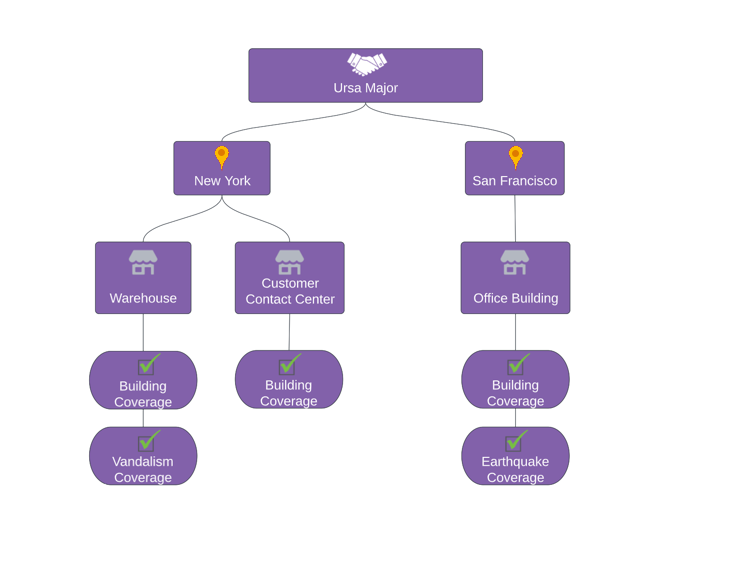
Ursa Major is shopping for insurance. They have two locations, one in New York and one in San Francisco. The New York location has two buildings: a warehouse and a customer contact center. Each building must have its own coverage. Additionally, the warehouse has been a target for vandalism in the past, so Ursa Major decides that they want to add the optional vandalism coverage to that building. Similarly, earthquakes are common near the San Francisco location, so they decide to add the optional earthquake coverage to the office building at that location. Now Ursa Major has exactly the coverage they need for all of their buildings, and nothing extra!
Insurance Quote Commercial Lightning Web Component
The Insurance Quote Commercial Lightning web component is specially designed to help you build complex quotes. It features a side panel for editing line items. Buttons for common actions display prominently so your users can issue policies, create quote versions, compare quote version histories and add additional products with ease.

To make the Issue Policy button available to your users, select the Show Issue Policy Button on the Insurance Quote Commercial LWC in the Lightning App Builder. Read Create and Configure Lightning Experience Record Pages to learn how.
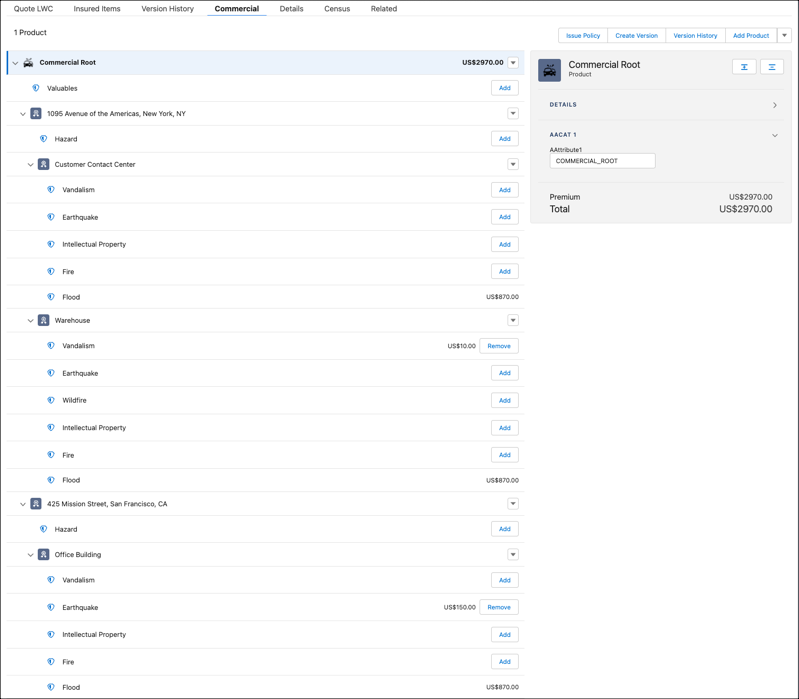
This component supports multi-root quotes. Multi-root quotes consist of a quote that has multiple root products. Users can view root products and associated coverages on the same UI. In products used for commercial quoting, define the Instance Key Formula in a way that creates unique instance keys. For example, for a Vehicle product, use a formula that incorporates unique license or part numbers:
vehicle.vehicleType + " " + vehicle.vehicleLicNum + " " +
                    vehicle.vehicleChassisNum
A well-formed Instance Key Formula ensures that products in a multi-root quote have unique instance key values, and that the attribute rules used for commercial quoting work consistently. Find the Instance Key Formula field on the product Details page.
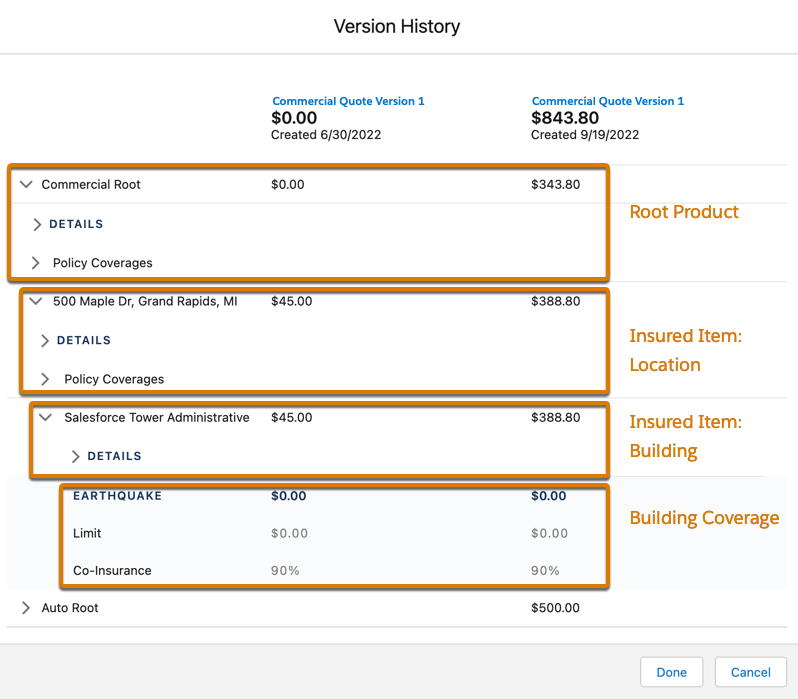
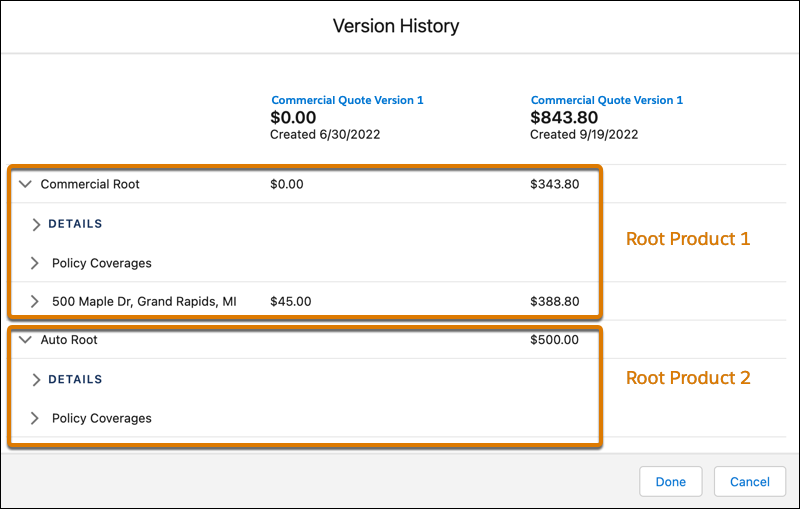
When you compare versions of a quote, the side-by-side view shows details for multiple levels of insured items in single- and multi-root quotes.
For example, compare two versions of a Commercial Product quote with multiple levels of insured items and coverages.
Or compare two versions of a multi-root quote.

Commercial Quoting Workflow
After you've created and configured a quote, there are several other things you may want to do and be aware of:
To make the Insurance Quote Commercial LWC available for your users, you must add it to the Quote page. Read Lightning App Builder to learn about adding custom components to your lightning pages.
-
To estimate how much a commercial policy would cost, you use a quote.
-
Once you have created a commercial quote, you can configure it to provide the coverages needed.
-
You can rate quotes as many times as you want to during the quoting process.
-
You can create and compare quote versions from a Quote record.
-
The Type field on the Quote Details tab helps you to differentiate between quotes created for new business and endorsement (mid-term adjustment) quotes.
-
Issue a Policy from a Commercial Quote
You can issue a policy directly from a commercial quote using the Issue Policy button.
-
Optional Coverage Rules for Quoting
When you make changes to insured items, insured parties, and coverages on the Commercial Quote UI, optional coverage rules run. Which rules run depends on what you've done to the quote.
-
You can use a variety of commission calculations that apply to individual agents and products in different time periods. You get to choose which events trigger a calculation, including quotes. As agents do business, services calculate and save commission data to quote objects so you can view and report on them.
- Create a New Commercial Quote
To estimate how much a commercial policy would cost, you use a quote. - Configure a Commercial Quote
Once you have created a Commercial quote, you can configure it to provide your customer with exactly the coverage they need. - Pricing Discount for Multiroot Quotes
To calculate discounts and reprice premiums during the issuance and endorsement of multiroot quotes, use the Pricing Discount out-of-the-box solution. Enable the PricingDiscountIntegProcName custom setting to use this solution in the Insurance Commercial Quote Lightning web component. - Issue a Policy from a Commercial Quote
You can issue a commercial policy directly from a quote using the Issue Policy button.
