You are here:
Configure Field Sets for Claim Participant Roles
Show claims adjusters exactly the right information for each claim participant, nothing extra. For example, configure separate field sets to show different information for first-party claimants, third-party claimants, and auto body shops.
Users who process claims see the fields from the appropriate field set when they review details about each claim participant. If a claim participant has multiple roles, the Claim Participant card shows unique fields from each role.
-
From Setup, in Object Manager, find and select the Claim Participant object. Go to Field Sets, and then click New.
Create a field set for each claim participant role. For example, create a field set called
FieldsetWitnesswith Account Name, Phone, Email, and other key fields for witnesses.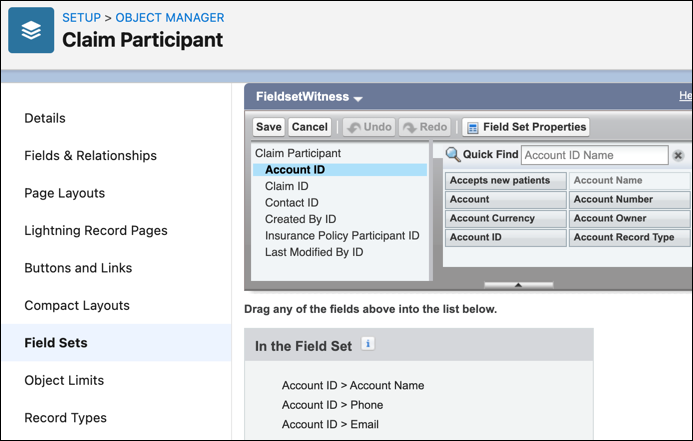
- From Setup, in the Quick Find box, enter Custom Settings, and then select Custom Settings.
- Next to Insurance Configuration Setup, click Manage.
- Click New.
-
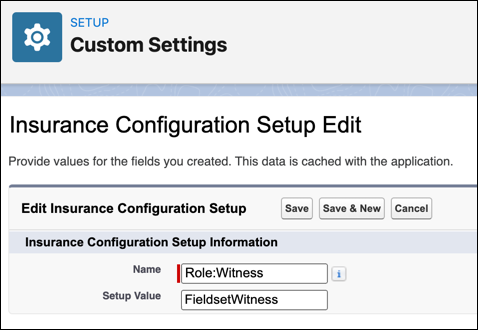
Configure a custom setting that corresponds to each participant role field set.
- For Name, enter Role: followed by a Claim Participant role value. For example, enter Role:Witness.
-
For Setup Value, enter the name of the field set you created for this role.
Did this article solve your issue?
Let us know so we can improve!
