You are here:
Configure the Cancel Payment Action
Configure your org with custom settings and an integration procedure to support canceling the payment made for a payment detail record.
Your configuration includes:
-
An integration procedure called
ClaimInitiateCancelPaymentIP. -
A custom setting called
ClaimInitiateCancelPaymentIP. -
A custom setting called
CancelButtonDisplayStatuses.
After you complete configuration tasks, the InsClaimItemService:
cancelPayments service can create offsetting tracking entries that
effectively remove payments from claim financials and policy term standings.
-
Configure an integration procedure called
ClaimInitiateCancelPaymentIP. Have this integration procedure accept as inputs eitherPaymentIdfrom the Claim Payment Summary object orItemIdfrom the Claim Coverage Payment Detail object.Format the JSON structure like this:
{
  "itemIds": [
    {
      "Id": "0l25c000000CalvAAC"
    },
    {
      "Id": "0l25c000000CalvAAC"
    }
  ]
}
Additionally, have the integration procedure invoke the appropriate processes when a user cancels a loss or expense payment. For example, the procedure can send a message to a payment gateway to notify the bank of the cancellation.
Note the Type and SubType of your
ClaimInitiateCancelPaymentIPintegration procedure. You enter these values in a custom setting that you create next. - From Setup, in the Quick Find box, enter Custom Settings, and then select Custom Settings.
- Next to Insurance Configuration Setup, click Manage.
- Click New.
-
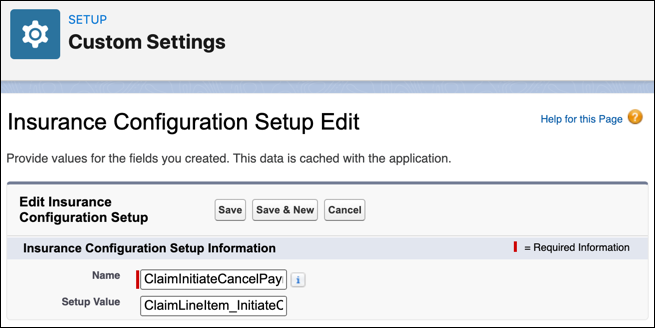
Configure a custom setting called
ClaimInitiateCancelPaymentIP. - Click Save.
- Click Back to List, and then click New again.
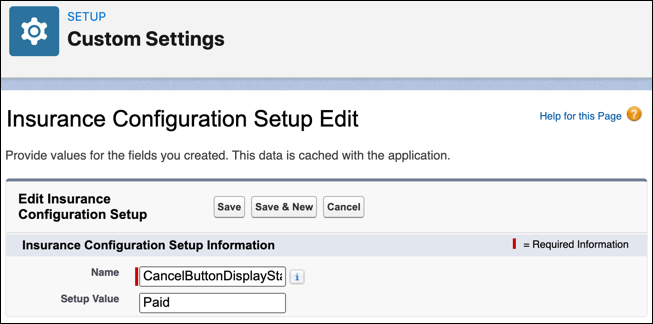
- Configure a custom setting called CancelButtonDisplayStatuses.
-
Confirm that the user interface lets users click the Cancel
Payment payment action new payment action only for the
Paid payment detail status.
If a claim's Financials tab doesn't show the action as expected, clear the session cache and reload the page.
Make sure that individual payment details show the correct action, and that the action dropdown at the top of the page shows the action only if it applies to all the selected payment details. Also confirm that the cancellation process launches as expected for the new action.