You are here:
Configure the Claim Financial Summary
Claims adjusters can monitor financials using charts that answer key questions: What are the losses worth and how much of the reserve is left? How much has been spent on loss and expenses payments? How do claim recoveries impact financial exposure? How much of the deductible or limit has a policyholder consumed?
- On a claim, click the quick access menu (the gear icon) and select Edit Page.
- Click the Tabs component, then click Add Tab.
- Click the new tab. For Tab Label, enter Summary.
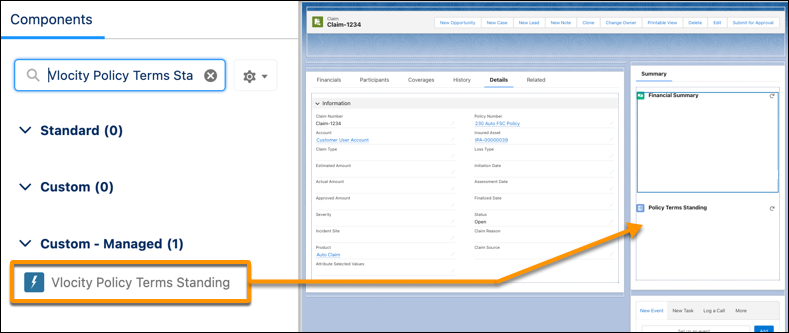
- Find the Vlocity Policy Terms Standing component, then drag it to the new Summary tab.
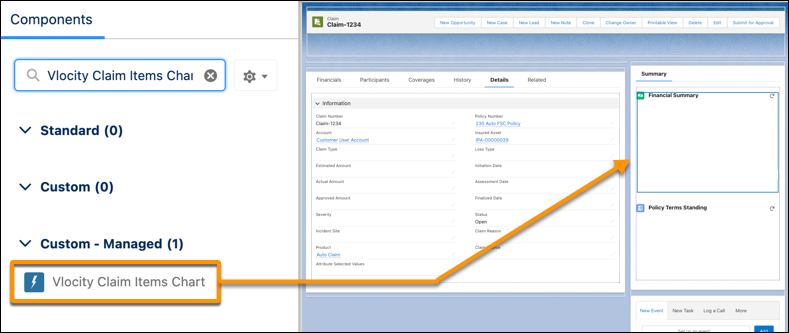
- Find the Vlocity Claim Items Chart component, then drag it to the new Summary tab.
-
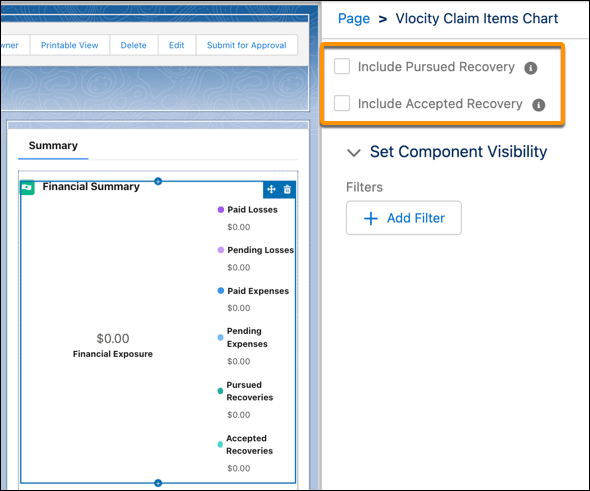
In the Summary panel, click the Financial Summary chart and select
Vlocity Claim Items Chart
settings.
If your org tracks claim recoveries by using the Claim Recovery object, use these chart settings to control how estimated and actual recovery amounts impact the overall financial exposure calculation.
Include Pursued Recovery
Select this check box to subtract estimated recovery amounts from the Financial Exposure value at the center of the chart.
Include Accepted Recovery
Select this check box to subtract actual recovery amounts from the Financial Exposure value at the center of the chart.
 Note
NoteThis applies to the Salesforce FSC ClaimRecovery object, not the vlocity_ClaimRecovery__c object.
- Click Save.