You are here:
Create Lightning Record Pages for Insurance
Create the Lightning record pages that apply to Insurance and Insurance Industries Extension orgs.
- From Setup, use Quick Find to find and select Lightning App Builder.
- Click New.
- Select Record Page, then click Next.
-
For Label, enter a unique, descriptive name. For example:
-
Claim Product Record Page
-
Product Record Page
-
Product Class Record Page
-
Product Coverage Record Page
-
Product Spec Record Page
For Object, enter Product. Then click Next.
-
- For the page template, click Clone Salesforce Default Page, and then select Grouped View Default. Then click Finish.
-
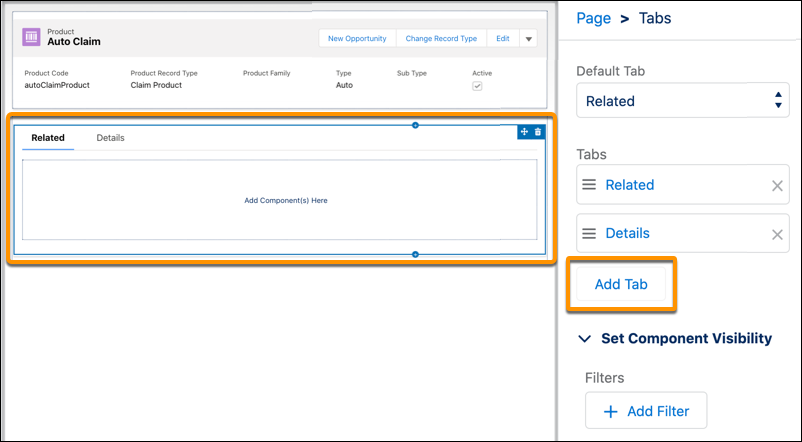
Click the Tabs component, then click Add Tab.
Add the custom tabs that belong on the page. Here are the typical ones.
-
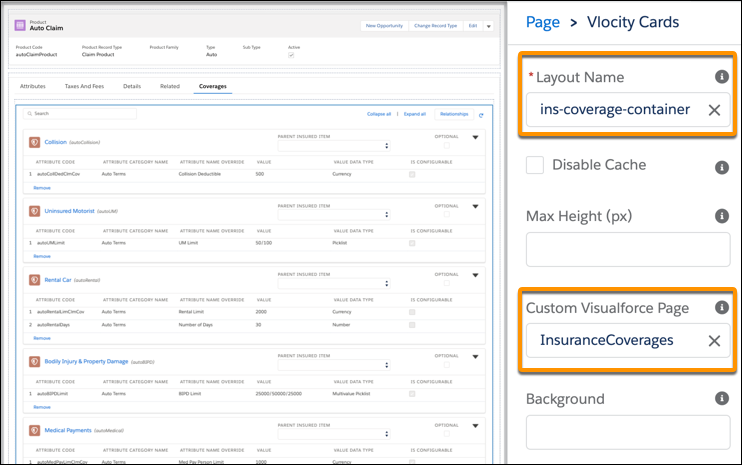
Find the Vlocity Cards component and drag it to a custom tab. Then define the appropriate Layout Name and Custom Visualforce Page. Do this for each custom tab.
Here are the values for each type of record page.
Record Page Tab Properties Claim Product Injuries Layout Name: ins-claims-injuries-admin-container
Properties Layout Name: ins-claims-properties-admin-container
API Layout Name: ins-product-methods-helper
Rules Layout Name: ins-product-rules
Product
Coverages Layout Name: ins-coverage-container
Custom Visualforce Page: InsuranceCoverages
Insured Items Layout Name: ins-insured-items-container
Custom Visualforce Page: InsuranceInsuredItems
Rating Facts
Attributes
Rules
Surcharges
Simulate
API
Product Class
Coverages
Insured Items
Rating Facts
Attributes
Rules
Product Coverage
Attributes
Surcharges
Product Spec
Attributes
Lightning record pages are now configured in your org. Activate them to make them available to users. See Activate the Lightning Record Pages You Create.