You are here:
Create a Request Insurance Proof Service Process
Create a unique version of the Request Insurance Proof service process and enter the details.
| REQUIRED EDITIONS |
| Available in: Lightning Experience in Professional, Enterprise, and Unlimited editions where Financial Services Cloud license is enabled with FSC Insurance add-on. |
| USER PERMISSIONS NEEDED | |
| To set up the Request Insurance Proof service process: | Industries Service Process, Industry Service Excellence, Omnistudio, Case, Service Catalog Request objects Read, Create, Edit, Delete, View All Records AND FSC Insurance AND Financial Services Cloud Extension OR FSC Sales OR Financial Services Cloud Basic OR Financial Services Cloud Standard |
| To use Request Insurance Proof service process: | Industries Service Process, Industry Service Excellence, Omnistudio, Case, Service Catalog Request objects Read, Create, Edit, Delete, View All Records AND FSC Insurance AND Financial Services Cloud Extension OR FSC Sales OR Financial Services Cloud Basic OR Financial Services Cloud Standard |
- In Setup, in the Quick Find box, enter Service Process Studio, and then select Service Process Studio.
- Click New Service Process, and then click Create from Template.
- Select Request Insurance Proof, and click Save & Launch.
-
Enter a process name and a unique API name.
 Note Make a note of the API name. It is used in the Process Insurance Proof Request orchestration template. Here, we have FSCIns_RequestInsuranceProof as the API name used for the new service process which is used in orchestration initiation conditions [Record.SvcCatalogItemDefinition.DeveloperName in the image].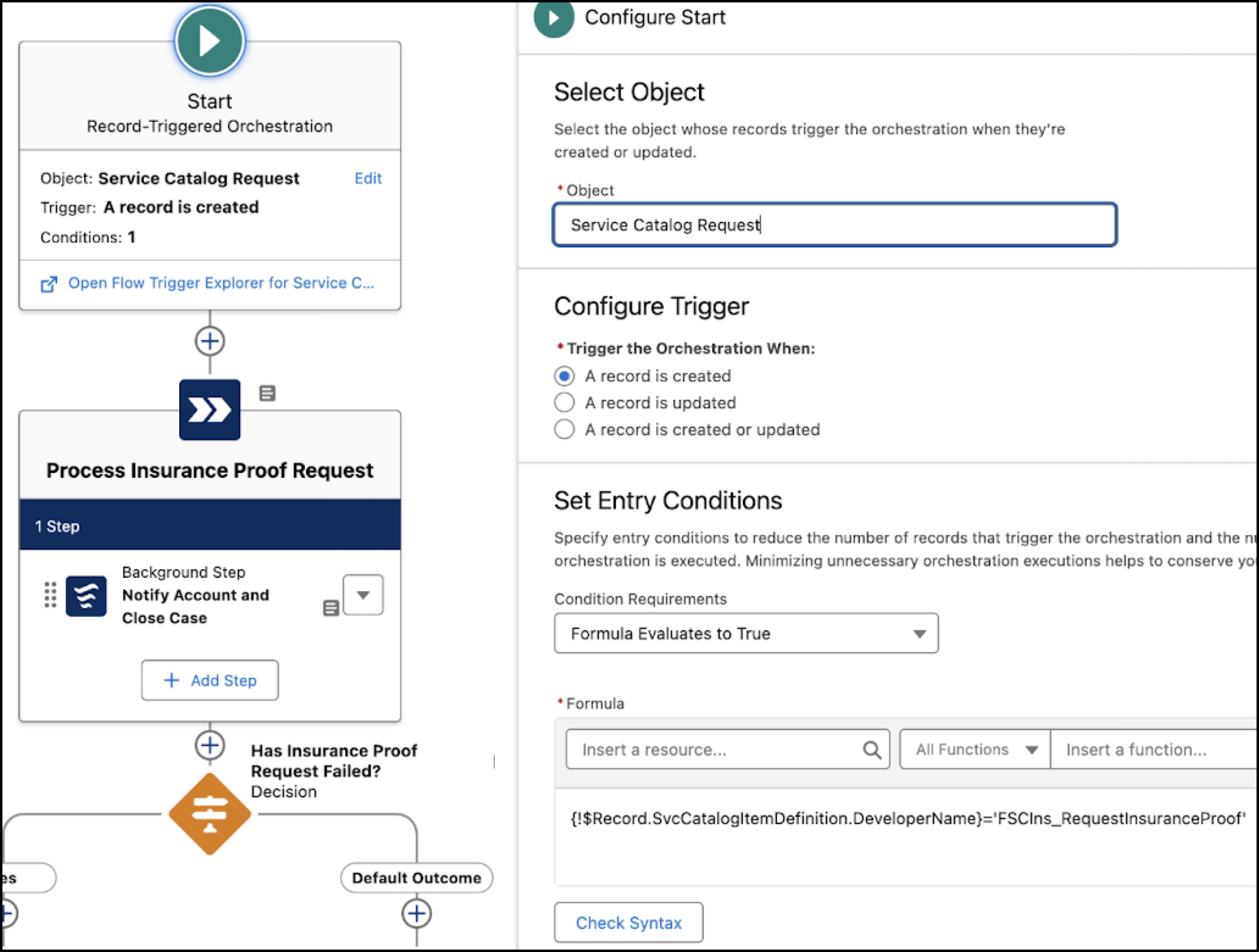
- Update the short and long description.
- Save your changes.
