Loading
Insurance
Table of Contents
Select Filters

          No results
          No results
          Here are some search tips

          Check the spelling of your keywords.
          Use more general search terms.
          Select fewer filters to broaden your search.

          Search all of Salesforce Help
          Customize the Claims Adjuster's View of Claim Details

          Customize the Claims Adjuster's View of Claim Details

          Administrators configure page layouts with information that helps adjusters assess claims at a glance.

          1. From Setup, in Object Manager, find and select Claim.
          2. Click Page Layouts.
          3. Click Claim Layout.
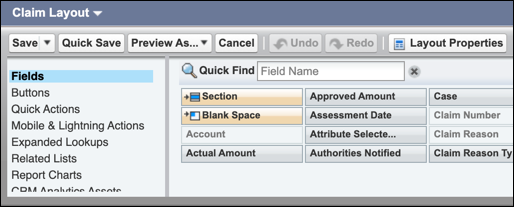
          4. In the palette, click Fields.

            Page layout palette with Fields selected

          5. Drag fields from the palette to the Claim Detail section of the layout.

            To remove a field, drag it from the layout to the palette.

          6. Click Save.
           
          Loading
          Salesforce Help | Article