You are here:
Digital Experience Site Component Customization
We've provided out-of-the-box components for Insurance Experience sites, but we know you'll probably want to brand them with your logos, icons, colors, and fonts for your customers to see. You can also customize the data that's displayed.
Most of the components that come out-of-the-box are built using OmniStudio FlexCards. When you activate a FlexCard, it compiles an LWC. It's that LWC that you place in the Digital Experience site.
Think about customizing site components in three ways:
-
Look, feel, form, and organization
In addition to customizing the look and feel of the components, you can change the placement of elements on the cards to create a different flow of information.
-
Data
You can also add and remove data on cards. To do this, you may need to create new data sources (Omnistudio Data Mappers and Integration Procedures), or make changes to the existing out-of-the-box data sources used by the components.
-
New and different
If the components we created don't meet all your needs, you can create your own. We recommend that you use FlexCards to build new components for your sites.
Workflow for Configuring FlexCard-Based Digital Experience Site Components
The process for configuring most of the site components is a little bit complicated, but don't worry. You'll get the hang of it.
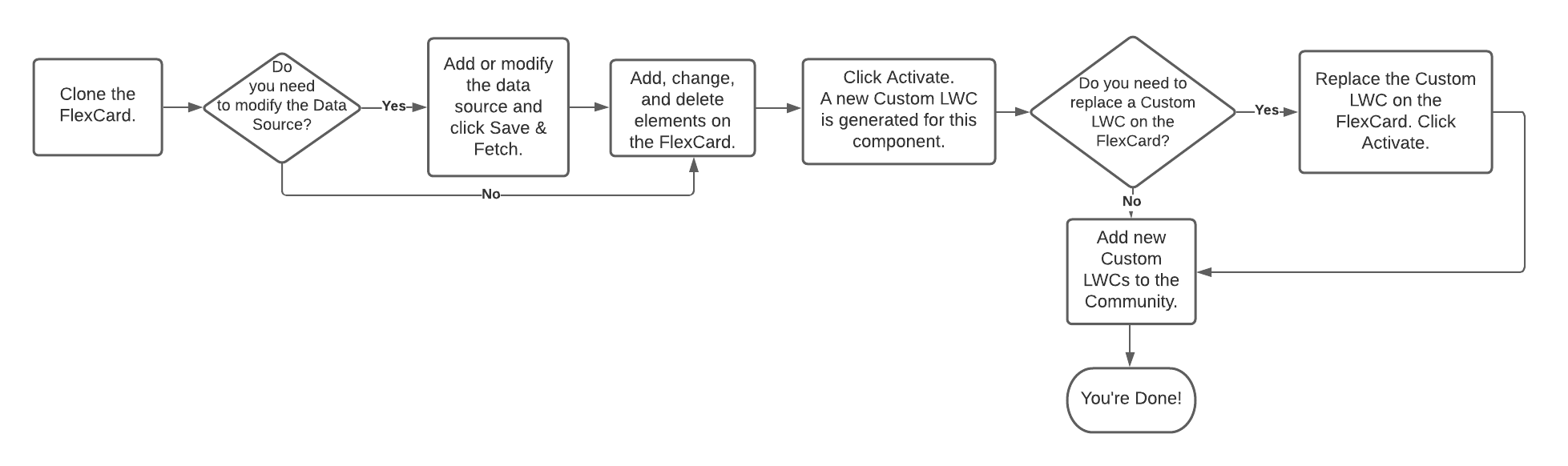
To customize FlexCard-based components, follow the flow diagram above. Each step in the diagram has its own topic:
Non-FlexCard Based Components
A few components are not built using FlexCards. Instead, they are:
-
LWCs
These components are used by other UIs as well as Experience sites.
After you extend any of these components, you need to go through the same process to replace the out-of-the-box component with your extended component as you do with the components that use FlexCards for customization. Add Customized Components to the Site tells you how.
-
Classic card-based components
Use the same process to customize these components as you use for the FlexCard components, but use the Vlocity Cards designer to customize the cards.
- Clone a Component's FlexCard
When you want to customize a component for the Vlocity Insurance Broker or Policyholder Experience site, the first task is to clone the component's FlexCard. - Manage the Data Source for an Experience Component
Some Experience components use data sources to pull in information to display. - Customize a Component
To customize an Experience component, you can make changes to the FlexCard for that component. Changes can include adding elements, making changes to the existing element, and removing elements. - Replace a Customized LWC on an Experience Component
Some Experience components call Lightning Web Components (LWCs). If the LWC is actually part of another experience component you customized, you need to remove the old LWC and add the customized one to the FlexCard of the component you're working on. - Add Customized Components to the Site
When you customize Experience components (or create new ones), you need to add them to your experience site so your end users can see them.
