Loading
Feature degradation | Gmail Email delivery failureRead More
Insurance
Table of Contents
Select Filters

          No results
          No results
          Here are some search tips

          Check the spelling of your keywords.
          Use more general search terms.
          Select fewer filters to broaden your search.

          Search all of Salesforce Help
          Edit Page Layout Assignments for Insurance

          Edit Page Layout Assignments for Insurance

          After you upgrade, edit the page layout assignments for Product, Insured Item Spec, and Coverage Spec objects.

          1. From Setup, click the Object Manager tab.
          2. Click Product.
          3. Click Page Layouts.
          4. Click Page Layout Assignments.
          5. Click Edit Assignment.
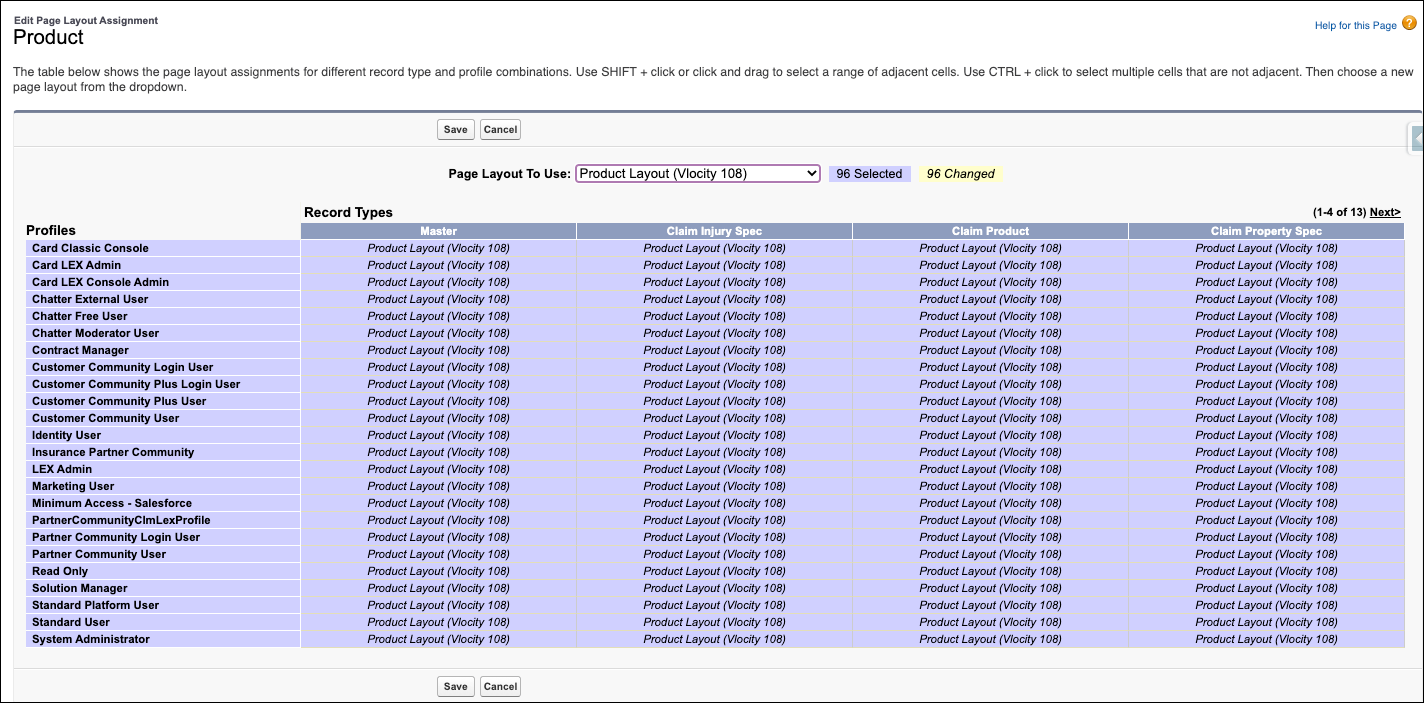
          6. Select all the page layouts you want to change, then choose the latest Product page layout from the Page Layout to Use dropdown.
            Edit Page Layout Assignments for Product objects

            We recommend that you choose the most recent version of each page layout.

          7. Click Save.
           
          Loading
          Salesforce Help | Article