Loading
Insurance
Table of Contents
Select Filters

          No results
          No results
          Here are some search tips

          Check the spelling of your keywords.
          Use more general search terms.
          Select fewer filters to broaden your search.

          Search all of Salesforce Help
          Enable Allow Activities on Activity Template

          Enable Allow Activities on Activity Template

          Before you upgrade Insurance, enable the Allow Activities setting on the Activity Template object.

          1. From Setup, click the Object Manager tab.
          2. Click Activity Template.
          3. Click Edit.
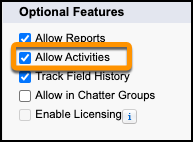
          4. Scroll down to the Optional Features section and verify that Allow Activities is selected.
            The Allow Activities option selected.
          5. If Allow Activities is not selected:
            1. Select Allow Activities.
            2. Click Save.
           
          Loading
          Salesforce Help | Article