You are here:
Check Financial Authority in Claim Payment Processes
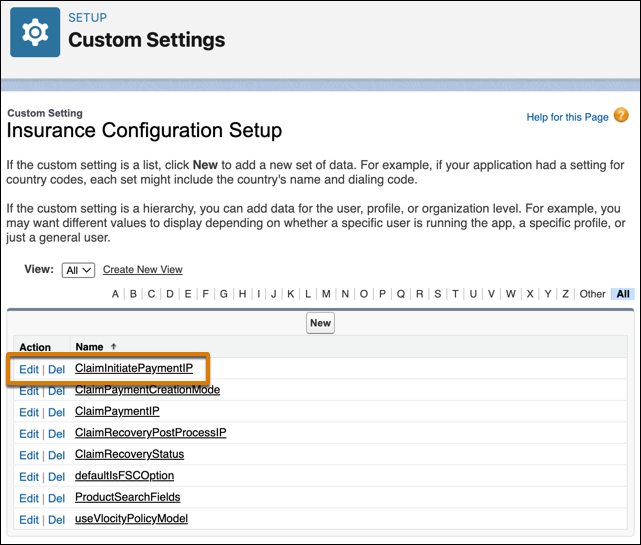
As part of your financial authorization workflow, configure the Integration Procedure that's specified for the ClaimInitiatePaymentIP Insurance Configuration Setup custom setting. This is the same Integration Procedure that's kicked off by InsClaimItemService: invokeInitiatePaymentIP.
-
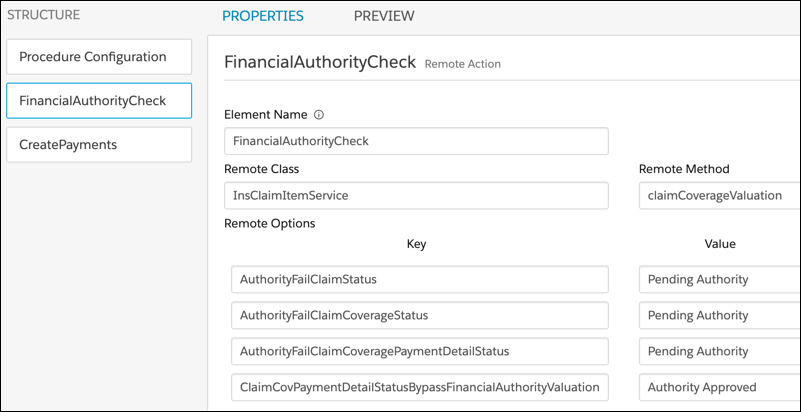
Add a new Remote Action called FinancialAuthorityCheck or something similar.
Have it call
InsClaimItemService: claimCoverageValuationto verify a user's financial authority.Remote Class
Remote Method
InsClaimItemService
claimCoverageValuation
Add remote options to set the Status of claims, claim coverages, and payment details to Pending Authority if a user doesn't have the authority to pay or approve an amount. Add another remote option to tell the service to skip the user financial authority evaluation for claim coverage payment detail records with a Status of Authority Approved.
Key
Value
AuthorityFailClaimStatus
Pending Authority
AuthorityFailClaimCoverageStatus
Pending Authority
AuthorityFailClaimCoveragePaymentDetailStatus
Pending Authority
ClaimCovPaymentDetailStatusBypassFinancialAuthorityValuation
Authority Approved
-
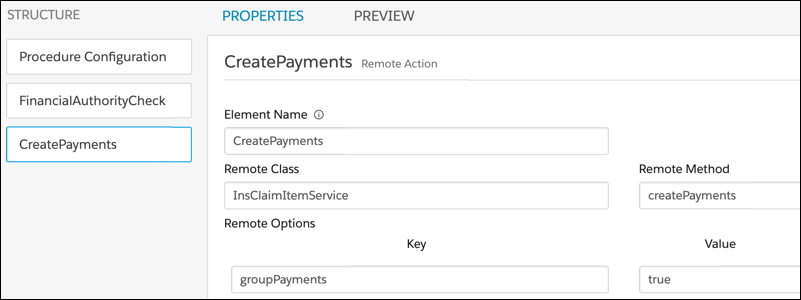
Check the CreatePayments Remote Action, which calls
InsClaimItemService: createPaymentsto create payments. Make sure the financial authority check comes before the CreatePayments action. This wayInsClaimItemService: createPaymentsdoesn't run unless the financial authority check passes.