You are here:
Create Flows for Financial Authorization Workflows
Create two clones of the Update Records Based on Their Financial Authority Approval Status flow. Configure them to take required actions when a user's financial authority is either approved or rejected.
- From Setup, in the Quick Find box, enter Flows, and then select Flows.
- Click Update Records Based on Their Financial Authority Approval Status.
- Click Save As.
- Enter a label and name, and then click Save.
-
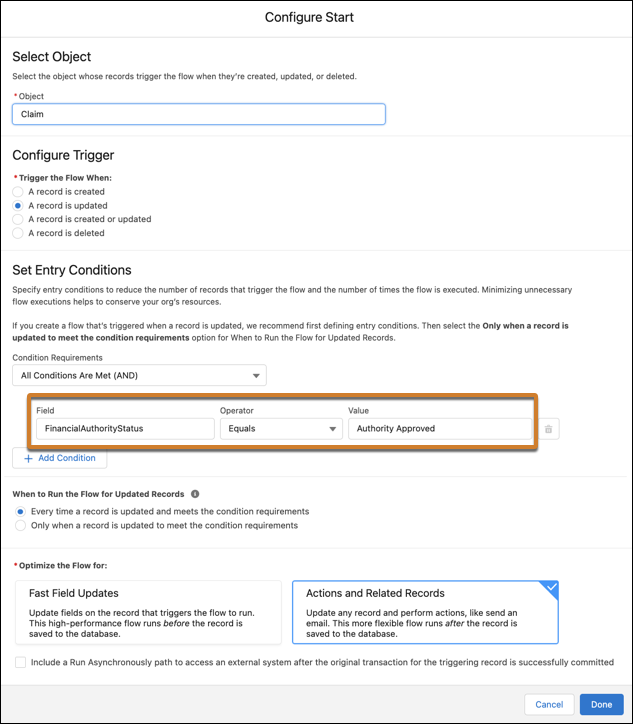
In the Start element of one of the cloned flows, specify a set entry condition to launch the flow when a Claim object is updated with a FinancialAuthorityStatus value of Authority Approved.
While you can configure a different value, the pre-configured tools included with Insurance are set up to use Authority Approved. It's easiest to use this default value.
-
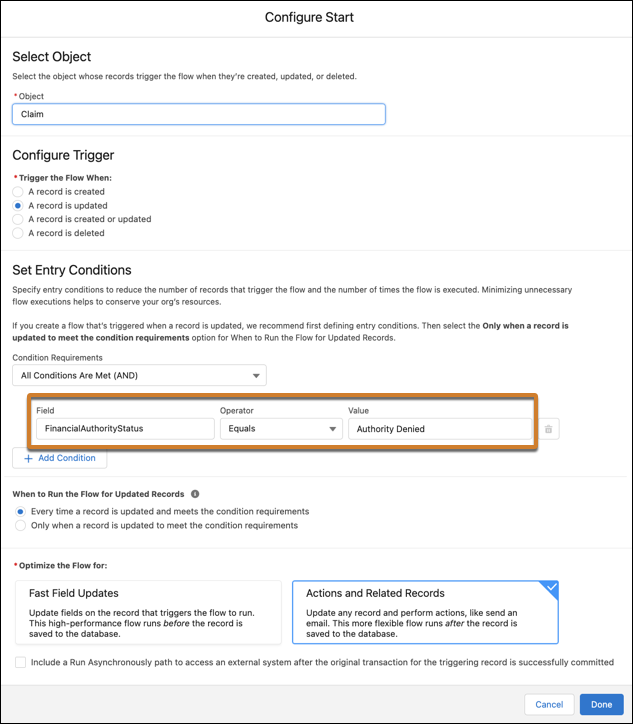
In the other cloned flow, specify a set entry condition to launch the flow when the FinancialAuthorityStatus value is Authority Denied.
- After configuring the cloned flows, activate them.
Did this article solve your issue?
Let us know so we can improve!
