You are here:
Set Limits on Amounts Users Can Pay and Approve
Limit how much users can pay or approve for each type of financial activity by using User Financial Authority records.
Before You Begin
Create a plan.
-
Consider the reporting structure of your claim team and define a role hierarchy that aligns with it. You can also configure sharing rules to grant read-only access of User Financial Authority records to subordinates. When you create User Financial Authority records, start with the team members at the top of the reporting structure. For example, create a record for the vice president first, then the supervisor, then the claims adjusters who report to the supervisor. Otherwise, validation errors can occur when users edit maximum approval amounts greater than their own.
-
Decide whether to configure user payment and approval limits per product. Setting up a single product-neutral limit is faster because you create fewer User Financial Authority records. Setting up product-specific limits gives you more granular control over approval limits.
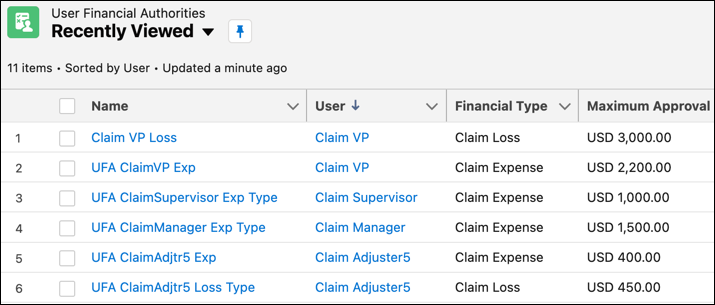
- From the App Launcher, find and select User Financial Authorities.
-
Click New or click the User Financial Authority to edit.
You can edit records with a Maximum Approval Amount equal to or less than your own. You can't edit your own User Financial Authority record.
-
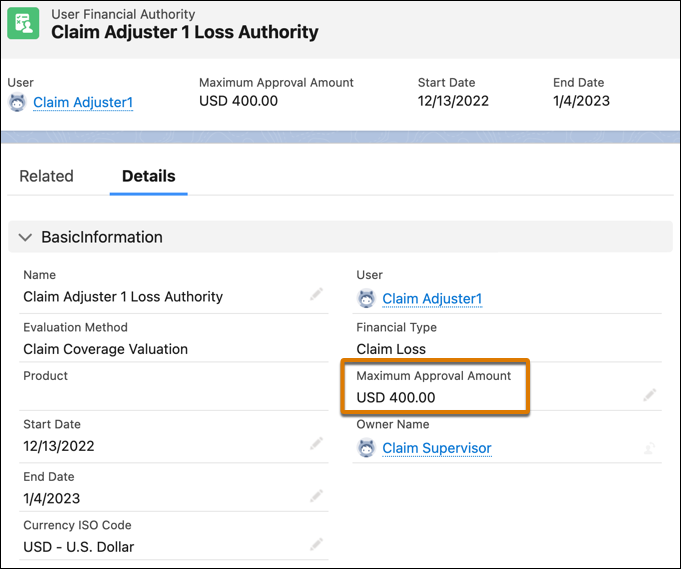
Enter details about the user's financial authority.
Field
Value
Name
A name that describes the user financial authority.
Example: Claim Coverage - Loss - Auto Product - 1,000
User
The user associated with the user financial authority.
Evaluation Method
Claim Coverage Valuation..
Financial Type
Claim Loss or Claim Expense, based on whether the Maximum Approval Amount applies to loss or expense payments.
Product
The product associated with the user financial authority. You can leave this blank to have the same limit apply to all products.
The system prevents you from creating active records that cause conflicts at runtime. So for a given user and financial type, you can't have a product-specific record and a product-neutral record with overlapping effective dates.
Maximum Approval Amount
The maximum monetary amount a user can approve for a financial activity.
Start Date, End Date
Date range when the user financial authority is in effect.
Services evaluate these dates at runtime. For example, if you update the end date to the current date, it affects the user's ability to pay and approve amounts immediately.
Currency ISO Code
The currency of the Maximum Approval Amount.
- Click Save.
