You are here:
InsCensusService:getQualifiedCensusMembers
Use this service to retrieve members that qualify for rating per family. Filters out dependents based on age, region, number of dependents.

The service can process up to 1,000 census members.
This number refers to the number of census members the service qualifies, not the number of records returned by the service.
Method: getQualifiedCensusMembers
How It Works
-
This service takes a
censusIdand retrieves all census members inGroupCensusMember__c. -
The service will retrieve the qualification criteria, based on the jurisdiction and filters inputs of the Calculation Matrix (see below).
-
Each dependent is evaluated based on their age.
-
All spouses are automatically qualified regardless of their age.
-
All primary members are included in the result.
-
All adult dependents are automatically qualified.
Calculation Matrix
You will need to create a Calculation Matrix to look up jurisdiction (locale, such as CA for California) and product category (medical, dental, vision) inputs and match them to the child dependents info, as shown below:
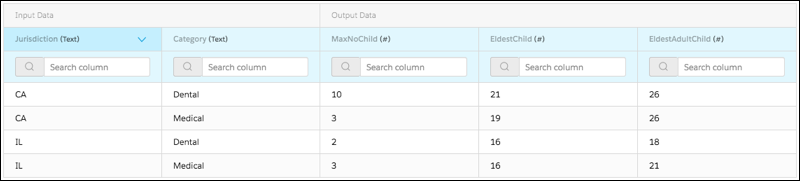
The outputs are defined as follows:
-
MaxNoChild—Maximum number of dependent children to be qualified for rating;
-
EldestChild—Dependents whose age is below or equal to this number are considered children;
-
EldestAdultChild—Dependents whose age is greater than EldestChild and below or equal to this number are considered adults.
You must add the calculation matrix as a custom setting as follows:
-
Go to Setup > Custom Code > Custom Settings.
-
Click Manage for Insurance Configuration Setup.
-
Click New. Enter QualifiedMembersMatrix in the Name field, and enter the name of the matrix you created in the Setup Value field.
-
Click Save.
Remote Options
Option |
Description |
|---|---|
|
Required Id of census with members to evaluate. |
|
Order by which the dependents are evaluated. If not specified, dependents are evaluated according to their age, from eldest to youngest, as per the effective date of the census. |
|
Product filters. Format:
Example:
|
|
U.S. state where dependent resides. |
Input JSON
Here's what the structure of the input JSON looks like. Note the nodes for jurisdiction (CA for California) and a filter for a medical product.
{
   "censusId":"a4D4P000000hbjSUAQ",
   "orderBy":"FirstName__c",
   "filters":"Type__c:Medical",
   "jurisdiction":"CA"
}
Output JSON
Here is a sample output JSON:
{
  "members": [
    {
      "attributes": {
        "type": "alyssa__GroupCensusMember__c",
        "url": "/services/data/v46.0/sobjects/alyssa__GroupCensusMember__c/a4C4P000000euW2UAI"
      },
      "Id": "a4C4P000000euW2UAI",
      "IsDeleted": false,
      "Name": "Che (Dep: Alice, Exact Age)",
      "CreatedDate": "2019-09-24T05:48:40.000+0000",
      "CreatedById": "0054P00000AAsNCQA1",
      "LastModifiedDate": "2019-09-24T05:48:40.000+0000",
      "LastModifiedById": "0054P00000AAsNCQA1",
      "SystemModstamp": "2019-09-24T05:48:40.000+0000",
      "alyssa__CensusId__c": "a4D4P000000hhDkUAI",
      "alyssa__AgeAsOfToday__c": 19,
      "alyssa__Birthdate__c": "2000-09-23",
      "alyssa__ClassCodes__c": "Che",
      "alyssa__FirstName__c": "Che (Dep: Alice, Exact Age)0",
      "alyssa__Gender__c": "Female",
      "alyssa__HasSpouse__c": false,
      "alyssa__IsFamily__c": false,
      "alyssa__IsOptOut__c": false,
      "alyssa__IsPrimaryMember__c": false,
      "alyssa__IsSpouse__c": false,
      "alyssa__MemberIdentifier__c": "Che0",
      "alyssa__MemberName__c": "Che (Dep: Alice, Exact Age)0 Che (Dep: Alice, Exact Age)",
      "alyssa__NumberOfDependents__c": 0,
      "alyssa__PrimaryMemberIdentifier__c": "Alice",
      "alyssa__TotalDependents__c": 0
    }
  ],
  "error": "OK"
}