You are here:
insOsMultiInstanceProducts Lightning Web Component
The insOsMultiInstanceProducts Lightning web component is an enhanced version of the insOsMultiGrandchildrenProduct Lightning web component with the enableEdit option to edit insured item attributes. This component displays product information in OmniScripts that offer quote and policy purchase flows for insurance products that are multi-instance and include insured products and insured parties.
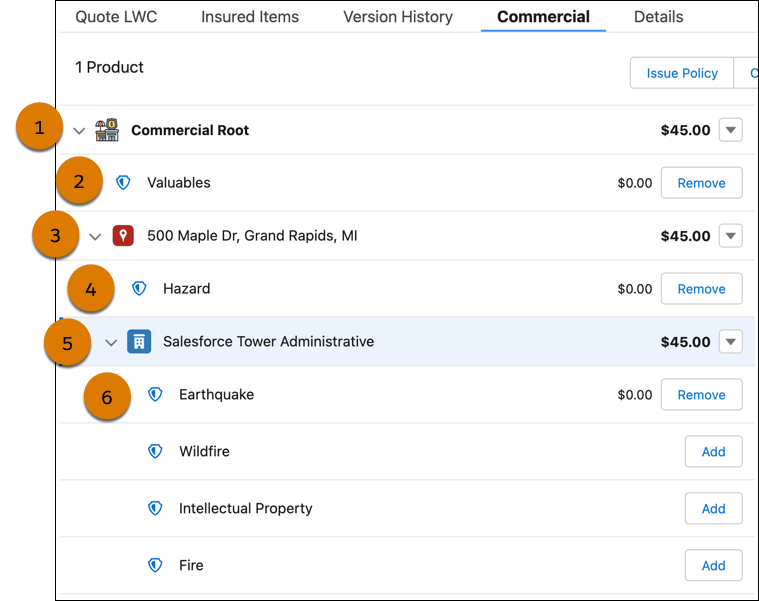
This Lightning web component helps users configure complex commercial quotes with multi-level insured item relationships and coverages. For example, a product structure with:
-
Commercial Root (1)
-
Commercial Root coverages such as "Valuables" (2)
-
Location insured item (3)
-
Location coverages such as "Hazard" (4)
-
Building insured item (5)
-
Building coverages such as "Earthquake" and "Wildfire" (6)

Use insOsMultiInstanceProducts along with insOsMultiInstanceChildProducts to build commercial quote flows for products with two levels of insured items, and coverages for the second level of insured items.
If root products are configured with multiple insured items, the insOsMultiInstanceProducts Lightning web component shows all the insured items even if they're not included in userInputs passed from InsProductService:getRatedProducts. This design makes it easier to add optional insured items in the user interface. If customers want to prevent optional insured items from appearing, they can use an Integration Procedure or Omnistudio Data Mapper to filter them out of the product JSON.
