Loading
Feature Disruption - Service Cloud VoiceRead More
Feature degradation | Gmail Email delivery failureRead More
Insurance
Table of Contents
Select Filters

          No results
          No results
          Here are some search tips

          Check the spelling of your keywords.
          Use more general search terms.
          Select fewer filters to broaden your search.

          Search all of Salesforce Help
          insQuote Lightning Web Component

          insQuote Lightning Web Component

          Use this component to display a quote. Calling other Lighting web components, insQuote, called Vlocity Insurance Quote in the Lightning App Builder, displays root products, coverages, insured items, insured parties, and attributes.

          This component contains additional components that let users add and modify insured items, add and modify insured parties, add and remove coverages, change attribute values, and reprice the quote based on changes made.

          This component works for desktop and is mobile responsive.

          To start off, insQuote displays the option to select the product being quoted. Here's what it looks like:
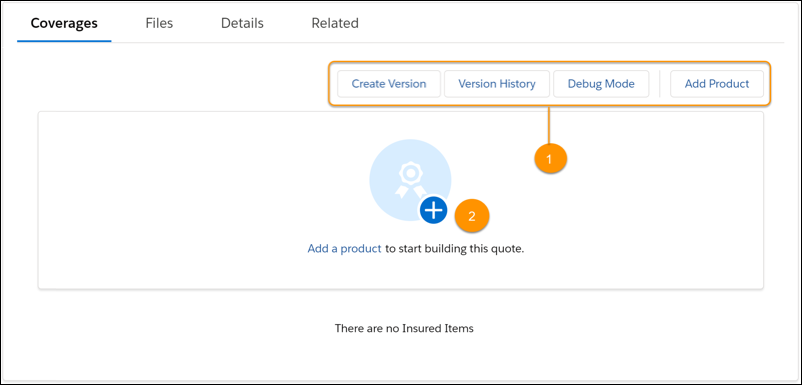
          insQuote LWC Coverages tab with buttons and Add a product option highlighted

          After a product is selected, the subsequent options are introduced based on the product structure. Here's an example of what it could look like after selecting a product:
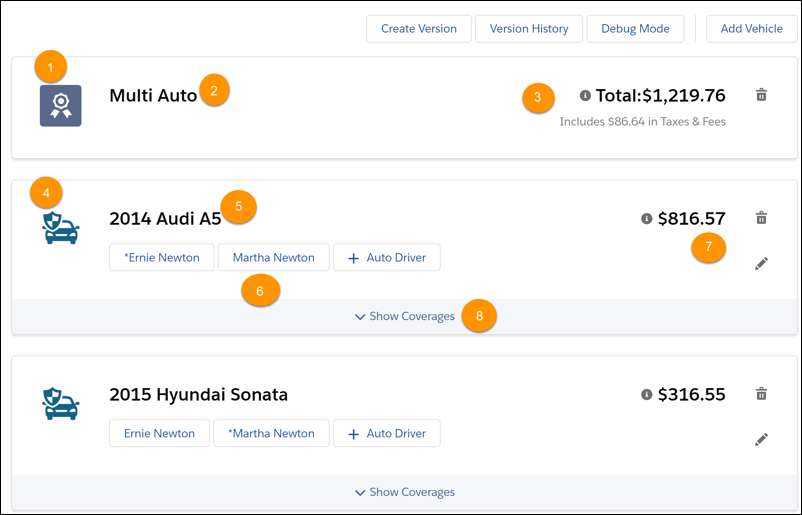
          insQuote LWC elements highlighted

          When it's been populated with information, insQuote LWC also displays:

          1. Icon for the product

          2. Product name

          3. Total Premium

          4. Icon for the insured item

          5. Insured item name

          6. One or more insured item attributes

          7. Insured item deductible

          8. Insured Item

          The LWC also displays Rate if the quote has been modified.

          What Users Can Do on this LWC

          With the top-level insQuote LWC, users can:

          • Add products

          When a product is added, insQuote acquires child LWCs. After this, insQuote can be used to:

          • Add insured items

          • Add or remove coverages

          • Modify coverage attributes

          • Edit insured items

            Look for the pencil icon.

          • Delete products

            Look for the trashcan icon.

          • Delete insured items

            Look for the trashcan icon.

          What this LWC Does

          The insQuote LWC is a container for the quote product list. It fetches the Quote line items and displays them as a list on the page.

          If there are no products added, insQuote adds the root products to the page as the user builds the quote from scratch.

          Services Called by this LWC

          insQuote doesn't call any services.

          Other LWCs Used by this Component

          insQuote includes these components:

          • lodash

          • pubsub

          • utility

          • date_fns

          • insCreateVersion

          • insPolicyManagement

          • insQuoteSingleRoot

          • insQuoteLargeGroup

          • insQuoteProductList

           
          Loading
          Salesforce Help | Article