You are here:
insQuoteCoverage Lightning Web Component
This component shows users a coverage on a quote.
Most quotes will include many instances of this LWC, one for each coverage on an insurance product. In the following screenshot, each red box contains one instance of insQuoteCoverage.

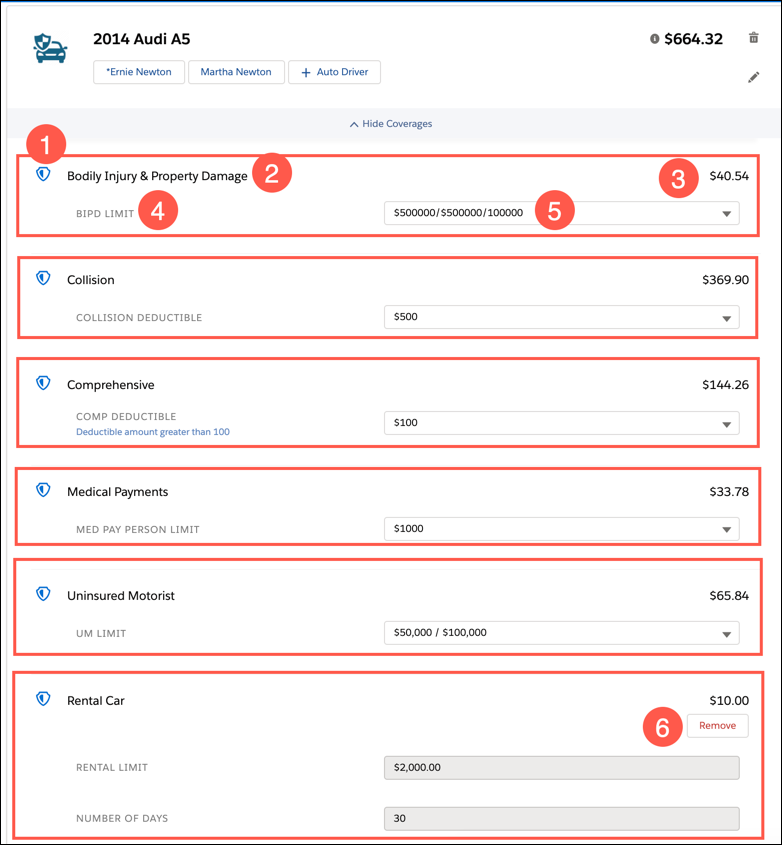
The insQuoteCoverage LWC displays:
-
An icon for the coverage
-
Coverage name
-
Premium price of the coverage
-
Attribute name (one or more)
-
Attribute value (one or more) (which may or may not be customizable by the user)
-
Add/Remove button (optional coverages only)
What Users Can Do on this LWC
Users working on quotes can do the following actions on this LWC:
-
Change attribute values
Users can only do this on configurable attributes. These have a white background and might have a dropdown carat, radio buttons, or other controls.
Non-configurable attributes have a gray background.
-
Add optional coverages to the quote
Look for any coverage with an Add button
-
Remove optional coverages from the quote
Look for any coverage with a Remove button
