You are here:
Insurance Product Inheritance
Insurance product modeling includes two levels of inheritance: child spec inheritance and product class inheritance. By using inheritance, you can cut down the amount of time you spend individually creating every product model in your product catalog.
Inheritance also lets you make changes to a child spec or product class at any time. Those changes are inherited by every product model using the child spec or product class without you needing to make any individual changes.
You can override the child specs and product classes on individual product models so as to create unique product models when and where you need to. This doesn't break the inheritance. Your product model will still inherit any changes you make to the child spec or product class except those you've overridden.
How Child Spec Inheritance Works
When you add a child spec to a root product spec, all the following information comes over and is part of the instance of the child spec that now exists on the root product:
-
Attributes
-
All options and configurations on each attribute
-
Attribute rules
-
Attribute value rules
Here's what that looks like:
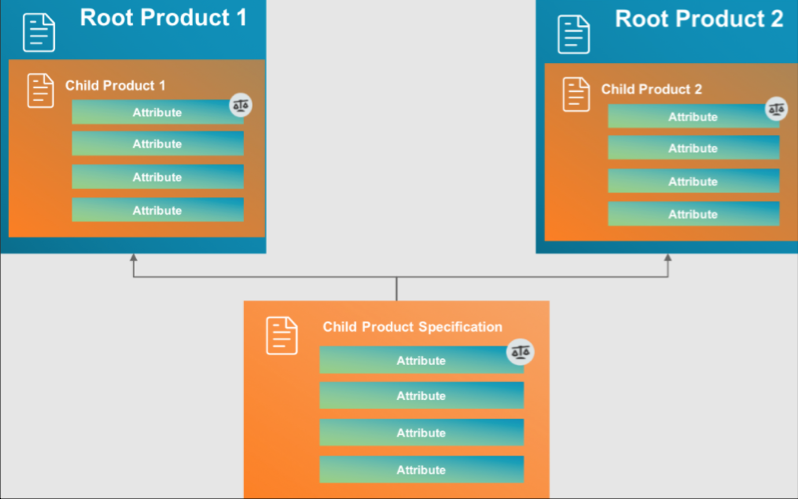
Any time you make a change to one or more of the above parts of an original child spec, those changes are inherited by all instances of the child spec that are attached to root product specs.
The types of child specs that this inheritance model applies to are:
-
Coverage spec
-
Insured Item spec
-
Insured Party spec
-
Rating Fact spec
You can override any attribute, attribute configuration, or rule on an instance of a child spec that's attached to a root product spec.
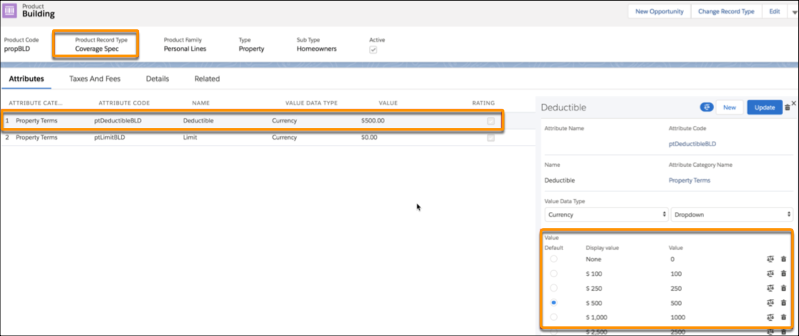
In this example, the Building coverage spec has a Deductible attribute. Deductible has a default value of $500 set on this spec.
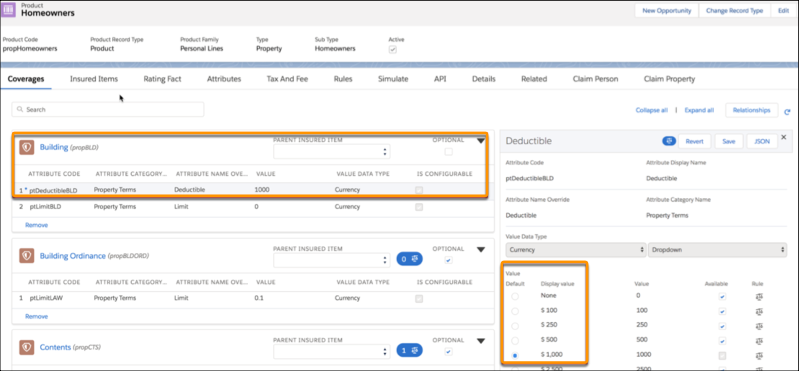
The Building coverage is attached to the Homeowner root product spec. In this instance, the Deductible attribute's default value is set to $1000. This overrides the child spec.
When you override something like this, it gets marked with a blue asterisk (*) on the UI.
Once you override an attribute, attribute configuration, attribute rule, or attribute value rule, that whole attribute stops inheriting changes from the original child spec.

You can manually push changes from a child spec to all the products that inherit from it, overriding any overrides.
To push attribute changes from a child spec, click the down arrow at the top right and choose Push Attribute.
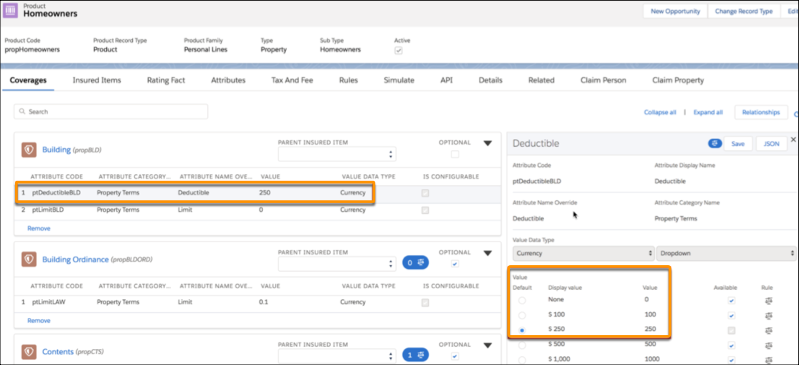
In this example, the Building coverage spec's Deductible attribute is changed to $250.
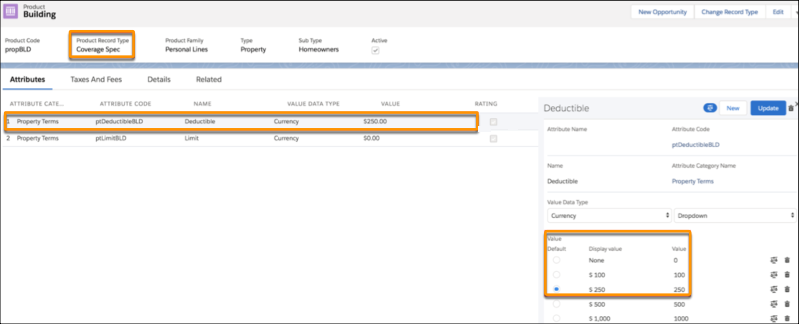
Because this attribute was overridden on the Homeowners root product, it does not inherit the new Deductible default value from the child spec. Instead, the override remains.
You can revert any override you make.
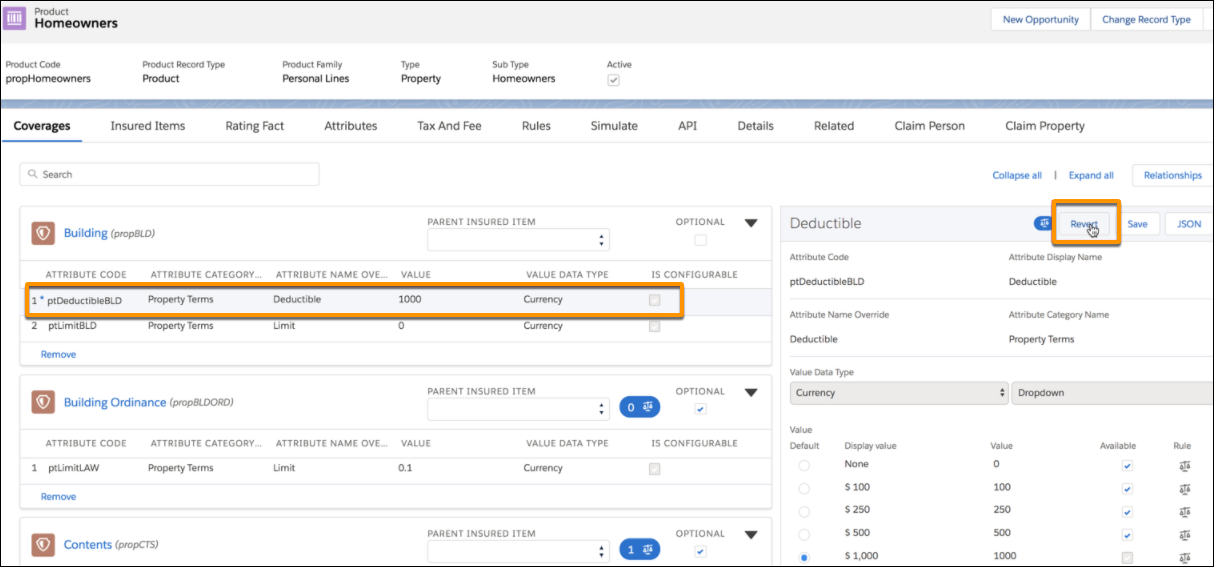
After you revert an override, it resumes inheriting any new changes made to the child spec.
To enable default-value override rules for partner or community users, change the Sharing Setting for the Compiled Attribute Override and Attribute Assignment objects to Public Read Only
How Product Class Inheritance Works
When you create a product model based on a product class, it inherits the following:
-
A few Details, including:
-
Rating Procedure Name
-
Rating Procedure Type
-
-
Coverages
-
Insured Item
-
Insured Party
-
Rating Facts
-
Product Rules
Here's how basic product class inheritance looks when you create product models based on a product class:
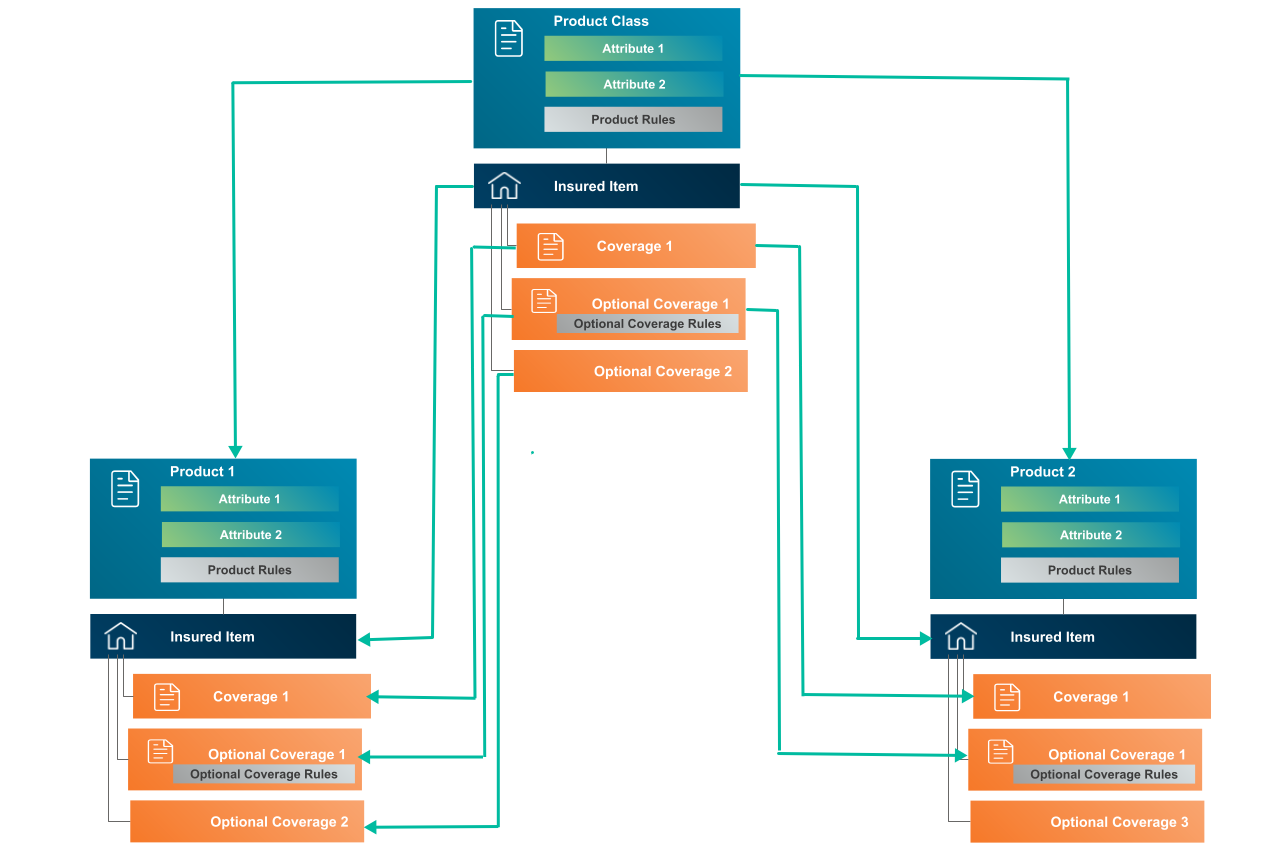
After you create the product models based on product classes, you can make additions and changes to items that are not inherited from the product class.
You can:
-
Add Taxes & Fees
-
Add new attributes at the root product level
-
Add coverages
-
Add insured items
-
Add insured items
-
Add product rules
You can't do the following to items inherited from product specs:
-
Modify or delete coverages, including optional coverage rules
-
Modify or delete insured items and insured parties
-
Modify or delete attributes on child specs or product, including attribute rules and attribute value rules
-
Modify or delete product rules
Learn more about:
- Product-Level Attribute Inheritance
You can set attributes at the product level of a product class (that is, on the attribute tab on the product class spec). All product models you create based on that product class inherit these attributes. - Product Rules Inheritance
Product rules include eligibility rules and underwriting rules. When you set up product rules on a product class, all product models you create based on that product class inherit those rules. - Child Spec Inheritance with Product Classes
Child spec inheritance, which includes coverages, insured items, insured parties, and rating facts, exists at two levels. - Optional Coverage and Coverage Relationship Rules Inheritance
When you set up optional coverage rules and coverage relationship rules on a product class, all product models you create based on that product class inherit those rules.
