You are here:
Integration Procedure for an Auto Insurance Product Rating
The product model underpins all the business processes used in a line of business. Services that price insurance products pull data from the product model, perform rating procedure calculations using that data, and then insert coverage and premium prices into the product model.
Here's an example of a product model for a Multi Auto root product at a high level:
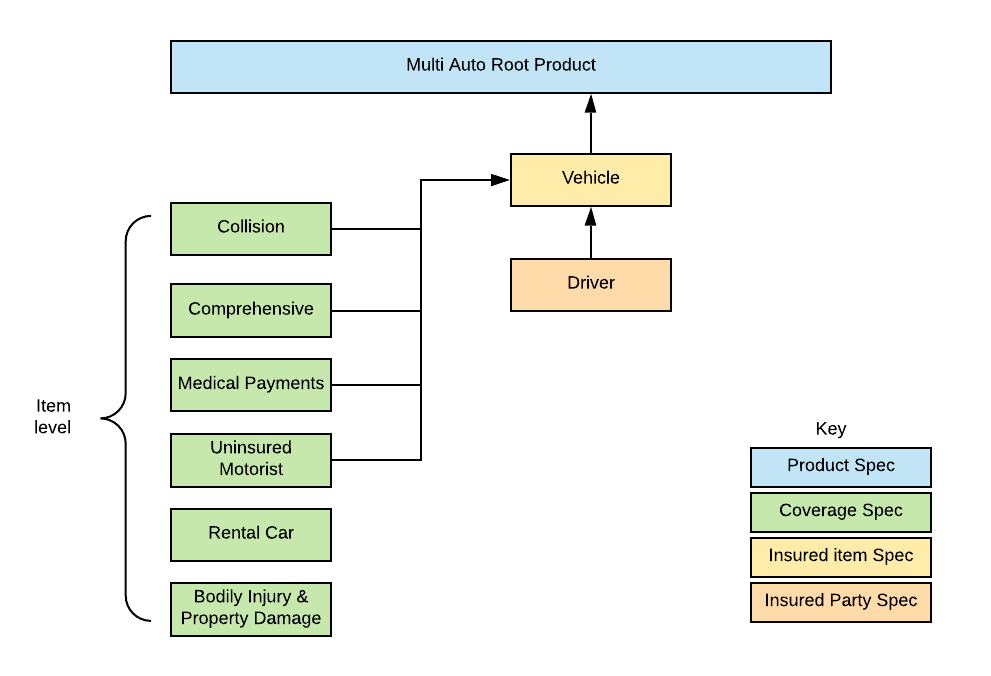
To rate the Multi Auto insurance product, we use this Integration procedure:
-
Type: Auto
-
Subtype: MultiInstanceRating
-
Name: Auto+MultiDriver Rating
Here's what this Integration Procedure does at a high level:

The Integration Procedure orchestrates the two major rating calculations: the driver calculations and then the vehicle calculations.
Here's what the Auto MultiInstanceRating Integration Procedure looks like:
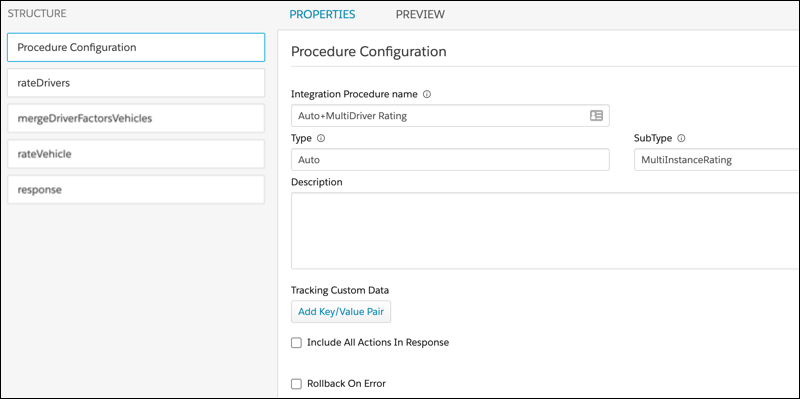
Before you create your own Integration Procedure to rate your auto insurance products, review and test the structure of this one to see how it works. You can model your own Integration Procedure on this one if it works for you.
Here's what component each step of the procedure uses, and what each step does:
-
Expression Set Action
Rates the drivers by calling the autoRateDrivers expression set.
The following remote options are set:
-
Key: includeInputKeys
Value: autoVehicle.instanceKey,autoDriver.instanceKey
What it does: Specifies the keys to include from the input set into the output sets of the calculation results. The aggByKey option and subsequent steps of this Integration Procedure use these keys to identify the correct set of calculation results.
-
Key: includeInputs
Value: true
What it does: Turns on the code that pulls the instance keys specified by the includeInputKeys option.
-
Key: aggByKey
Value: autoVehicle.instanceKey
What it does: Uses the autoVehicle.instance key InputKey in the calculation result sets to determine the sets to run aggregation steps on.
-
Key: effectiveDate
Value: %options:effectiveDate%
What it does: Passes in this value as an option to the
InsProductService: getRatedProductservice used by this Integration Procedure. This data is used to pull the correct versions of expression sets and lookup tables for the Integration Procedure to use.
-
-
List Action
Merges the calculation results (rateDrivers:output:aggregationResults) for drivers from step 1 with the original input data (input_1) from the input JSON. Matches the autoVehicle.instanceKey from the driver calculation output and merges the data.
-
Expression Set Action
Rates the vehicles by calling the autoRateVehicles expression set.
-
Key: includeInputKeys
Value: autoVehicle.instanceKey,productKey,parentProdKey
What it does: Specifies the keys to include from the input set into the output sets of the calculation results.
-
Key: includeInputs
Value: true
What it does: Turns on the code that pulls the instance keys specified by the includeInputKeys option.
-
Key: includeRawCalculationResult
Value: true
What it does: Appends the raw calculation results from this expression set to the output JSON (as well as the parsed calculation results).
-
Key: effectiveDate
Value: %options:effectiveDate%
What it does: Passes in this value as an option to the
InsProductService:getRatedProductservice used by this Integration Procedure. This data is used to pull the correct versions of expression sets and lookup tables for the Integration Procedure to use.
-
-
Response Action
Returns the response for the Expression Set Action in step 4. The Send JSON Path specified is standard, sending only the necessary nodes.
