You are here:
Keep Claims Processing on Track with Action Plans
Assign tasks and set completion dates to keep your staff focused and your performance goals on target. Action plans associated with a claim assign tasks and deadlines to claim team members based on their role: claim administrator, special investigator, or whoever is the best fit for the task.
-
Prepare your org for Action Plans.
-
Make sure users have the Action Plans license.
-
Add Action Plans to the Related List on the Claim page layout.
-
-
In Object Manager, for the Claim Team Member object, add picklist values to the Role field.
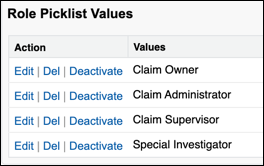
- Create a Claim Team Member record for each member of your team, and assign each team member the correct roles.
- Create action plan templates and action plans for claims. For example, create action plans that list the tasks the Claim Owner and Claim Supervisor must complete for a claim.
-
Add action plans to claims.
Build a flow that retrieves claim
OwnerIdand claim coverageOwnerId, and adds these values toClaimTeamMemberrecords. With these identifying values in theClaimTeamMemberrecords, action plans can get attached to particular claims.You can also add an action plan directly to a claim. On the claim record's related list, in the Action Plans section, click New Plan.
