You are here:
Learn About the Insurance Agent Console
The Insurance Agent Console is where your customer service representatives (CSRs) can view a timeline of interactions with the customer, get contextual alerts, take relevant actions, and search for knowledge articles. Learn how the console is organized to help your CSRs manage the entire service lifecycle from one page.
The console comes with these preconfigured Service Excellence components and platform capabilities:
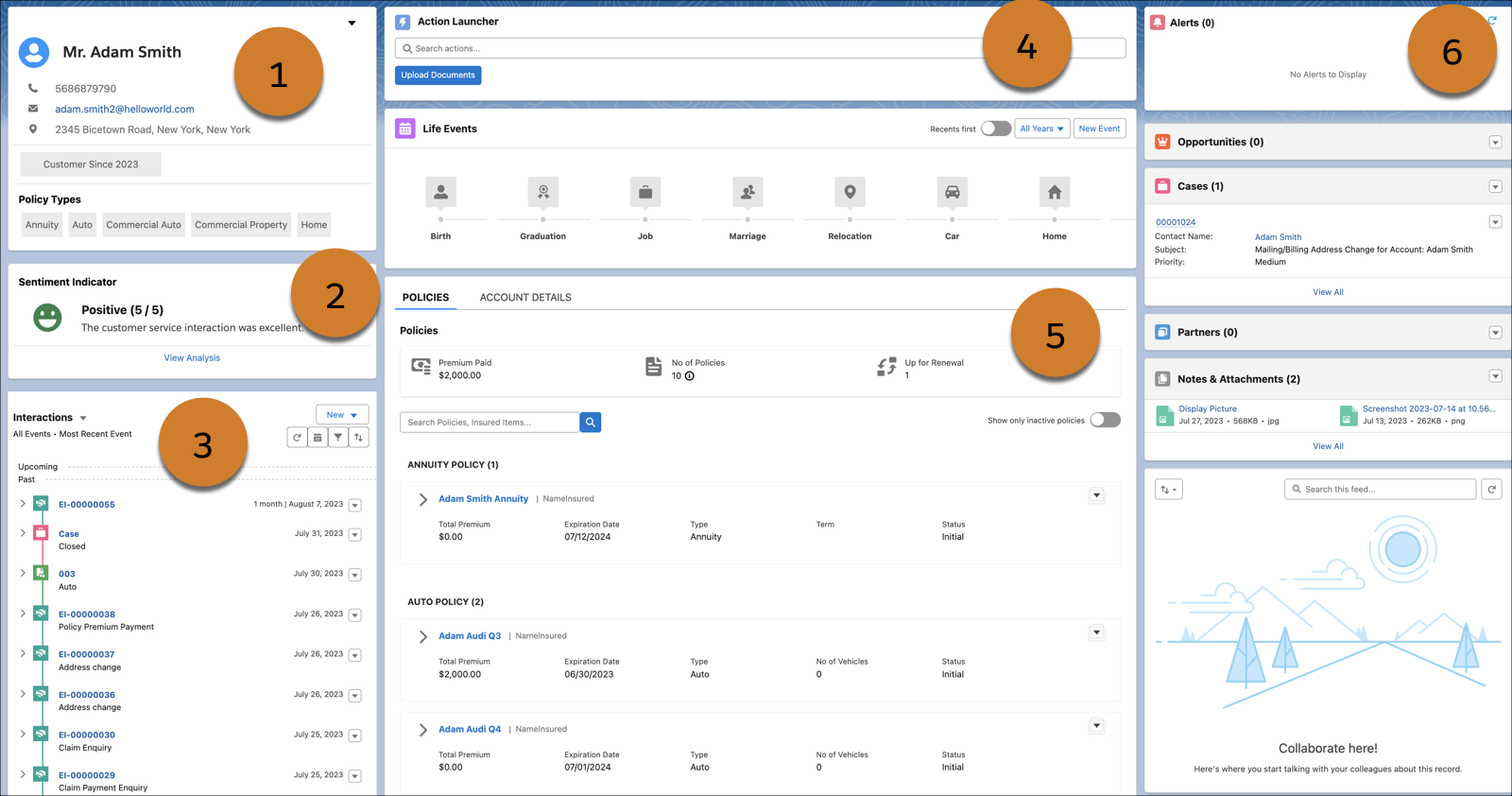
View profile card
CSRs can get the profile view of the customer with relevant details such as profile picture, address, and profile tags (1).
Analyze the customer experience
Know the current sentiment of the customer based on past engagements with the contact center and the sentiment recorded for those engagements (2).
Track interactions with Customers
CSRs can ensure continuity in engagements with the customer with a chronological, interactive timeline of all interactions with the customer (3). The timeline component is preconfigured to work with customer account records and engagement interactions.
Take relevant actions
CSRs can use the Action Launcher on the Insurance Agent Console to quickly find and run service actions, such as uploading documents (4). You can also configure your own actions to launch flows and/or OmniScripts.
View policy details
Get a consolidated view of all the policies held by the customer on the Insurance Agent Console (5).
Get contextual alerts
CSRs can receive timely alerts on related activities like an upcoming premium due date, policy renewal, and new claims. These alerts can help them proactively address issues (6). You can set up alerts as per your business needs.
You can configure these components to work with other standard navigation apps too.
In Lightning App Builder, on the Insurance Agent Console account record page that you're editing, drag the standard components from the Components panel to the Lightning page canvas.
- Prerequisites for Setting Up the Insurance Agent Console
Review these prerequisites and considerations to set up and use the Service Console for Insurance customers. - Get Access to Insurance Agent Console
To access the service console, enable the Service Excellence for Insurance setting for your org.
