You are here:
Manage a Claim's Participants
As a claims adjuster, you have access to essential information about claim participants and can complete tasks related to them.
-
View each participant's account or contact name and their role or roles in the claim.
-
Add a participant to a claim.
-
Edit participant information, delete a participant, or add details about a participant's injury or involved vehicle. The system administrator can customize actions available for each claim participant role.
-
Get contact information for the claim participant.
-
View an involved item or injury associated with this claim participant.
-
Show or hide all the involved items and involved parties.
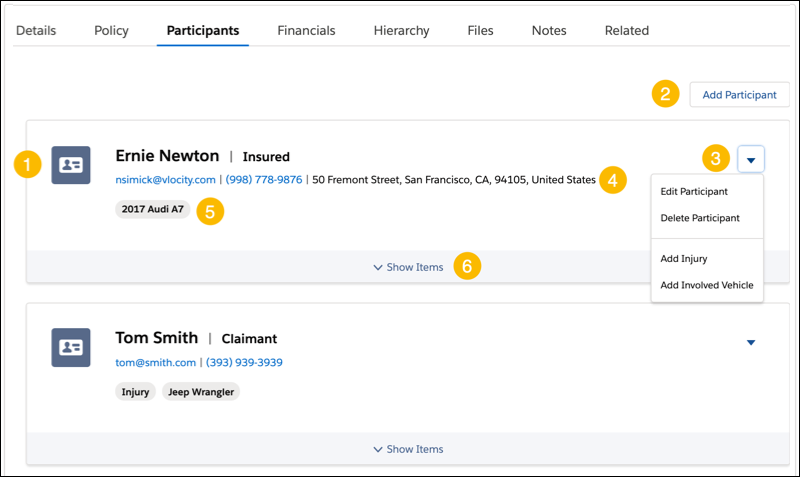

- On a claim, click the Claim Participant tab.
-
Add, edit, or delete claim participants.
To add a participant, click Add Participant.
-
For participants not yet in the system, choose Create New Contact. Add account information and select a Participant Role.
-
For participants already in the system, choose Search Existing Accounts. Search for and select the participant, select a Participant Role, then click Next.
To edit a participant, click the dropdown menu for the participant and choose Edit Participant. When you edit a participant, you can select additional roles.
To delete a participant, click the dropdown menu for the participant and choose Delete Participant. Then click Delete.
-
