You are here:
Manage the Data Source for an Experience Component
Some Experience components use data sources to pull in information to display.

The highlighted are in this flow shows where you are in the process of customizing Experience components: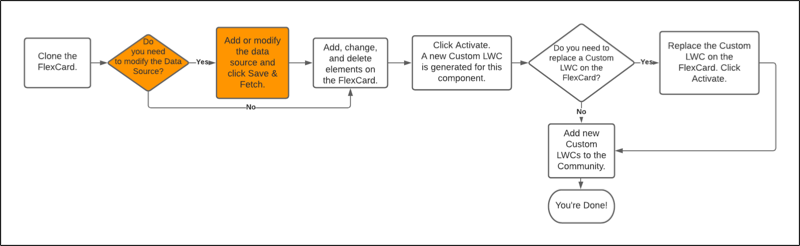
Most data sources used by experience components are one of these:
-
Integration Procedure
-
Omnistudio Data Mapper
-
Apex Remote used for a Vlocity Insurance service
Before You Begin
-
Determine what data source you plan to use.
-
If you're using a Vlocity Insurance service or one of the out-of-the-box Data Mappers or Integration Procedures, determine what remote options and other settings you want to use, and what values to assign to each.
-
If you're using a totally custom Data Mapper, Integration Procedure, or other data source, make sure it's created and tested. Determine what options and settings you need, and what values to assign to each.
- Replace the Data Source on the FlexCardReplace the Data Source on the FlexCard
- Modify Options and Inputs on the Data SourceModify Options and Inputs on the Data Source
- Make Changes to the Data Source DirectlyMake Changes to the Data Source Directly
- Replace the Data Source on the FlexCard
If you need to, you can replace the data source on a FlexCard with another data source: - Modify Options and Inputs on the Data Source
If the current data source is the correct one, but you need to make changes to specific things like inputs or options, you can do that. Here's how: - Make Changes to the Data Source Directly
If the data source for a component is an Omnistudio Data Mapper or an Integration Procedure, you can make changes to the Data Mapper or Integration Procedure directly to get the data you want flowing into your site.
