You are here:
Map Rating Outputs on Product Simulator
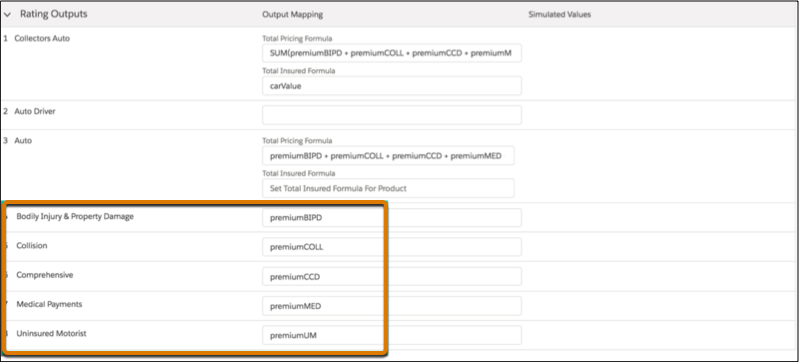
The best place to map your rating output variables is on the Simulate tab on the root product page. You can see each of the coverages in a list under Rating Outputs in the Simulate tab.
If your rating procedure is an expression set, the expression set publishes the output variables as dropdowns to the Simulate tab fields. You can use the dropdowns to map the output variables. Verify that the correct output variable corresponds to each coverage.
If your rating procedure is an Integration Procedure, you must enter the output variables for each coverage.
Here's what the output mappings look like on the root product Simulator tab:

Note If you have Integration Procedures from earlier releases, you can use calculation matrices and calculation procedures instead of lookup tables and expression sets.
Coverage output mappings are stored on the product's child item record.
Keep in mind that:
- We recommend that you define the rating outputs mapping on the Simulate tab of the root product instead of on the child spec itself. Why? It ensures that the rating output mapping defined in the product child item record can be used by rating procedures.
- For coverages, use the Pricing Source Mapping field and not Pricing Formula for mapping outputs. Using the Pricing Formula field to map outputs causes errors in the rating procedure execution.
- You can't use a split-limit attribute as a rating output.
InsProductService:rePriceProductandInsProductService:getRatedProductsverify that attributes used as rating output for an insurance product are defined in rating procedures for that product. To use attributes as rating output, assign a rating procedure to the root product spec if one isn't assigned already. Make sure this rating procedure includes the correct rating output attribute mappings.
Did this article solve your issue?
Let us know so we can improve!
