You are here:
Mobile Insurance Account Actions Component
Quickly provide your mobile Policyholder site users with links to common account management tasks with the Mobile Insurance Account Actions component. The Mobile Insurance Account Actions component sits inside of the Mobile Insurance Header component.
-
FlexCard: insManageAccountMobile_nds
-
LWC: cfInsManageAccountMobile_nds
-
Label: Insurance Manage Account Mobile Newport
This component is designed for mobile. Looking for the Insurance Account Actions component designed for desktop? Read Insurance Account Actions Component.
Here's what the Mobile Insurance Account Actions component looks like when it's rendered in the Policyholder site:
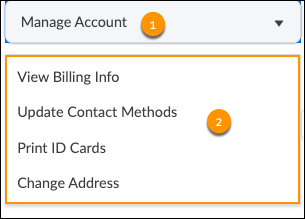
The parts of this component are:
-
Dropdown menu label:
Manage Account
-
Actions configured for the menu that launch pre-defined OmniScrips:
-
View Billing Info
-
Update Contact Methods
-
Print ID Cards
-
Change Address
-
What Your Users Can Do on this Component
Mobile Policyholder site users can use the links in the Mobile Insurance Account Actions component to update their personal information and preferences. Your users are also linked to other common tasks like printing ID cards or viewing billing information.
FlexCard Structure
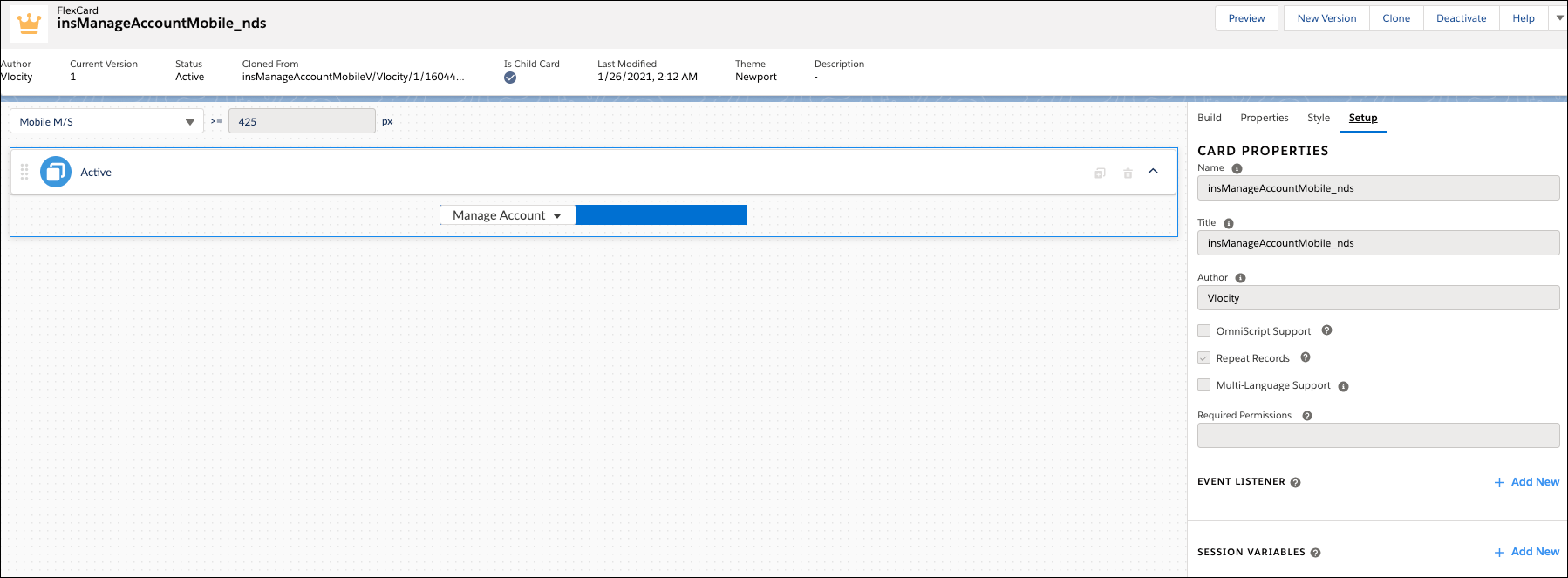
The FlexCard contains a menu element with four actions. Each of these actions launches an OmniScript.
You can add, remove, and change any of these elements based on what you want your users to see. To learn how see Add Elements to a FlexCard. Other good topics to read to learn about how this FlexCard works include FlexCards Display Elements Reference, FlexCards Menu Properties, and FlexCards Action Properties.
Many of the elements of this card contain Custom CSS styles. You can make changes to these styles to create a different look and feel. To learn how to work with Custom CSS in FlexCards, see Apply Custom CSS to a FlexCard Element .
