You are here:
Multi Auto Product Model
The Multi Auto product is a multi-instance product model that lets users create quotes for multiple vehicles driven by multiple drivers. This product model has the flexibility to handle complex combinations, such a quote that's got three vehicles and four drivers who aren't all associated to the same vehicles.
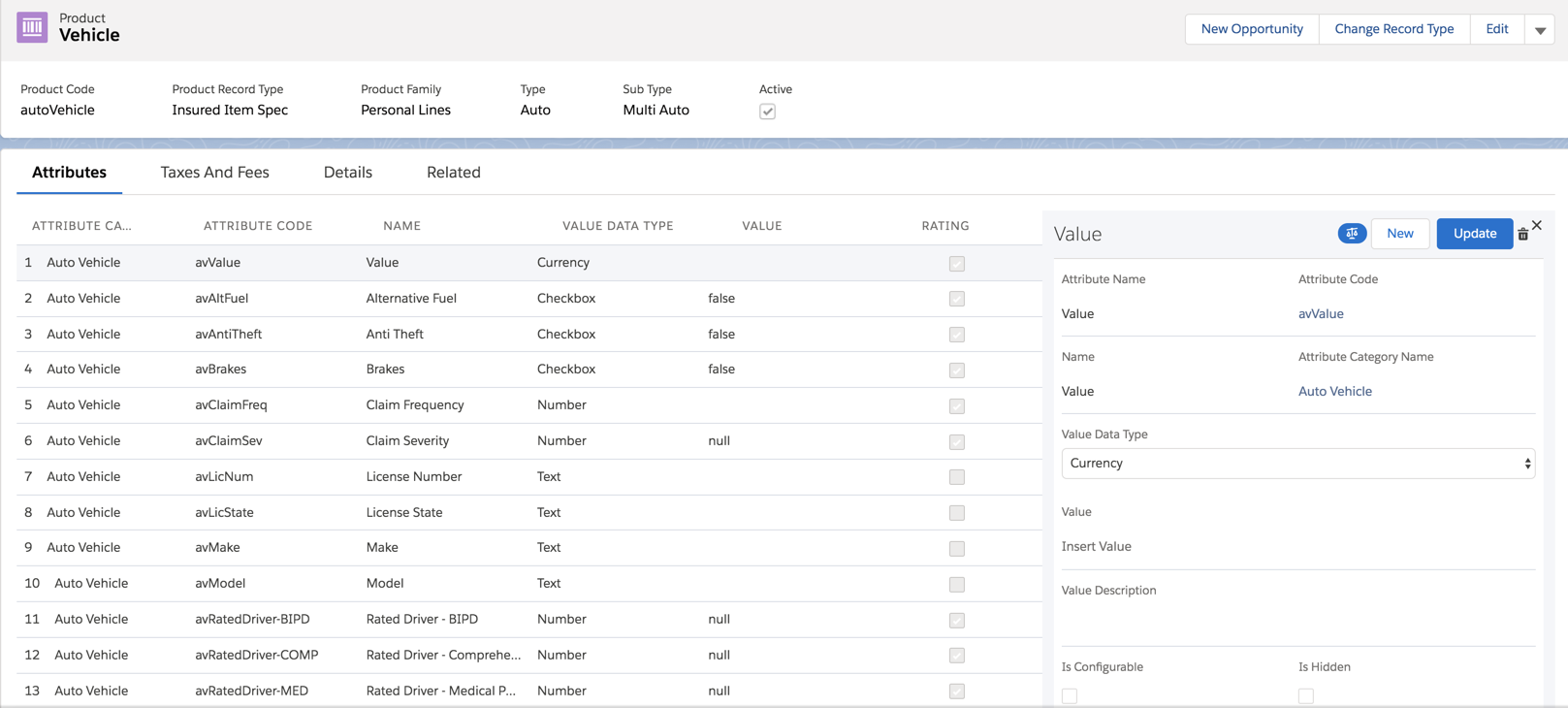
Insured Item: Vehicle
The Insured Item Spec is the spec for vehicles to be insured. It's named:
-
Name: Vehicle
-
Product Code: autoVehicle
It contains attributes that apply to a vehicle, all in the Auto Vehicle attribute category.
Values for these attributes get collected from the end customer who's shopping for insurance. Vlocity Insurance uses many of these attributes to help rate (price) the Multi Auto product.
Each attribute is configured for this insured item spec on the right pane of this page. Click each attribute name to see its configuration on the right pane. Scroll down to see if the Rating checkbox is selected. If it's selected, this attribute is used to rate the insurance product.
Many of these attributes correspond to user inputs in the quote OmniScript and quote UI.
Insured Party: Driver
The insured party spec represents drivers for an auto insurance product. It's a child of the Insured Item spec. It's named:
-
Name: Auto Driver
-
Code: autoDriver
It contains attributes, all from the Auto Driver attribute category.
Values for these attributes get collected from the end customer who's shopping for insurance. Vlocity Insurance uses many of these attributes to help rate (price) the Multi Auto product.
Each attribute is configured for this insured party spec on the right pane of this page. Click each attribute name to see its configuration on the right pane. Scroll down to see if the Rating checkbox is selected. If it's selected, this attribute is used to rate the insurance product.
Many of these attributes correspond to user inputs in the quote OmniScript and quote UI.
To learn more about insured party specs, see Child Specs for Root Products.
Coverages
Coverage specs define the required and optional coverages on an insurance product. On the Product page, the Product Record Type at the top left of the page = Coverage Spec.
The auto product model contains the following coverage specs:
Coverage Spec Name |
Product Code |
Configuration |
|---|---|---|
Collision |
autoCollision |
Contains the Collision Deductible power attribute, configured with Currency Dropdown values. |
Comprehensive |
autoComp |
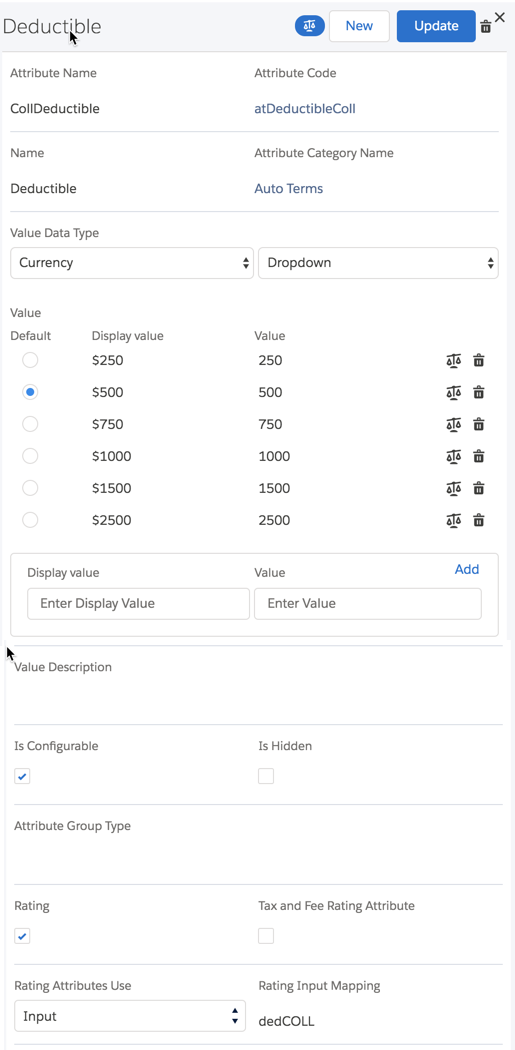
Contains the Comp Deductible power attribute, configured with Currency Dropdown values. |
Medical Payments |
autoMedical |
Contains the Med Pay Person Limit power attribute, configured with Currency Dropdown values. |
Uninsured Motorist |
autoUM |
Contains the UM Limit power attribute, configured as a Picklist Dropdown. |
Rental Car |
autoRental |
Contains the Rental Limit power attribute with a Currency value set to 2000. Contains the Number of Days power attribute with a Number value set to 30. |
Bodily Injury & Property Damage |
autoBIPD |
Contains the BIPD Limit power attribute, set up as a Multivalue Picklist with a list of split-limit values. |
Multi Auto Root Product
The root product spec is the container for the Multi Auto product model. The system uses the data stored in this product model in downstream business processes, including quoting, issuing policies, and adjudicating claims.
The Auto Driver insured party spec is a child of the Vehicle insured item spec, which makes Auto Driver a grandchild of the Multi Auto root product. This hierarchy creates a parent > children > grandchildren product structure. When the Multi Auto product is rated out for quoting and a policy gets issued, multiple drivers can be associated with one vehicle. The driver records are stored only once, despite being associated with multiple vehicles.
The Multi Auto root product contains a number of coverages, all of which are associated with the Vehicle insured item as a parent insured item. This structure makes Multi Auto a multi-instance product model. This means that whenever a quote is rated out for this product, each vehicle in the quote can have its own different levels of coverage.
To learn about how to set up root product specs, see Root Product Specs.
Attributes
All the attributes used in the Auto insurance product and the insured item spec, insured party spec, and coverage specs are defined in the Vlocity Attribute Designer. Attributes are arranged into Attribute Categories.
Want to see a complete list of the attributes used in the Multi Auto product model? Visit the Auto Attribute Catalog.
In the Vlocity Attribute Designer, basic information is defined for all attributes, such as name and attribute code.
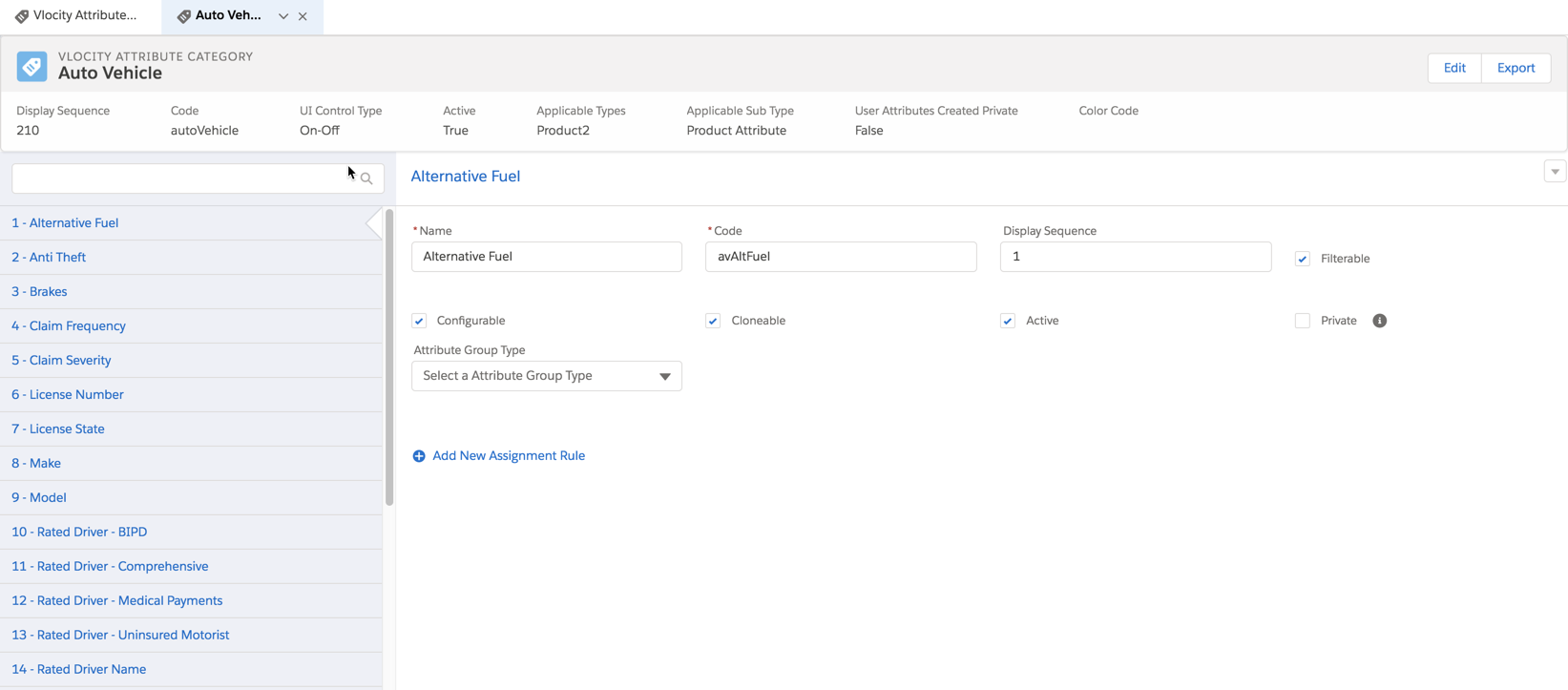
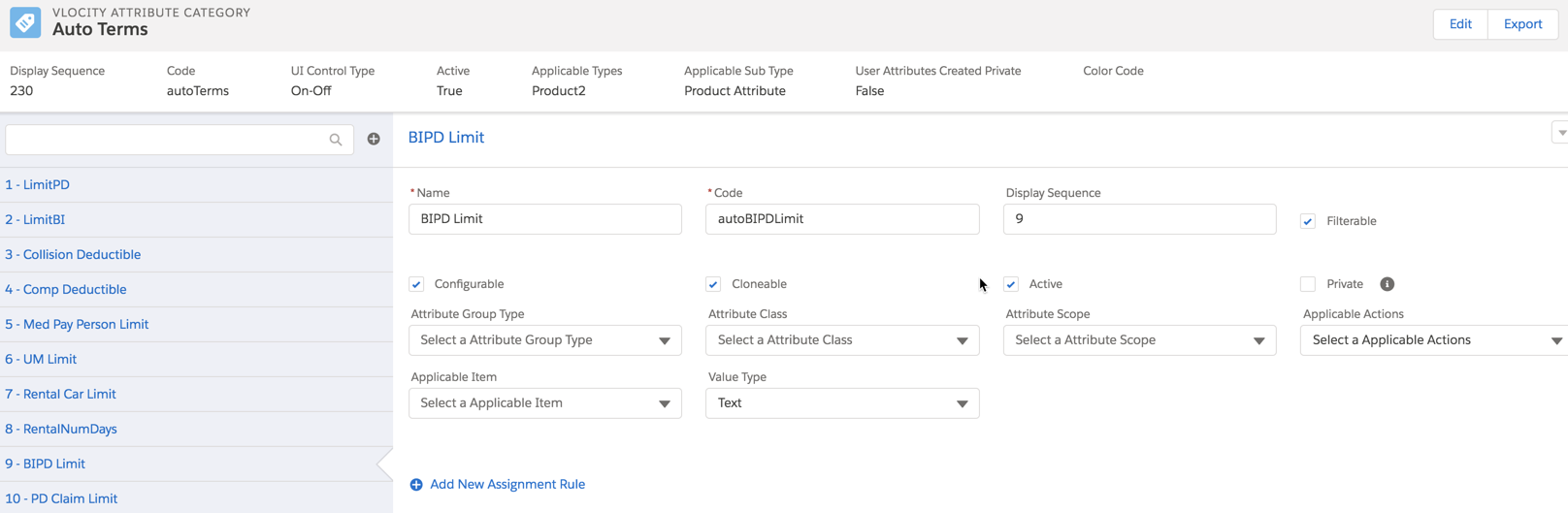
For specific limit and deductible attributes that we use to describe policy terms, more information is defined:
-
Attribute Class
-
Attribute Scope
-
Applicable Actions
-
Applicable Item
-
Value Type
Attributes that have these fields set are called power attributes. Power attributes defined for policy terms so that the claims system can track them.
To learn more about power attributes, including when to use them and how to set them up, see Policy Terms as Power Attributes.
The attribute's Value Data Type, available values, default selected value, rating status, and other specifics are configured on the insured item spec, insured party spec, coverage spec, or root product spec.
For example, this attribute configuration comes from the Comprehensive coverage spec:
A common attribute configuration used in the Auto product is the split limit attribute. This attribute type is used when several policy terms need to be displayed and selected together by customers. But Vlocity needs to access and act on each attribute independently for rating, rules, and claims.
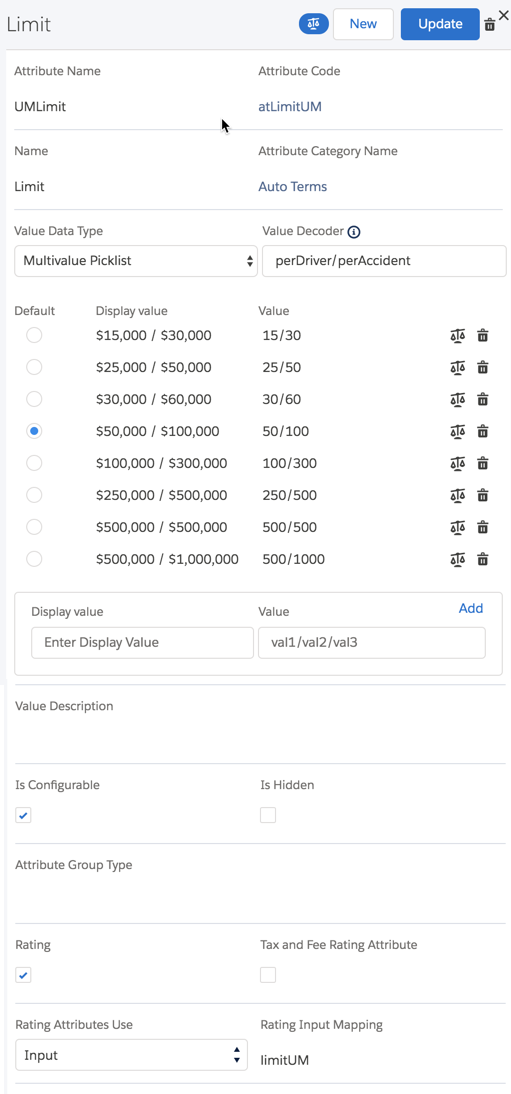
The Uninsured Motorist coverage contains a Limit attribute that's got a split limit.
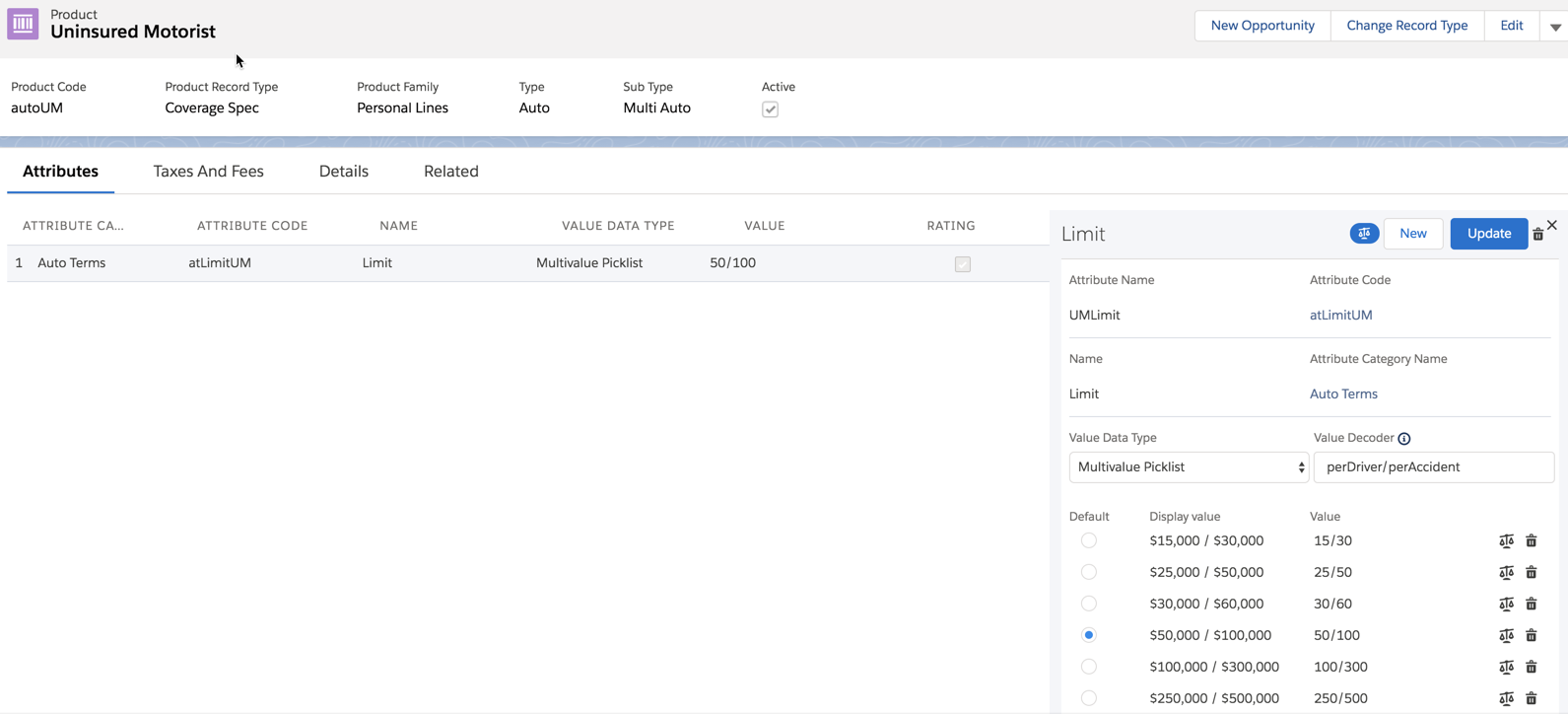
To configure this split limit attribute, we selected Multiselect Picklist for the Value Data Type and created a Value Decoder to help Vlocity work with the split limit attribute values.
Eligibility Rules
The Multi Auto product model does not include any Eligibility Rules. If you want to create eligibility rules for your auto product models, see Create Product Eligibility Rules to learn how.
Workflow (Underwriting) Rules
Multi Auto includes several workflow (underwriting) rules. These get run towards the end of the quoting process by the InsQuoteService:invokeProductRules service. This service is called by an integration procedure in the Auto quote OmniScript and by the Lightning Web Component in the Quote UI.
Workflow (underwriting) rules are created on the insurance root product spec, on the Rules tab.
Here are the workflow rules we created on Multi Auto:
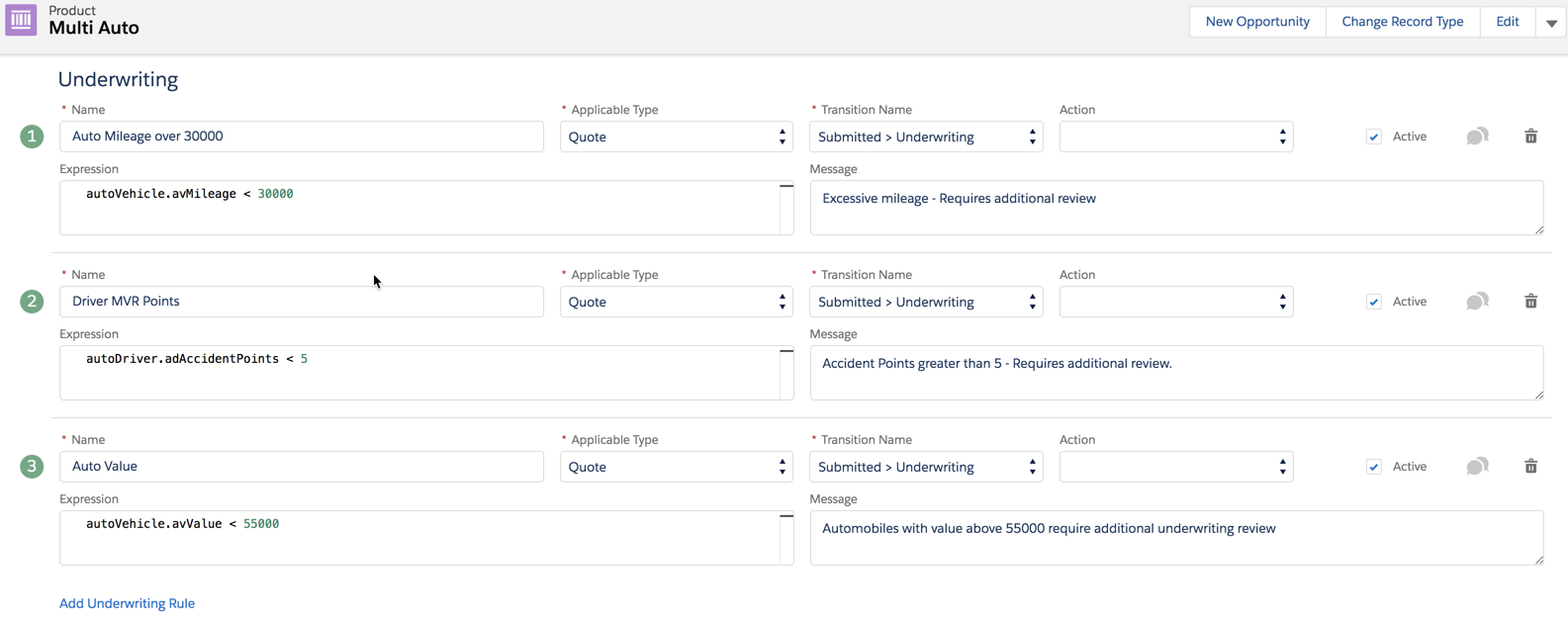
You can modify these, delete those you don't want to use, and/or add your own.
Optional Coverage Rules
The Multi Auto product does not include any optional coverage rules.
To learn how to create your own optional coverage rules, see Optional Coverage Rules.
Attribute Rules
The Multi Auto product includes the following attribute rules:
Attribute with Rule |
Rule Type |
Spec It's On |
Override* |
|---|---|---|---|
Comp Deductible |
Message |
Collision coverage spec |
Yes |
* If an attribute rule has Override = Yes, that means the rule was set on the instance of the child spec that's attached to the Multi Auto root product spec. That means that the instance of the child spec on Multi Auto overrides the child spec.
To learn about how child spec inheritance and overrides work, see Insurance Product Inheritance.
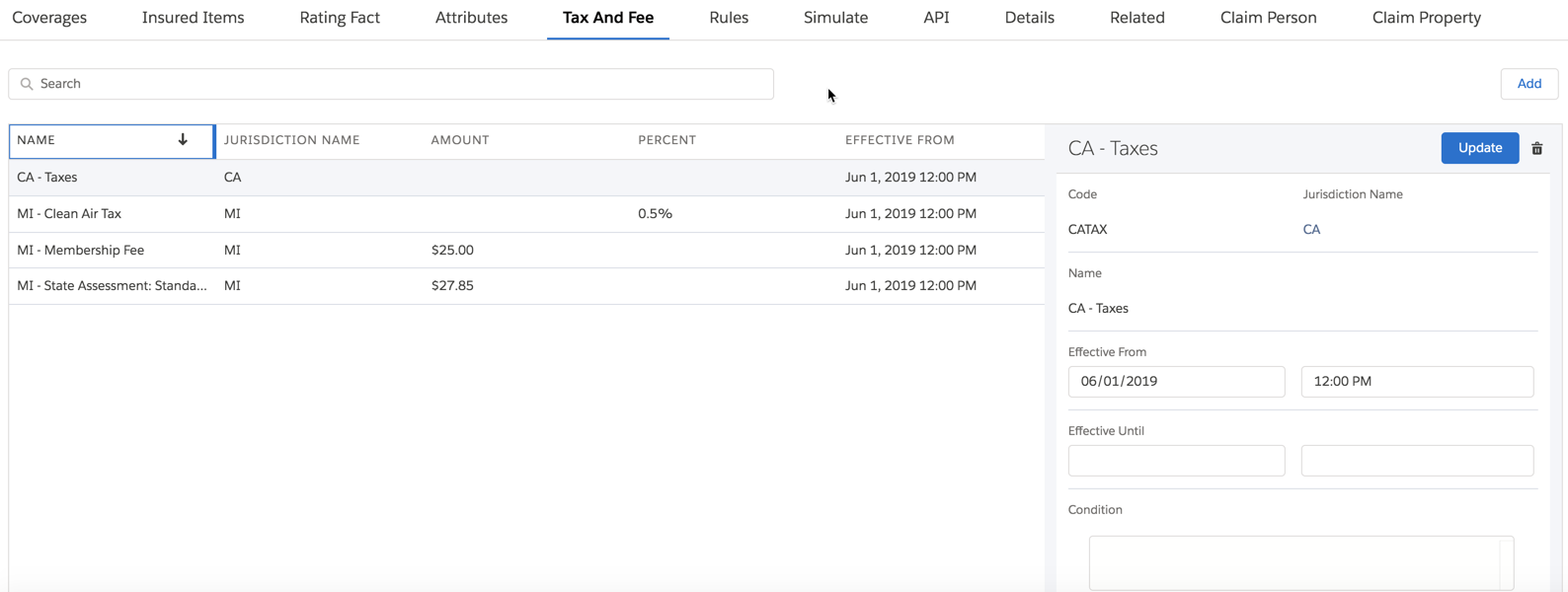
Surcharges
The Multi Auto insurance root product includes several surcharges set up to be calculated when quotes are created and policies are modified.
Simulate Rating the Multi Auto Product
The Simulate tab on the root product spec has the ratings set up to simulate rating the Multi Auto product model. To learn about this setup, see Auto Rating.
