You are here:
Multi Auto Rating
The rating procedure we use is the auto_MultiInstanceRating Integration Procedure. It calculates the coverage prices for the Multi Auto product. Any time a broker or customer service rep generates a quote for a potential customer, the quote business process calls this rating procedure to calculate the price for that quote.
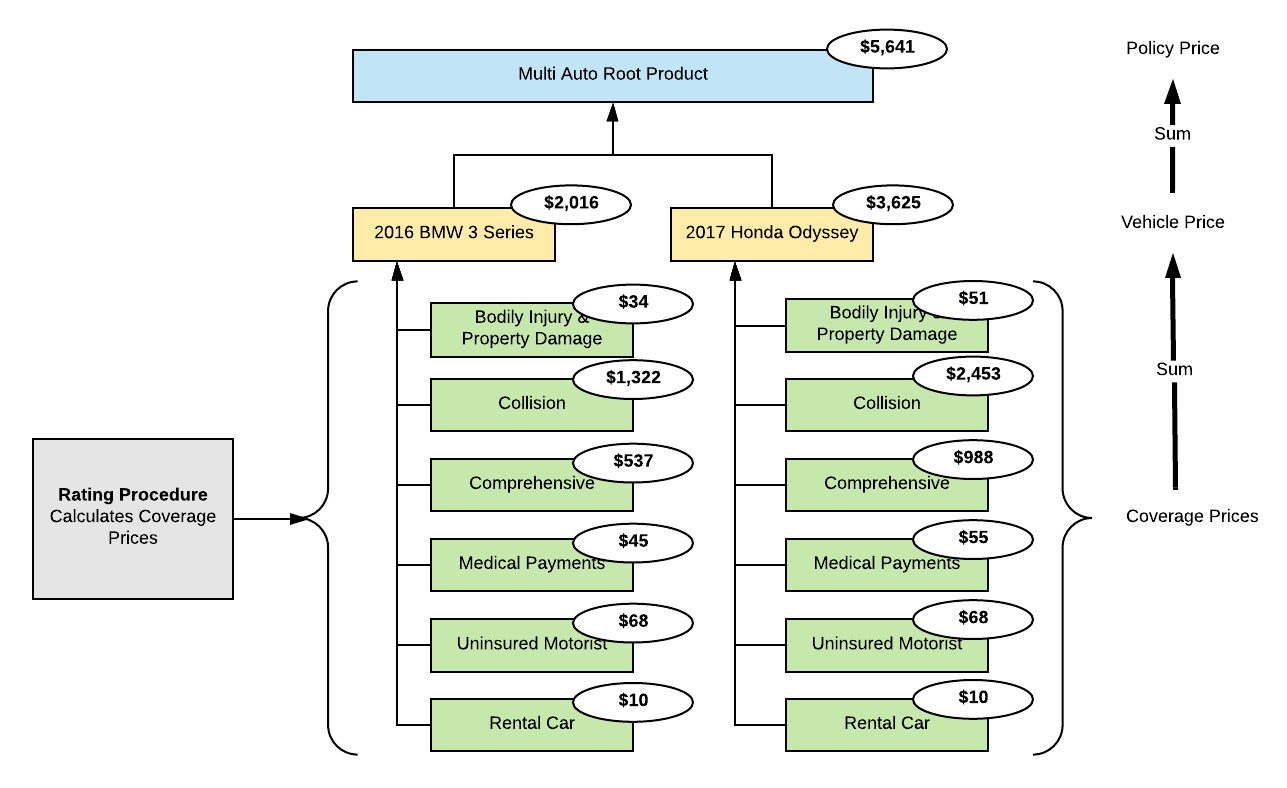
Each insurer defines how they will calculate prices for their insurance products. This rating procedure provides one realistic example for calculating auto insurance product prices. You can use our example as a guide as you decide how to create your own auto insurance rating procedure.
Rating Input
To understand the construction of the rating procedure, you need to understand the form of the input data passed into the procedure. The Multi Auto product includes a Vehicle insured item spec as the primary multi-instance item that auto policies will insure. You can create quotes for multiple vehicles.
For a deep dive into the rating input for the Multi Auto product, see Multi Auto Rating Input.
Rating Procedure
A rating is a risk-based calculation of a premium based on a set of input characteristics. We use rating procedures to price insurance products and health plans. You'll set up, map, and implement rating procedures for all your products and plans.
For details of the Multi Auto rating procedure, see Multi Auto Rating Procedure.
Pricing Formulas
After the rating procedure returns the coverage prices, Vlocity uses the product model pricing formulas to roll up the prices. On the product model, the premium per vehicle is calculated, and the total policy premium is calculated.
Here's what that looks like:

This happens on the Simulate tab of the product model. On the Multi Auto product model's Simulate tab, you'll see the Rating Inputs and Rating Outputs mapped from the rating procedure. To learn how to do this, see Map Ratings to Product Specs
Under the Rating Output section of the Simulate tab, the formula to calculate the per-vehicle premium is in the Vehicle > Total Pricing Formula field. The Vehicle Total Pricing Formula is:
premiumBIPD + premiumCOLL + premiumCCD + premiumMED + premiumUM+premiumRental
The formula total policy premium for this product is in the Multi Auto > Total Pricing Formula field. The Multi Auto Total Pricing Formula is:
SUM(premiumBIPD + premiumCOLL + premiumCCD + premiumMED + premiumUM+premiumRental)
Next Steps
After you've gotten a look at the rating procedure, go to the Multi Auto product model and try simulating the rating procedure that's mapped to the product model.
Then you can go on to the quote flows to see how the Auto Application rates products for quotes.
- Multi Auto Rating Input
To understand the construction of the rating procedure, you need to understand the form of the input data passed into the procedure. The Multi Auto product includes a Vehicle insured item spec as the primary multi-instance item that auto policies will insure. You can create quotes for multiple vehicles. - Multi Auto Rating Procedure
A rating is a risk-based calculation of a premium based on a set of input characteristics. We use rating procedures to price insurance products and health plans. You'll set up, map, and implement rating procedures for all your products and plans.
