You are here:
Set Up Out Of Sequence Endorsement Flows
Configure flows to support Out-of-Sequence Endorsements (OOSE). Create a Modify Policy flow to show impacted policy versions before generating an endorsement quote, and update the Endorse Policy flow so it calls the correct invocable action depending on whether the endorsement is normal or OOSE.
Required Editions
| Available in: Lightning Experience |
| Available in: Enterprise, Unlimited, and Developer Editions of Digital Insurance Platform |
Configure the Modify Policy Flow
Build a flow that shows impacted policies before creating an endorsement quote.
- In Setup, find and select Flows.
- Click New Flow and select Screen Flow.
- Add a Get Records element to fetch the policy from which the endorsement quote will be created (for example, policyV2).
-
Use these conditions to fetch all impacted policies.
field operator value Reference Policy Number Equals policyV2.ReferencePolicyNumber Effective From Date Greater Than or Equal Create Quote > Effective Date isValidDate Equals True 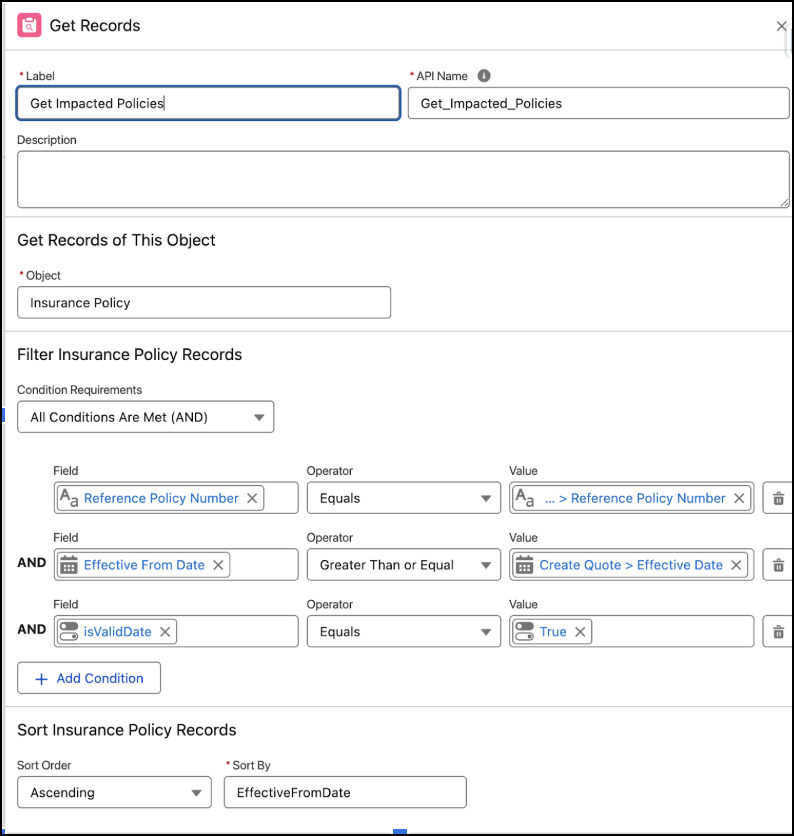
- Add a Screen element with a Data Table component to display the impacted policies.
- Add an Action element to call the createQuote invocable action to create the endorsement quote.
- Save and activate the flow.
Configure the Endorse Policy Flow
Update the endorsement flow so it calls the correct invocable action depending on the type of endorsement.
- In Setup, find and select Flows.
- Create a new flow or edit an existing Endorse Policy flow.
-
Add a Decision element to check whether the endorsement is out-of-sequence.
- Use a custom checkbox field, such as isOOSE, on the quote.
- Update this field when you create the quote.
- If isOOSE = false, call the endorsePolicy invocable action.
-
If isOOSE = true, call the createOOSE IA.
- Fetch the policyId required for OOSE from the sourceInsurancePolicy field.
- Create an Apex-Defined Variable of type OutOfSequencePolicyEndorsementInputRep.
- Create variables to pass required and optional values.
-
Assign the variables to the input rep and pass it to the createOOSE invocable
action.
variable description required contextId Context ID of the endorsement quote. Yes policyId ID of the active policy version. Fetch this from the sourceInsurancePolicy field. Yes effectiveDate Effective date of the endorsement in YYYY-MM-DD format. Ensure the flow validates the format before passing it. Yes insurancePolicy.policyName Custom policy name for the endorsed version. No insurancePolicy.policyNumber Custom policy number for the endorsed version. No transactionRecord.name Custom name for the OOSE transaction record. No fieldSetIds.policyFieldSetId Field set ID for InsurancePolicy. No fieldSetIds.assetFieldSetId Field set ID for InsurancePolicyAsset. No fieldSetIds.coverageFieldSetId Field set ID for InsurancePolicyCoverage. No fieldSetIds.participantFieldSetId Field set ID for InsurancePolicyParticipant. No  Note The Out-of-Sequence Policy Endorsement invocable action accepts the effectiveDate only in YYYY-MM-DD format. Make sure the flow validates and converts the date to this format before passing it.
 - Save and activate the flow.
-
Review the sample request payload for Create Out of Sequence Policy Endorsement invocable
action.
{
  "inputs": [
    {
      "outOfSequencePolicyEndorsementInputRep": {
        "contextId": "0000000i18tq18g00291756887529235fa93a78767224150998f3da85fa50e14",
        "policyId": "0YTZM0000004Cs34AE",
        "effectiveDate": "2025-06-01",
        "insurancePolicy": {
          "policyName": "New OOSE Policy",
          "policyNumber": "New OOSE Policy"
        },
        "transactionRecord": {
          "name": "OOSE transaction"
        },
        "fieldSetIds": {
          "policyFieldSetId": "xxx",
          "assetFieldSetId": "xxx",
          "participantFieldSetId": "xxx",
          "coverageFieldSetId": "xxx"
        }
      }
    }
  ]
}
Did this article solve your issue?
Let us know so we can improve!
