You are here:
Package Installation Flows
Insurance uses managed and unmanaged packages that you install in a certain order. The number of packages you install depends on which features you plan to use.
Basic Package Installation Flow
You install at least three packages to use Insurance.
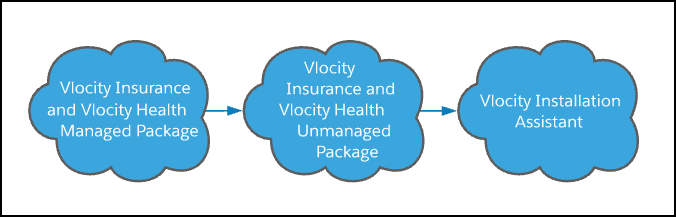
Install the packages in this order:
-
The Insurance and Vlocity Health Managed Package.
-
The Insurance and Vlocity Health Unmanaged Package.
-
The Vlocity Installation Assistant.
Package Installation Flow with the Insurance Industries Extension Packages
To use all of the great features in our Insurance Industries Extension packages, you must have the required licenses.
If you're using Insurance, you must have a Salesforce FSC license, a Policy Administration license, and a Claims Management license.

Install the packages in this order:
-
The Insurance and Vlocity Health Managed Package.
This package contains data model extensions, Apex Insurance services, templates, cards, Lightning components, product modeling components, and rating engine components.
-
The Insurance Industries Extension Managed Package.
This package contains Insurance components for use with Salesforce Financial Services Cloud. Install this package in addition to the standard managed package only if you use Salesforce Financial Services Cloud.
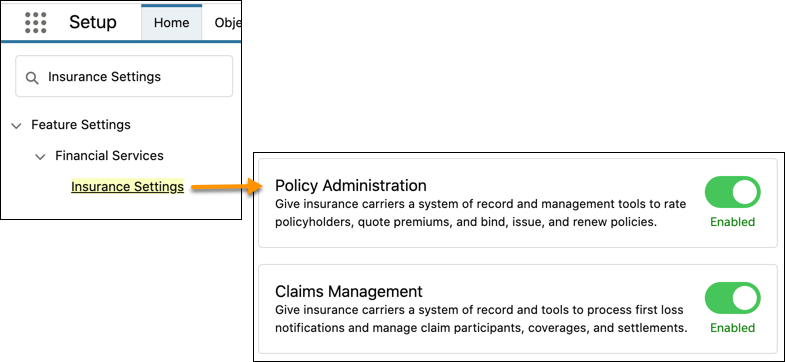
If you have the add-on licenses for Policy Administration and Claims Management, you must enable these features before you install the Insurance Industries Extension Managed Package. From Setup, in the Quick Find box, enter Insurance, and then select Insurance Settings. Enable Policy Administration and Claims Management.
If you use group benefits, see Give Users Access to Group Benefits in the Salesforce Data Model.
-
The Vlocity Insurance and Vlocity Health Unmanaged Package.
This package contains the Lightning record pages for the product modeling and rating UI, as well as UIs for quotes, policies, and other objects. A new version of the unmanaged package is available for select releases.
-
The Insurance FSC Unmanaged Package.
This unmanaged package contains Digital Experience Site templates. To learn about using these templates, see Set Up Your Digital Experience Site.
 Important
If you decide to install the Insurance FSC Unmanaged Package, enable Digital Experience Sites first. See Enable Digital Experiences.
-
The Vlocity Installation Assistant.
This unmanaged package contains the Vlocity Installation Assistant app, which walks you through installation and upgrade tasks. A new version of the Installation Assistant is available for select releases.
- Install Managed Packages for Insurance
Managed packages are the first packages you install in your Insurance install or upgrade process. - Install Unmanaged Packages for Insurance
The Insurance unmanaged package contains custom record pages. The Insurance FSC unmanaged package contains Digital Experience Site templates. - Install the Vlocity Installation Assistant
To make it easier to configure Insurance after installing or upgrading, install the unmanaged package that contains the Installation Assistant.
