You are here:
Policy Terms as Power Attributes
Enforce policy terms such as limits and deductibles by using power attributes. The "power" in power attributes comes from the extra metadata that you can configure for them. Insurance uses this metadata to track attributes as policy terms, from the product model to the policy record, and then on to claims against the policy.
The best way to describe how you can use power attributes to track policy terms through the life of an insurance policy is to show some examples. Let's walk through the configuration of limit and deductible policy terms on an automobile insurance product. Then we can look at sample models of other insurance products.
Power Attributes on the Attribute Designer
To start using power attributes, create limits and deductibles as product attributes in the Vlocity Attribute Designer. Turn these attributes into power attributes by configuring extra metadata for them.
To get all the attributes needed for an auto insurance product, we create a bunch of limit attributes and deductible attributes. Later, we add these attributes to child specs.
Example: You can set up a Collision Deductible attribute that you add directly to the Collision Coverage Spec.
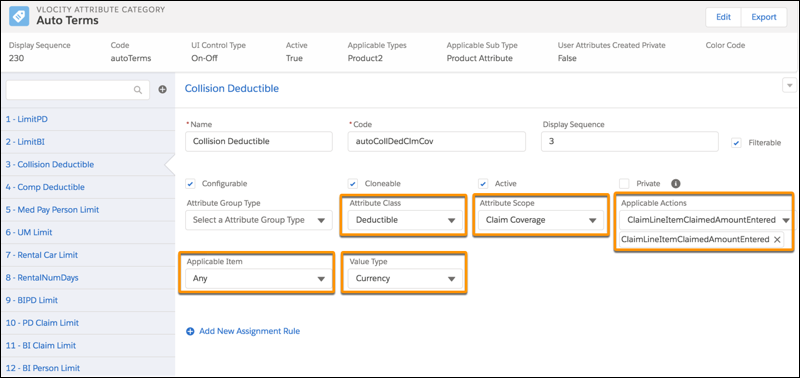
The power attribute metadata that we set up in this example are:
-
Attribute Class
-
Attribute Scope
-
Applicable Actions
-
Applicable Item
-
Value Type
-
Benefit Type
-
Duration Type
To learn more about how to set up power attributes, see Product Attributes in Product Specs.
Split Limit Attribute Configuration on Child Specs
Split limit attributes are a flexible configuration option commonly used on auto insurance products. When you split a limit, you separate it into component parts, such as a bodily injury limit per person, a bodily injury limit per claim, and a property damage limit per claim.
For example, this Auto Bodily Injury Property Damage (BIPD) limit is a split limit attribute. It isn’t a power attribute. It's a regular attribute that doesn't have any power attribute metadata defined.
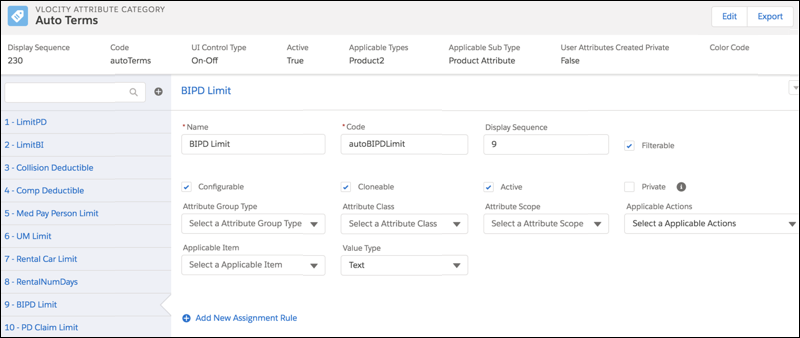
But at the coverage spec level, the Auto BIPD attribute has a split limit and is composed of three power attribute subcomponents:
-
Bodily Injury (BI) Person Limit (Code=autoBILimClmCov)
In this power attribute subcomponent, Attribute Scope = Claim Coverage.
-
Bodily Injury (BI) Claim Limit (Code=autoBILimClm)
In this power attribute subcomponent, Attribute Scope = Claim, which distinguishes it from the BI Person Limit power attribute subcomponent.
-
Property Damage (PD) Claim Limit (Code=autoPDLimClm)
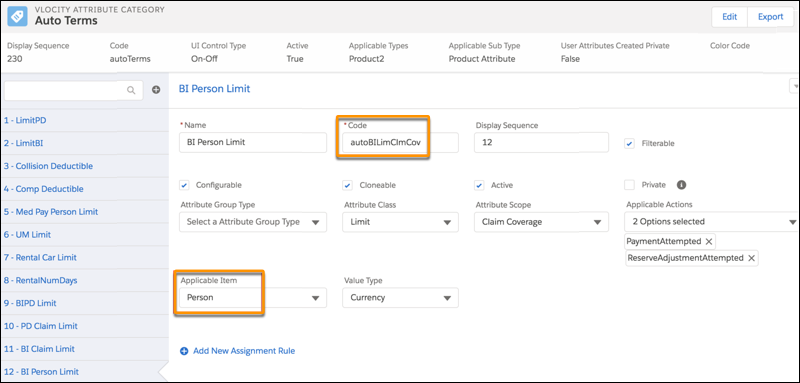
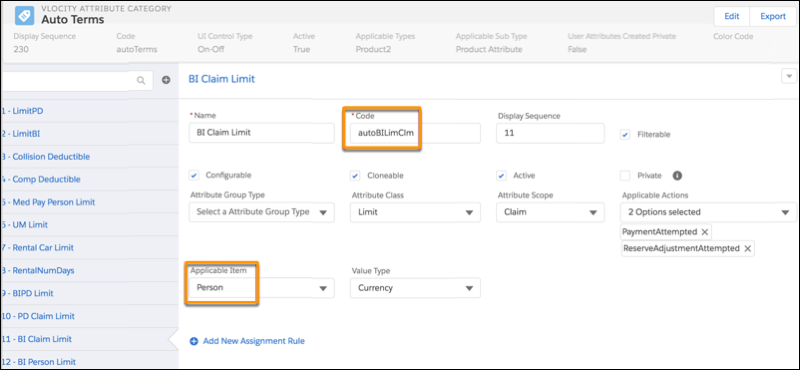
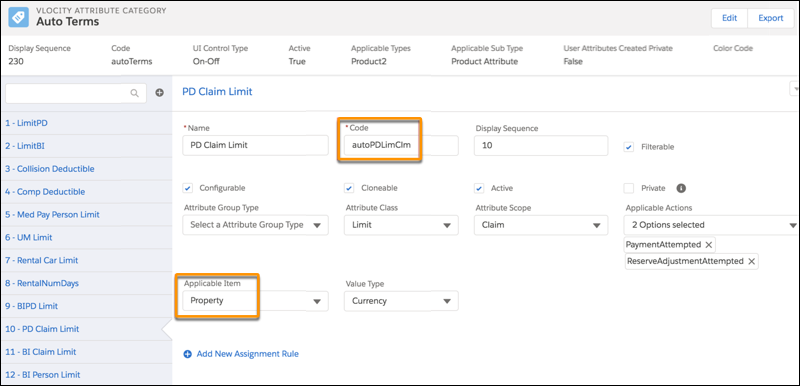
Each power attribute subcomponent has all the power attribute metadata defined.
Use Applicable Item to specify whether a power attribute subcomponent applies to a Person or Property.
Take note of the Codes for the subcomponents (autoBILimClmCov, autoBILimClm, and autoPDLimClm). These three power attribute subcomponents make up the larger Auto Bodily Injury Property Damage (BIPD) split limit attribute. We reference the Codes when we associate the split limit attribute to the Bodily Injury & Property Damage coverage spec later.
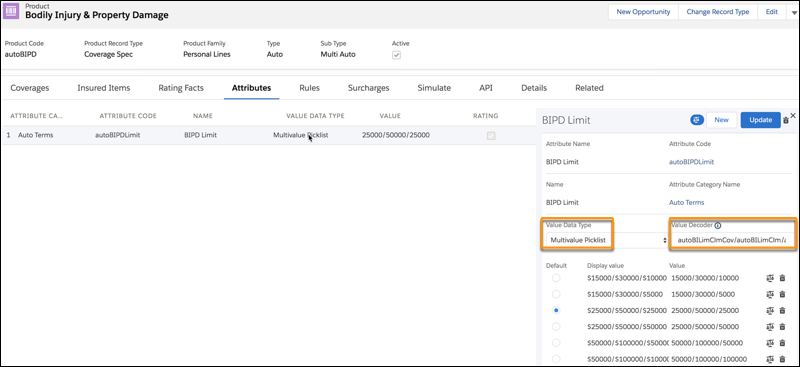
We configure the split limit attribute directly on the Bodily Injury & Property Damage coverage spec. To create the power attribute subcomponents of the split limit attribute:
-
We add the Auto BIPD attribute to the coverage spec.
-
When configuring the attribute, in Value Data Type, we select Multivalue Picklist. That's the only setting that can accept split limit values.
-
In Value Decoder, we enter Code values for power attribute subcomponents that make up the Auto BIPD attribute. We include the slash (/) separator character between the values, in the same way that we format split limit values:
-
We enter the list of split limit values to make available to users when they buy insurance products.

You can configure limits for bodily injury and property damage in various ways. For example, to enforce a combined single limit, you can configure it as a Claim scope directly on the Bodily Injury & Property Damage coverage spec as described in Policy Terms as Power Attributes.
Policy Terms on Quotes and Policies
Your power attribute configuration pays off when quotes and policies reflect exactly the right options and terms. The coverages, limits, and deductibles available on quotes and policies come directly from your power attributes and split limit attributes.
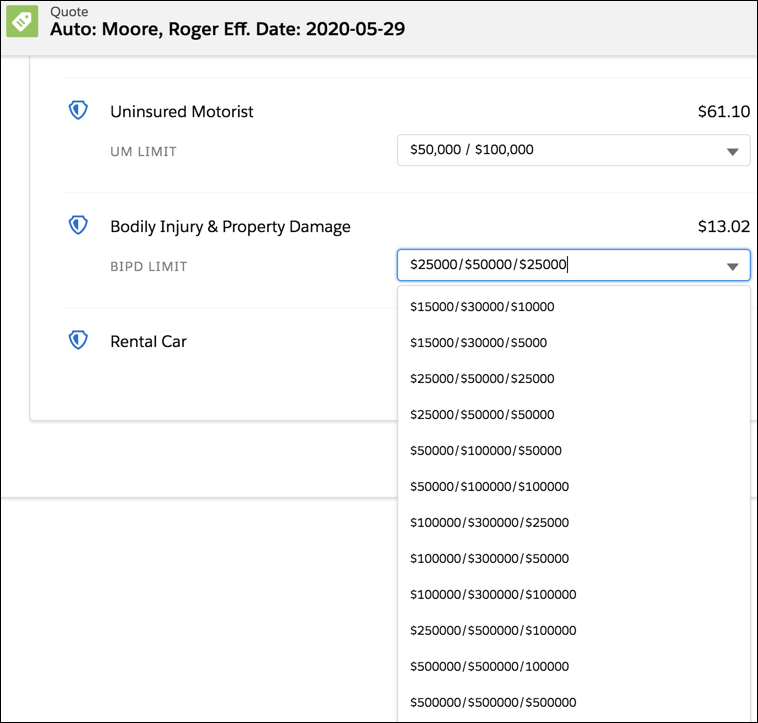
On this quote, the customer can choose from the split limit values in the Bodily Injury & Property Damage attribute that you set up.
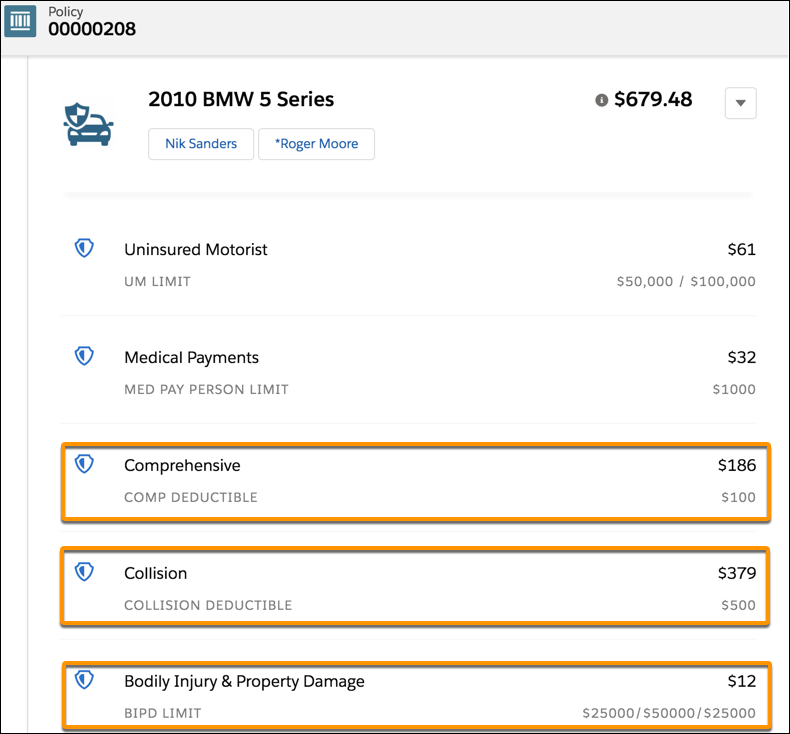
When the customer buys the policy, the power attributes and split limit attributes appear on the policy record. On this policy record, you can see the Bodily Injury & Property Damage split limit attribute. The Comprehensive and Collision deductibles that you see here are also power attributes.
Policy Terms Standing
When a customer files a claim against a policy and starts using policy terms, power attributes work together with services behind the scenes. They make it possible for claim team members to track how much of the policyholder’s deductible or limit is consumed.
Insurance starts to show policy terms standings as soon as:
-
A customer creates a claim for power attributes that are configured on the root product.
-
A customer creates a claim coverage for power attributes that are configured on coverage specs.
The policy terms start to get tracked as pending or used as reserves are set and payment details are entered and paid.The Policy Terms Standing panel calls the InsPolicyTermsService: getCurrentStandings service. This service gets the latest data for applicable policy terms across policy versions within the configured duration of the power attribute, for example the policy term or calendar year. The extra metadata set up for power attributes lets these services track in real time the accumulation of any policy terms that are used on claims.
Claim View
The Policy Terms Standing on a claim record page shows all the policy terms (for example, limits and deductibles) on the root policy level to which the claim is associated. Additionally, the policy terms on the policy coverage level are shown for any claim coverage that is open on the claim. This view doesn’t support additional grouping of policy terms.
Use the Vlocity Policy Terms Standing LWC to configure policy terms standings on the Insurance Claim record page
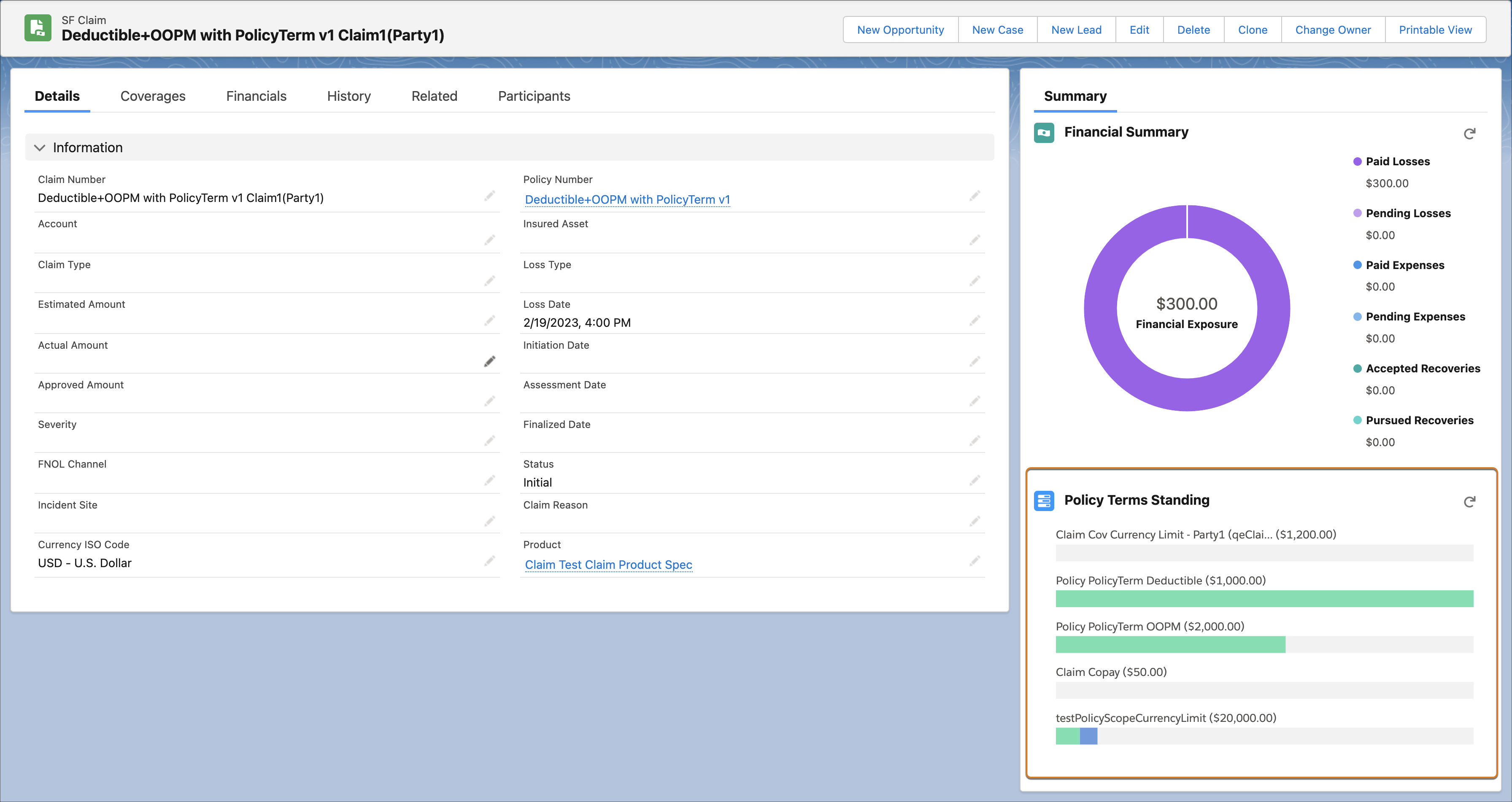
Policy View
The Policy Terms Standing on a policy record page shows all the policy terms (for example, limits and deductibles) on the root policy. After you select an insured policy participant or policy asset from the Insured dropdown, the remaining policy coverage level terms are grouped by and sorted by policy coverage.
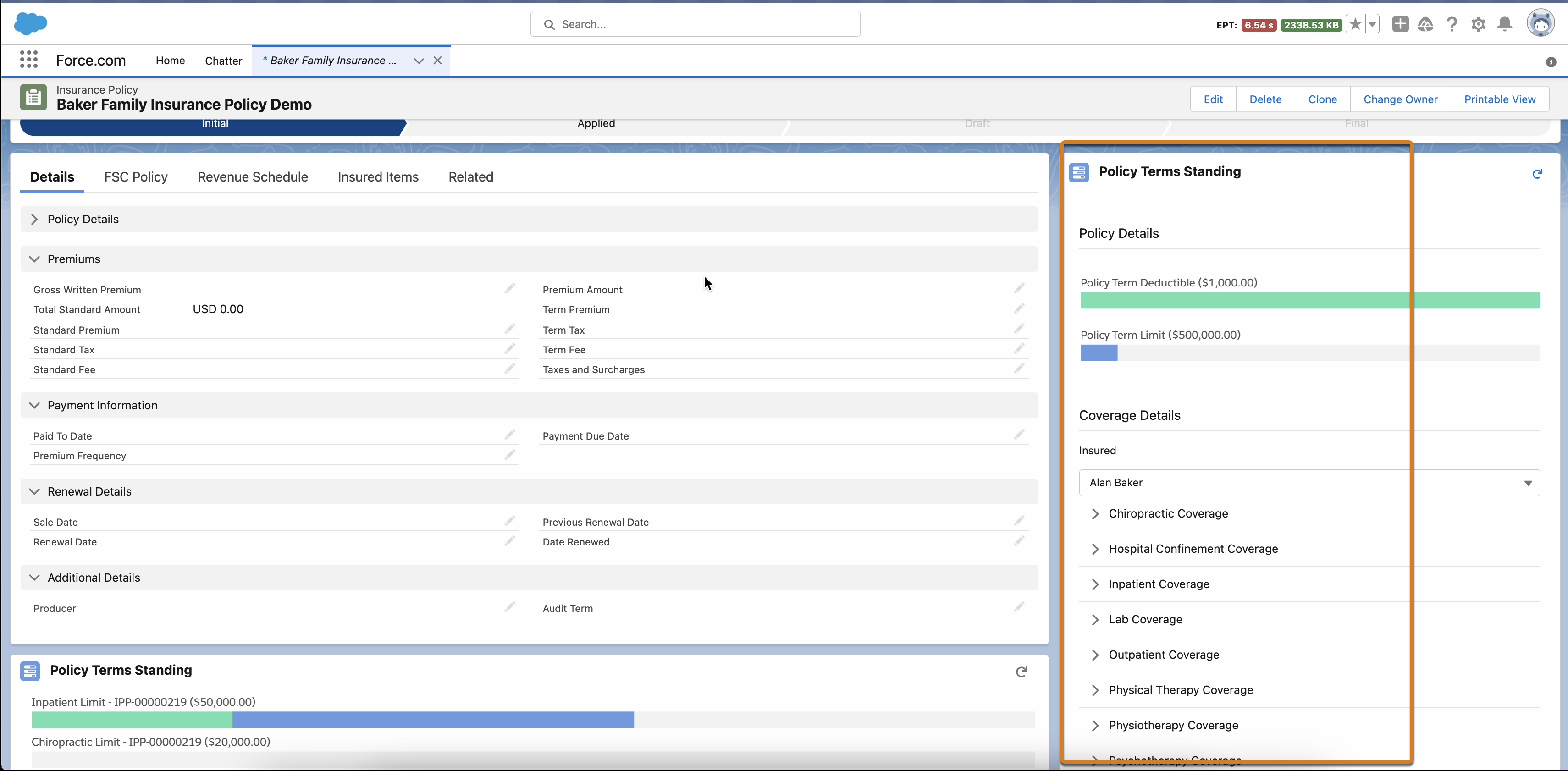
Policy Details: Displays terms standing at the policy level and policy coverage level without any participantId or assetId.
Coverage Details: Displays the list of participants or assets associated with the selected policy and retrieves the current standings for the selected insuredId at the coverage level. Expand a coverage to show the term standings associated with it.
To learn how administrators can configure the policy terms standing on an insurance policy record page, see Configure the Policy Terms Standing.
Policy Example: Policy Terms Tracked Across Policy Versions
Consider the mid-term adjustments and payments that commonly occur throughout the life of a policy, and how the accumulation of policy terms applies across policy versions.
Sample Event Timeline |
Policy Terms Standing |
|||
Policy Version |
Limit |
Accumulation | Limit Remaining | |
1. Policy creation |
Version 1 |
$2,000 |
$500 |
$1,500 |
2. Mid-term adjustment |
Version 1 |
$2,000 |
$500 |
$1,500 |
Version 2 |
$2,000 |
$500 |
$1,500 |
|
3. Payment of $1,000 |
Version 1 |
$2,000 |
$1,500 |
$500 |
Version 2 |
$2,000 |
$1,500 |
$500 |
|
4. Mid-term adjustment increases limit |
Version 1 |
$2,000 |
$1,500 |
$500 |
Version 2 |
$2,000 |
$1,500 |
$500 |
|
Version 3 |
$2,500 |
$1,500 |
$1,000 |
|
-
Policy creation
Policy Version 1 is created and accumulates $500 against a $2,000 limit. This leaves $1,500 of the limit remaining.
-
Mid-term adjustment
A mid-term adjustment results in the creation of Policy Version 2. The $500 already accumulated against the limit is reflected in Policy Terms Standing for Version 2, and $1,500 of the limit still remains on both Version 1 and Version 2.
-
Payment of $1,000
Financial activity that affects Version 1 also affects Version 2, and vice versa. For example, a $1,000 payment on Version 2 results in a $1,500 accumulation against the $2,000 limit in both Version 1 and Version 2. This leaves $500 of the limit remaining on both versions.
-
Mid-term adjustment increases limit
A mid-term adjustment changes the limit to $2,500 and results in the creation of Policy Version 3. The $1,500 already accumulated against the limit is reflected in Policy Terms Standing for Versions 1, 2, and 3. Versions 1 and 2 show $500 of the limit remaining, and Version 3 shows $1,000 of the limit remaining.
Financial activity that affects one version also affects the other versions. For example, activity that affects Version 3 also affects Versions 1 and 2, and activity that affects Version 2 also affects Versions 1 and 3. If a user attempts to make a $600 payment on Version 1 or Version 2, it exceeds the $500 limit remaining. But a $600 payment on Version 3 falls within the $1,000 limit remaining.
Note To track term standings across mid-term adjustment policy versions, ensure that the Insurance Policy Participant record is created with Account or Contact. Either of the field must be populated on the Insurance Policy Participant record.
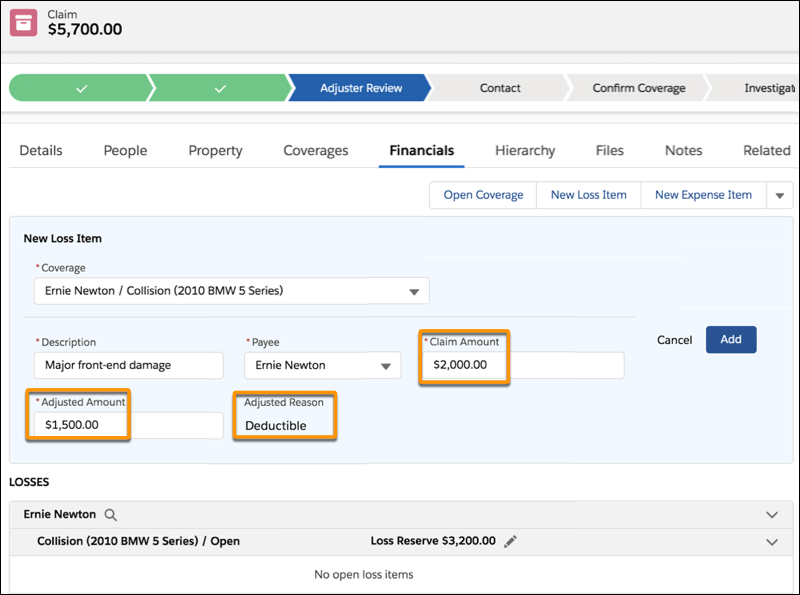
In this example of applying a deductible to a loss payment detail, a user enters a Claim Amount value of $2,000 for a Collision Coverage. The system:
-
Finds the deductible that applies to this loss ($500).
The system calculates that a $500 deductible applies because the Deductible power attribute is configured with Applicable Action equal to ClaimLineItemAmountEntered.
-
Calculates the adjustment to the claim amount ($2,000-$500).
-
Enters the Adjustment Amount ($1,500) and the Adjustment Reason (Deductible).
-
Tracks the consumption of the policy term, which is reflected in the Policy Terms Standing panel.
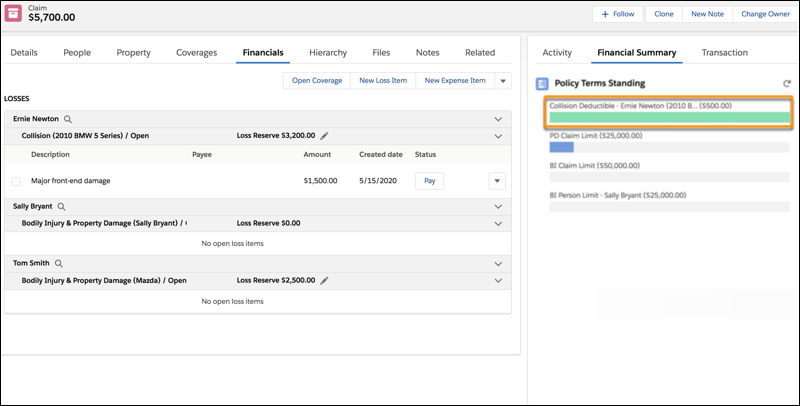
In the Policy Terms Standing panel, the green bar under Collision Deductible - Ernie Newton (2010 BMW) - ($500) shows that the full $500 deductible has been consumed. The Collision Deductible - Ernie Newton (2010 BMW) - ($500) label is constructed by stringing together attribute override name + claimant + involved item.
Next, we make a payment for the injury to Sally Bryant. This process is handled by the Bodily Injury & Property Damage coverage spec. Here we use the split limit attribute that we previously configured on this coverage spec. Because this payment is for an injury to Sally Bryant, the power attributes that apply are the ones with Applicable Item equal to Person.
When the payment is made (that is, when the Pay button is clicked), the consumption of these policy terms is tracked:
-
BI Person Limit, which applies per claim coverage.
-
BI Claim Limit, which applies per claim.
These limits are reflected in the Policy Terms Standing panel.
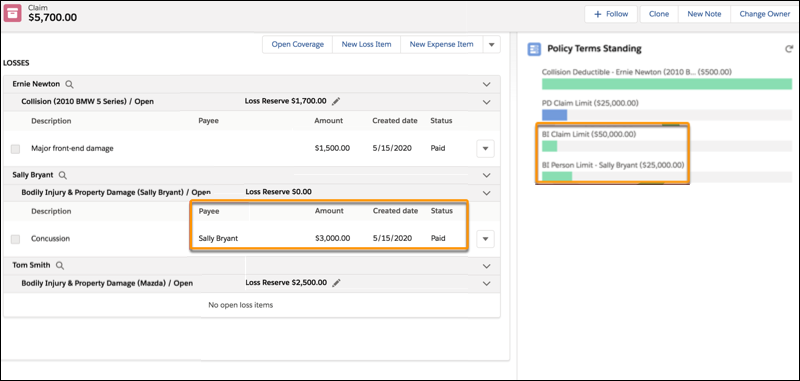
Dark blue bars indicate pending financials, which are loss reserve amount or payment details that haven't been paid yet, whichever is greater.
Green bars indicate amounts that have been consumed.
Product Example: Per Claim Occurrence (Auto)
To understand the variety of ways you can configure an insurance product, consider some valid combinations of product, class, and scope. Let's look at an example of another auto insurance product.
To illustrate the concept of underlying power attribute structures, this example shows a Bodily Injury & Property Damage coverage spec with a combined single limit for all payments to third parties. A combined single limit applies regardless of whether a payment is for injuries or property damage. This type of limit differs from the split limit attribute scenario described in Policy Terms as Power Attributes. In that scenario, separate injury and property damage subcomponents of a Bodily Injury & Property Damage coverage spec each have their own limits.
For a split limit attribute, the Applicable Item setting is used to specify whether an attribute applies to either a Person (for Bodily Injury) or Property (for Property Damage). For a combined single limit, the limit doesn't need to be split into subcomponents to handle the claim, so we use the Applicable Item value of Any.
To learn more about the Applicable Actions setting that's mentioned in all these examples, see Product Attributes in Product Specs.
Auto Root Product |
|||||
|---|---|---|---|---|---|
Power Attribute |
Attribute Class |
Applicable Actions |
|||
None |
— |
— |
— |
— |
|
Collision Coverage Spec |
|||||
|---|---|---|---|---|---|
Power Attribute |
Attribute Class |
Applicable Actions |
|||
Deductible applied every time a Collision coverage is opened on a claim |
Deductible |
Claim Coverage |
ClaimLineItemAmountEntered |
Any |
|
Comprehensive Coverage Spec |
|||||
|---|---|---|---|---|---|
Power Attribute |
Attribute Class |
Applicable Actions |
|||
Deductible applied every time a Comprehensive coverage is opened on a claim |
Deductible |
Claim Coverage |
ClaimLineItemAmountEntered |
Any |
|
Bodily Injury & Property Damage Coverage Spec |
|||||
|---|---|---|---|---|---|
Power Attribute |
Attribute Class |
Applicable Actions |
|||
Combined single limit for all payments to third parties, regardless of whether a payment is for injuries or property damage |
Limit - Currency |
Claim |
PaymentAttempted |
Any |
|
Product Example: Per Claim Occurrence (Property)
This example shows one way to configure power attributes for a property product. Remember, it's one of many possible design options.
Property Root Product |
|||||
|---|---|---|---|---|---|
Power Attribute |
Attribute Class |
Applicable Actions |
|||
Claim deductible for a property claim regardless of which coverages are being claimed |
Deductible |
Claim |
ClaimLineItemAmountEntered |
Any |
|
Dwelling Coverage Spec |
|||||
|---|---|---|---|---|---|
Power Attribute |
Attribute Class |
Applicable Actions |
|||
Claim limit for Dwelling Coverage |
Limit - Currency |
Claim Coverage |
PaymentAttempted |
Any |
|
Contents Coverage Spec |
||||||
|---|---|---|---|---|---|---|
Power Attribute |
Attribute Class |
Applicable Actions |
Benefit Type |
|||
Claim limit for Contents Coverage |
Limit - Currency |
Claim Coverage |
PaymentAttempted |
Any |
— |
|
Claim sublimit for Guns* |
Limit - Currency |
Claim Coverage |
PaymentAttempted |
Any |
Guns |
|
Claim sublimit for Furs* |
Limit - Currency |
Claim Coverage |
PaymentAttempted |
Any |
Furs |
|
Claim sublimit for Jewelry* |
Limit - Currency |
Claim Coverage |
PaymentAttempted |
Any |
Jewelry |
|
* Payment towards a sublimit also accumulates towards the parent Contents Coverage. |
||||||
Other Structures Coverage Spec |
|||||
|---|---|---|---|---|---|
Power Attribute |
Attribute Class |
Applicable Actions |
|||
Claim limit for Other Structures |
Limit - Currency |
Claim Coverage |
PaymentAttempted |
Any |
|
Product Example: Policy Accumulation (Example 1)
So far, we’ve looked at examples of policy structures with per claim occurrences that are typical of auto and property products that cover unexpected and (hopefully) infrequent losses. These next examples involve policy structures that anticipate a certain claim volume during the policy lifecycle. We analyze a couple of different ways to configure power attributes for this scenario.
In this example, we centralize insured obligation concepts at the root product level, which means that they apply to all coverages. We also enforce limits at the coverage level.
-
We have a policy-level deductible that must be met before insurance pays any claims. After the policy deductible has been met, a copay must be paid on every claim, up until the insured has reached an out-of-pocket maximum. After the out-of-pocket maximum is met, the policyholder doesn’t owe any more money on claims for the duration of the term.
-
We have currency and count limits on different coverage specs.
With policy accumulation terms, the concept of duration applies. A Policy Term Duration Type means that utilization accumulates from the effective date to the expiration date of the insurance policy. You can use Calendar Year instead to have utilization accumulate from January 1 through December 31, and reset each January 1. To learn more about the Duration Type setting, see Product Attributes in Product Specs.
Here are some guidelines for valid combinations of Attribute Class and Applicable Actions:
-
Deductible, Copay, Coinsurance, and Out of Pocket Max attribute classes always use the ClaimLineItemClaimedAmountEntered applicable action because you're trying to determine how much of that insured obligation amount to apply when entering a claimed amount. You can also use Limit - Currency with the ClaimLineItemClaimedAmountEntered applicable action if you want to set Adjusted Amount to the value of the limit when entering a claimed amount.
-
Limit - Currency, Limit - Claim Line Item Unit Count, and Limit - Scope Count attribute classes use the PaymentAttempted applicable action, but can also use ReserveAdjustmentAttempted to enforce limit-checking on Reserves.
Pet/Medical/Accident/Critical Illness Root Product |
||||||
|---|---|---|---|---|---|---|
Power Attribute |
Attribute Class |
Applicable Actions |
Duration Type |
|||
Policy deductible that must be met before insurance will pay |
Deductible |
Policy |
ClaimLineItemAmountEntered |
Any |
Policy Term |
|
Per claim copay that must be met up until the insured reaches the out of pocket maximum |
Copay |
Claim |
ClaimLineItemAmountEntered |
Any |
— |
|
Out of pocket maximum that must be met before the copay no longer applies to the insured for the duration of the policy |
Out of Pocket Max |
Policy |
ClaimLineItemAmountEntered |
Any |
Policy Term |
|
Inpatient Coverage Spec |
||||||
|---|---|---|---|---|---|---|
Power Attribute |
Attribute Class |
Applicable Actions |
Duration Type |
|||
Policy limit for Inpatient Coverage accumulated across all Claims for the duration of the policy |
Limit - Currency |
Policy Coverage |
PaymentAttempted |
Any |
Policy Term |
|
Outpatient Coverage Spec |
||||||
|---|---|---|---|---|---|---|
Power Attribute |
Attribute Class |
Applicable Actions |
Duration Type |
|||
Policy limit for Outpatient Coverage accumulated across all Claims for the duration of the policy |
Limit - Currency |
Policy Coverage |
PaymentAttempted |
Any |
Policy Term |
|
Lab Coverage Spec |
||||||
|---|---|---|---|---|---|---|
Power Attribute |
Attribute Class |
Applicable Actions |
Duration Type |
|||
Policy limit for number of Lab Procedures that can be claimed across all Claims for the duration of the policy |
Limit - Claim Line Item Unit Count |
Policy Coverage |
PaymentAttempted |
Any |
Policy Term |
|
Product Example: Policy Accumulation (Example 2)
In this example of policy accumulation terms, we decentralize insured obligation concepts down to the coverage level. This means that each coverage has its own insured obligation construct such as a copay on one coverage spec and coinsurance on a different coverage spec. We also enforce limits at the coverage level and add the concept of subcoverage limits by using Benefit Types.
Pet/Medical/Accident/Critical Illness Root Product |
||||||
|---|---|---|---|---|---|---|
Power Attribute |
Attribute Class |
Applicable Actions |
Duration Type |
|||
Policy deductible that must be met before insurance will pay |
Deductible |
Policy |
ClaimLineItemAmountEntered |
Any |
Policy Term |
|
Inpatient Coverage Spec |
||||||
|---|---|---|---|---|---|---|
Power Attribute |
Attribute Class |
Applicable Actions |
Duration Type |
|||
Policy limit for Inpatient Coverage accumulated across all Claims for the duration of the policy |
Limit - Currency |
Policy Coverage |
PaymentAttempted |
Any |
Policy Term |
|
Copay for every Inpatient Claim Coverage opened on a claim |
Copay |
Claim Coverage |
ClaimLineItemAmountEntered |
Any |
— |
|
Outpatient Coverage Spec |
||||||
|---|---|---|---|---|---|---|
Power Attribute |
Attribute Class |
Applicable Actions |
Duration Type |
|||
Policy limit for Outpatient Coverage accumulated across all Claims for the duration of the policy |
Limit - Currency |
Policy Coverage |
PaymentAttempted |
Any |
Policy Term |
|
Coinsurance for every Outpatient Claim Coverage opened on a claim |
Coinsurance |
Claim Coverage |
ClaimLineItemAmountEntered |
Any |
— |
|
Lab Coverage Spec |
|||||||
|---|---|---|---|---|---|---|---|
Power Attribute |
Attribute Class |
Applicable Actions |
Benefit Type |
Duration Type |
|||
Policy limit for Lab Coverage accumulated across all claims for the duration of the policy |
Limit - Currency |
Policy Coverage |
PaymentAttempted |
Any |
— |
Policy Term |
|
Limit on the number of times a specific lab procedure can be claimed for the duration of the policy |
Limit - Claim Line Item Unit Count |
Policy Coverage |
PaymentAttempted |
Any |
Procedure 1 |
Policy Term |
|
Limit on the number of times a specific lab procedure can be claimed for the duration of the policy |
Limit - Claim Line Item Unit Count |
Policy Coverage |
PaymentAttempted |
Any |
Procedure 2 |
Policy Term |
|
- Configure the Policy Terms Standing
Configure the Policy Terms Standing card for the Insurance Policy Record page to view the filtered policy terms data based on Insurance Policy Participant and group the data based on policy coverage level.
