You are here:
Process Dynamic Rich Text During Client-Side Document Generation
Using rich text tokens in a Microsoft Word document template, you can now insert rich text content in generated .docx and .pdf files. With dynamic rich text tokens, you can display the product details as a block of information with its original formatting in your generated document. The rich text token format is {{RTB_<richtexttokenname>}}, for example, {{RTB_Header}}.
Why: Rich text tokens can be placed anywhere within a document template, such as in a paragraph, table, text box, header, or footer. Text Area (Rich) field allows you to format text using different fonts, colors, ordered and unordered lists, and hyperlinks. Rich text tokens must be placed in a new line.
-
Document Generation Font Source is a new custom contract type setting. It specifies the source of the font used for rendering values during document generation. Enter Rich Text Editor Font or Document Font. Document Generation Font Source field is applicable only for Contract Lifecycle Management in Salesforce Industries.
-
Document Generation Font Source is a new input parameter setting in the generations options page for LWC OmniScripts such as single-DocxLwc, multiDocxLwc, and singleDocxLwcGuestUser. It specifies the source of the font used for rendering values during document generation. Values include Rich Text Editor Font and Document Font. The default value is Rich Text Editor Font. This parameter is applicable for OmniStudio Foundation Document Generation and Contract Lifecycle Management in Salesforce Industries.
 Note
NoteIf the document font is selected, during document generation, the application overwrites the fonts used in the Rich text field and takes the token font from the document template.
Where: This feature is available to all customers (new and existing) who upgrade to Summer '22.
Who: To design document templates, users need DocGen Designer or Contract Admin permissions. To generate documents, runtime permissions are needed.
How: To insert rich text into a generated document, first create custom Text Area (Rich) fields in your object (standard or custom). Add rich text content in the custom fields and format the data. Add rich text tokens in the document template, provide data mapping in the Omnistudio Data Mappers (Extract and Transform), and then generate the document with dynamic rich text.
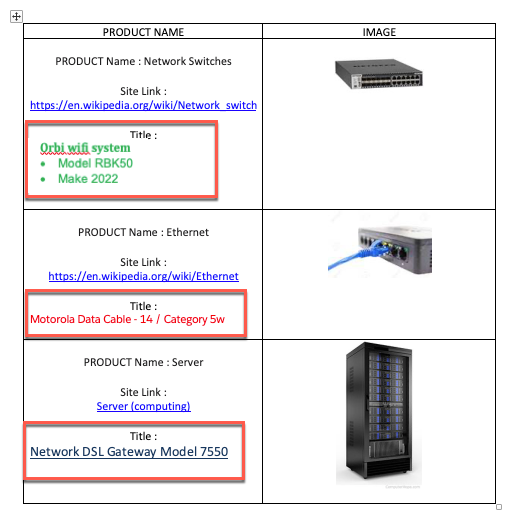
The image shows an example of a Word document with a list of products, their names, and their images. For each product, a rich-text list is inserted that describes the product details, such as model and make.