You are here:
Product JSON Structure Model
The product JSON object provides a portable product data object for runtime use between services and templates.
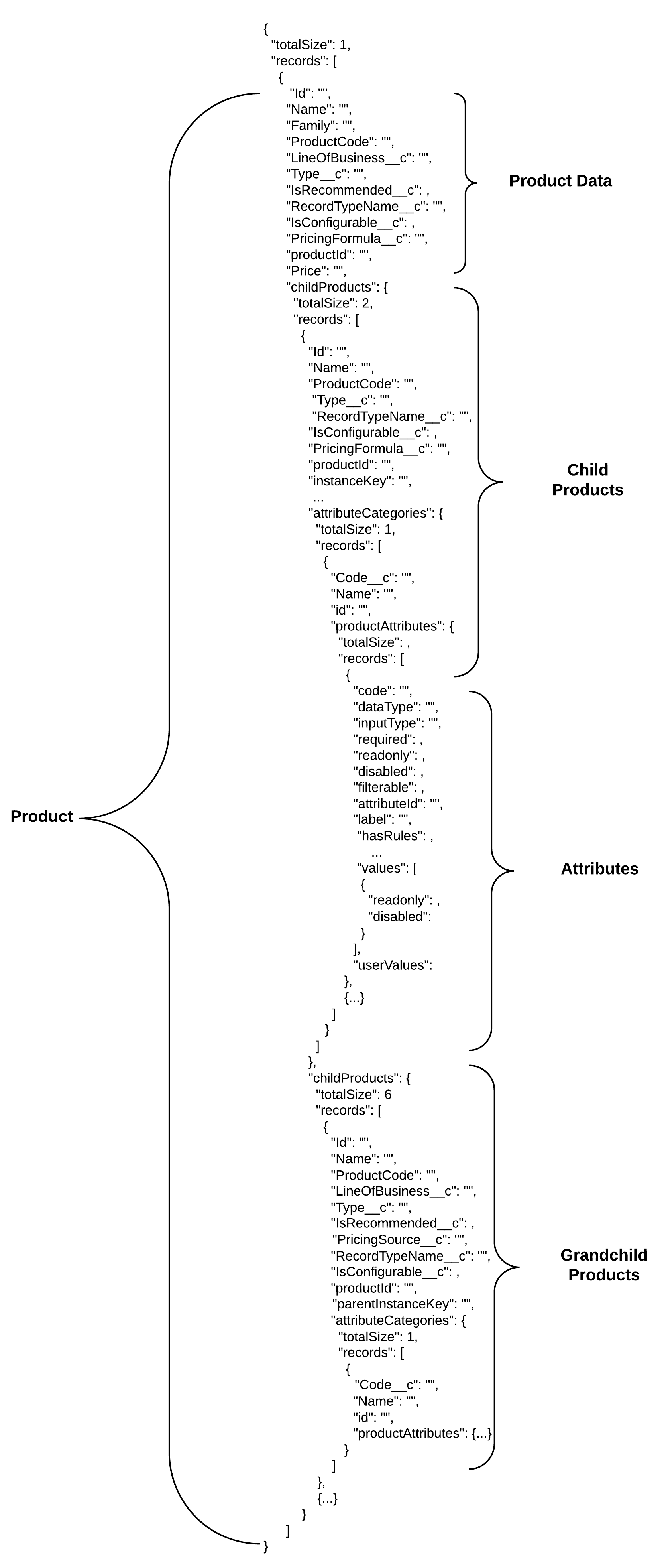
Many Vlocity insurance services are built to input and/or output product data objects. The product object definition is a map of a product as designed in Vlocity by a product administrator. Each product JSON object includes product data, attributes, child products, and service-specific data.
A product JSON's basic structure looks like this:
Product- and Service-Specific Data
Product data with service-specific data looks like this:
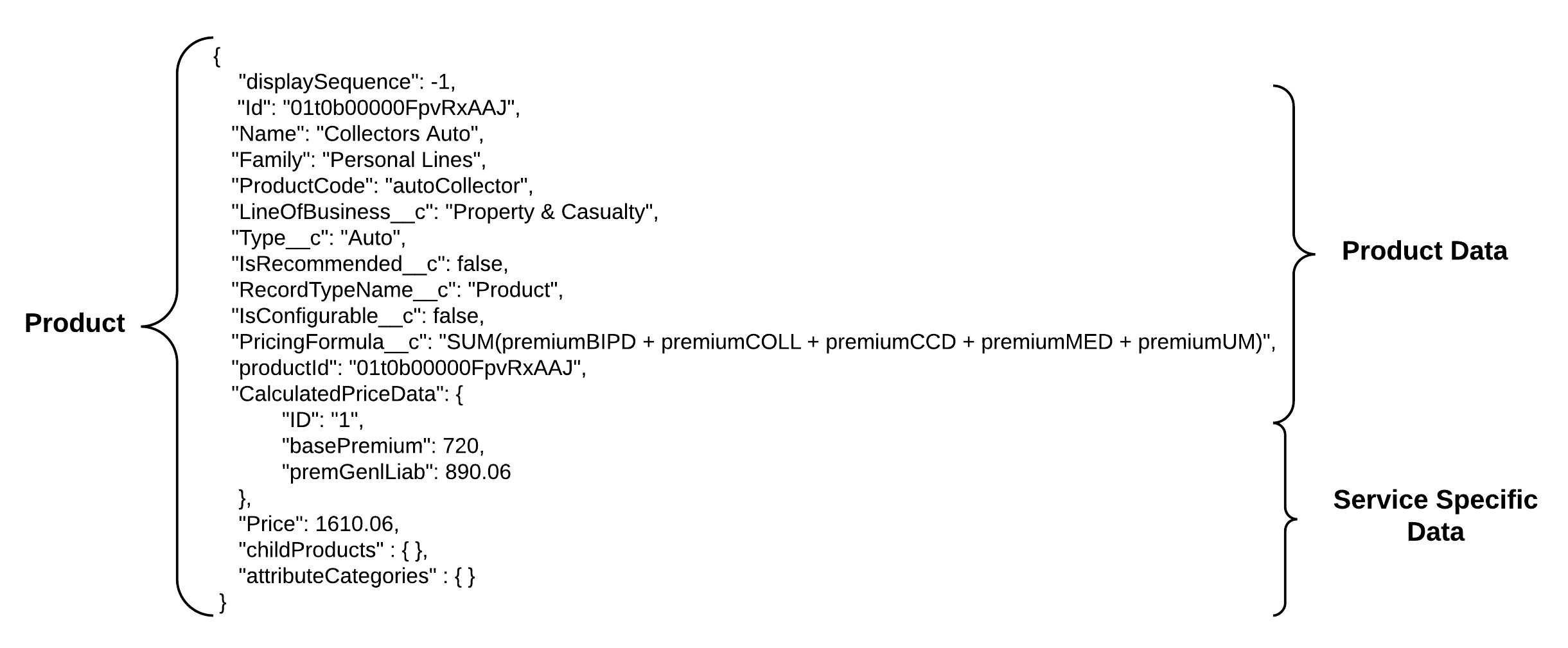
Many services add data to the product object as part of its action.
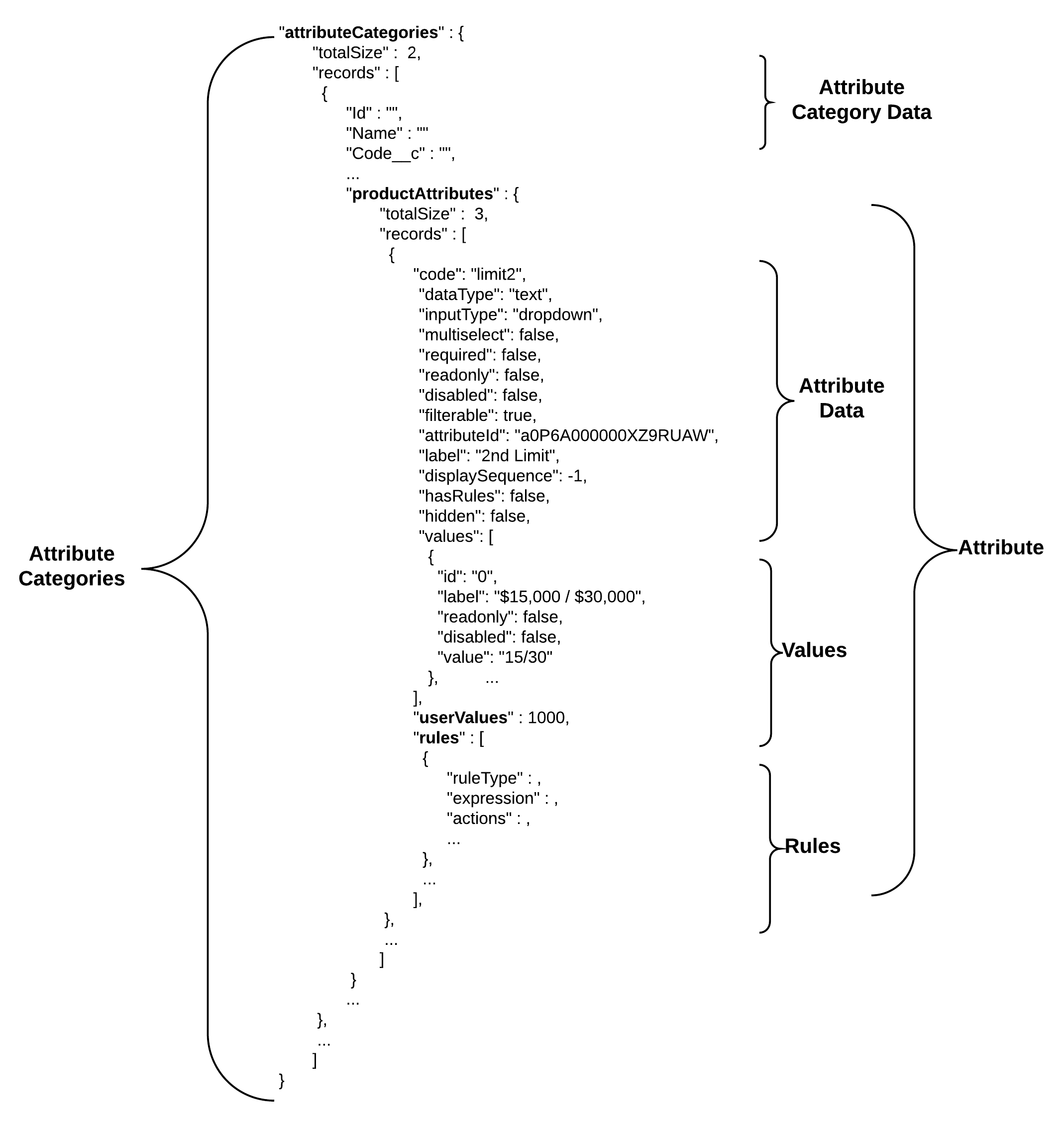
Attributes data is organized by attribute category. Each attribute category contains data about the category and an object with an array of attributes directly associated to the product.
Some services can take data added to the product object.
For
example, the createUpdatePolicy service can take an
additionalFields JSON in the product object. The additionalFields
JSON is a listing of field key/value pairs that it sets when creating or
updating the product record.
Each service has a list of specific data it takes in or adds to the product object as part of its input or output JSON.
Attributes
Attributes help define a product. All the attributes for a product are stored in an
object within an attributeCategories key. This object’s definition is the
same whether it's for root products or child products. It only contains attributes
associated to that specific product or child product.
The
attribute array is organized by attribute category. Each attribute category object in
the array contains one or more attribute objects in the record array of the
productAttributes object.
Each attribute object in the array contains the attribute data defined by the attribute assignment record for the specific product attribute relationship in the product definition.
An
attribute object contains attribute data that defines the attribute. For configurable
attributes, the attribute object can contain a single value or sets of values in an
array of values objects. Configurable attributes have the readonly value
set to false. Each attribute has a userValue that is the
value used for rating if it's mapped.
Rules associated to the attribute or values are added in an array of rules objects in a rules node.
Child and (grand)child Products
Child products are associated to root parent products or to first-level child products, they're never standalone. Coverage spec, insured item spec, insured party spec, and rating facts product types are examples of child products.
You can
find the record type of a child product in RecordTypeName__c of the child
product object. Child products use the same product object structure as the root
product, but they are defined differently based on their intended usage. Also,
coverage spec child products include an isOptional key/value pair that's
exposed in the product administration UI for child products, but not for the root
product.
Starting with the Vlocity Insurance Summer '18 release, child products include pricingFormula__c.
Starting with Vlocity Insurance/Vlocity Health Summer '18 release, the product structure supports the following structure:
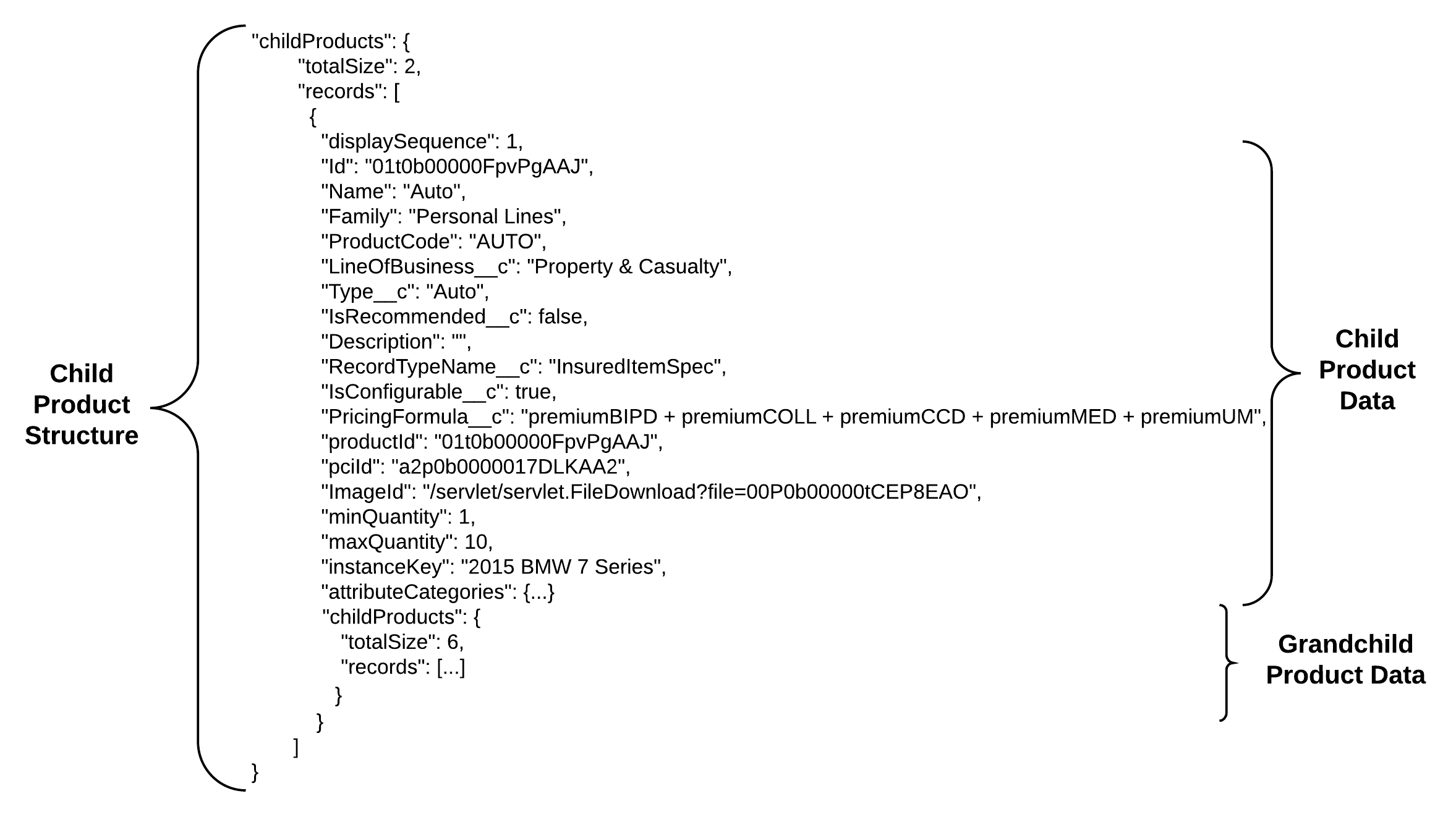
Child and grandchild products now include instanceKey fields. Each instanceKey describes a unique instance of an insured item in a policy that includes multiple insured items.
-
Root product
-
Child product
-
(Grand)Child product
Grandchild products are called childProducts, but the records are nested inside the first-level child product they are associated with.
-
-
Child and grandchild products now include instanceKey fields. Each instanceKey describes a unique instance of an insured item in a policy that includes multiple insured items.
(Grand)Child product records and their attribute records are structured the same way
as first-level child products and root products. They include a
parentInstanceKey field that ties them to the instance of the
first-level child product they're associated with.
Keys Catalog
The following are lists of the most common keys organized by type.
Many
fields are pulled directly from the object in Salesforce, which are specified in the
description. Most Salesforce object field names equal the name of the key and are also
specified in the description. In Salesforce, the field is prefaced by the namespace
<namespace>__<fieldname>,
for example vlocityins__isConfigurable.
Product
Key |
Description |
|---|---|
|
Object that contains key/value pairs of any product fields that are not part of the service. An optional addition used for input to Create/Update services. |
|
Attribute category records data structure, which contains a records array of attribute categories. Each category contains an array of attributes data. |
|
The JSON data produced by the calculation procedure or Integration Procedure. |
|
Child product records data structure, which contains records array of child products. Possible record types include coverage spec, insured item spec, and rating fact spec. |
|
Product2 field |
|
|
|
Product2 field |
|
Product2 field |
|
Product2 field pulled from
|
|
Identifies the specific instance of the insured item. |
|
Product2 field |
|
|
|
Product2 field |
|
Product2 field |
|
Product2 field |
|
The instance key of a (grand)child product's parent product. |
|
Calculated using the formula in |
|
The difference between the existing policy price and the new calculated price. |
|
Product2 field |
|
Product2 field |
|
Salesforce record ID of the product |
|
This node is included when the remote option
|
|
Product, CoverageSpec, InsuredItemSpce, or RatingFactSpec |
|
Product2 field |
|
Product2 field |
|
Product2 field |
|
The difference between the original total premium for term and the sum between the total premium for term of the new policy version and the updated premium for term of the old policy version |
|
Calculated using the formula in
|
|
Product2 field |
Attribute
Key |
Description |
|---|---|
|
Attribute category field |
|
Attribute category field |
|
Attribute category field |
|
Attribute category field |
|
Product attributes records data object, contains records array of attribute objects. |
Values

Key |
Description |
|---|---|
|
|
|
Sequencing id of value data object within the values array. |
|
Display label for the UI. |
|
|
|
Array of rules objects. |
|
The actual value the label represents. |
Rules
Key |
Description |
|---|---|
actions |
Definition of the action. |
expression |
An expression that is evaluated as follows: True: Trigger the action for the rule. False: No action is triggered. |
message |
For rules of type message, this value contains
The severity determines how the message displays. |
rule type |
Three rule types are supported:
|
value expression |
Enter For value, enter a valid %valueExpression%. |
