You are here:
Property Claims First Notice of Loss
Property damage happens. When it does, policyholders need to submit First Notice of Loss (FNOL) information to their insurers to start the claims process rolling. This application includes a property FNOL OmniScript that does just this.
To show how to gather information about accidents, the property FNOL OmniScript does these things:
-
Gathers initial loss information
-
Creates a claim record
-
Runs rules in the background
-
Puts the claim into an adjuster's workflow
The Property FNOL OmniScript name is:
-
Type/SubType: Insproperty/claimsFSC
-
Version name: propertyClaimFNOLFsc
Here is the claims FNOL business process flow:
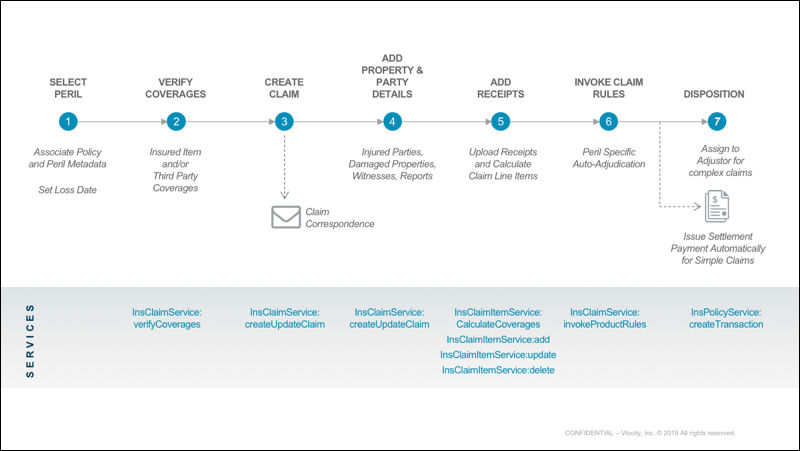
How It Works
Now let's step through the OmniScript the same way as a user sees it.
This OmniScript begins for a policyholder, broker, or agent after the policy number has been entered into the system, which finds the policy and uses the data in it. The OmniScript is triggered when the user selects File Claim from the policy.
The FNOL OmniScript starts by asking what kind of damage incident happened along with basic information about the incident. The date of the incident is important. The system uses that date to help determine whether the policyholder is covered for the incident.

You can also add images that show a user visually what different incidents look like.
Behind the scenes, the OmniScript calls a service that creates the initial claim record.
The OmniScript then asks for details of the damage for the incidents that were selected at the beginning.
The OmniScript asks whether any other property was damaged in this incident. In this case, we select no. If a user selects yes, the user gets more space to enter information about the other property's damage.
Next we tell whether anyone was injured in the incident. In this case, we select no. If a user selects yes, they get more space to enter information about injuries.
We mention if the police were notified and if there's a police report that can be uploaded if we have a copy.
After we finish entering information, the system provides a claim confirmation that includes the claim number.
What's in It
Component Name |
Component Type |
What It Does |
What It Calls |
|---|---|---|---|
setProductCodes |
Set Values |
Sets the product codes of the selected policy. |
None |
setPolicyId |
Set Values |
Sets the policy ID of the selected policy. |
None |
getPolicyNumber |
Omnistudio Data Mapper Extract Action |
Retrieves the policy details. |
insClaims_ReadPolicyProperty_FSCClaimFNOLOS |
enterDetailsofAccident |
Step |
Displays the screen for the user to enter incident information. |
None |
lookupClaimElements |
Matrix Action |
Finds the elements of the type of claim the user chose. |
None |
createClaimFSC |
Integration Procedure Action |
Creates the initial claim record. |
createPropertyClaimProcessFSC |
propertyDamages |
Step |
Displays the screen for the user to enter property damage information. |
None |
getInsuredItems |
Remote Action |
Finds and returns insured items and insured parties from a policy |
|
transformForScheduledItems |
Data Mapper Transform Action |
Transforms the insured item data. |
Trans_getSelectedItemsData_claimsOS |
propertyDamangedetailsStep |
Step |
Displays the screen to enter property damage information. |
None |
createDamagedProperty |
Integration Procedure Action |
Transforms the property damage information and then calls InsClaimService:createUpdateClaim to update the information in the claim record. |
AddFirstPartyPropertyToClaim |
createScheduledItems |
Integration Procedure Action |
Transforms the scheduled item information and then calls InsClaimService:createUpdateClaim to update the information in the claim record. |
AddScheduledItemToClaim |
otherPropertyDamages |
Step |
Displays the screen to enter information about other property damages. |
None |
InjuryLineItems |
Step |
Displays the screen to enter information about other injuries. |
None |
evidence |
Step |
Displays the screen to enter information about a police report, if any. |
None |
setClaimName |
Set Values |
Sets values of the claim name. |
None |
updateClaimName |
Data Mapper Post Action |
Updates the initial claim record with all the information. |
Ins_UpdateClaimName |
evaluateClaimProductRules |
Integration Procedure Action |
Calls InsClaimCoverageService:invokeProductRules to evaluate rules for property FNOL claims. |
propClaimRuleEvaluateService |
setAdjustorRules |
Set Values |
Setting the claim rules from the previous step. |
None |
getClaimNumber |
Data Mapper Extract Action |
Extracts the Claim ID for the policy. |
insClaim_ReadFSCClaimByClaimId_FNOLOS |
claim |
Step |
Displays a confirmation for the claim that is created. |
None |
