You are here:
Property Product Model
The product models underpin all the business processes used in the Property line of business. The name of these product models are:
-
Homeowners
-
Renters
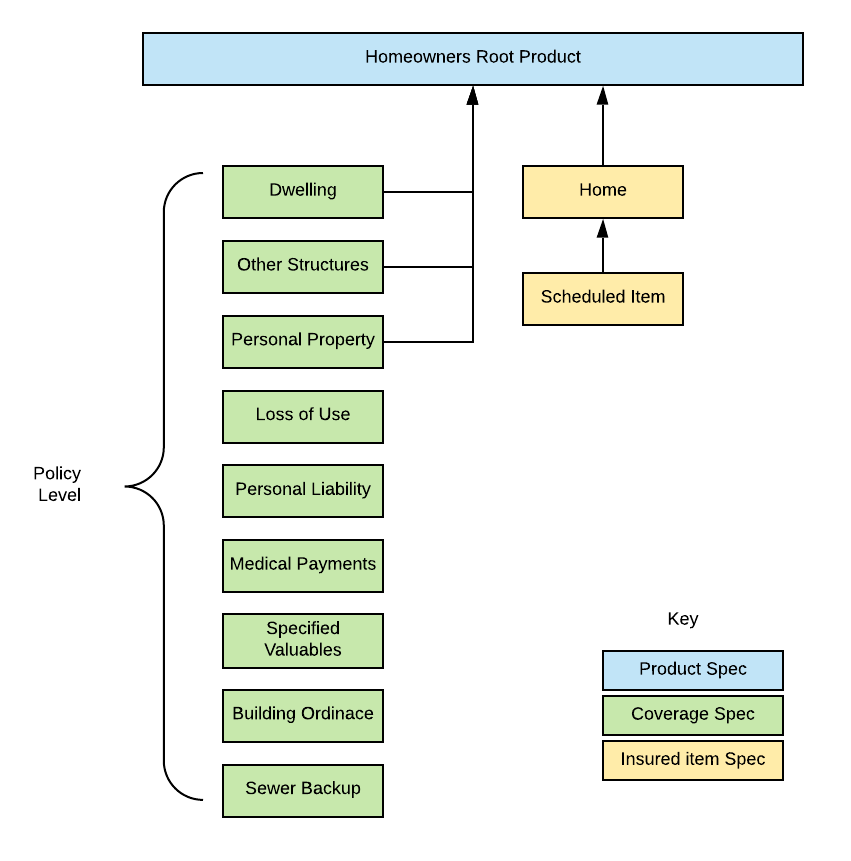
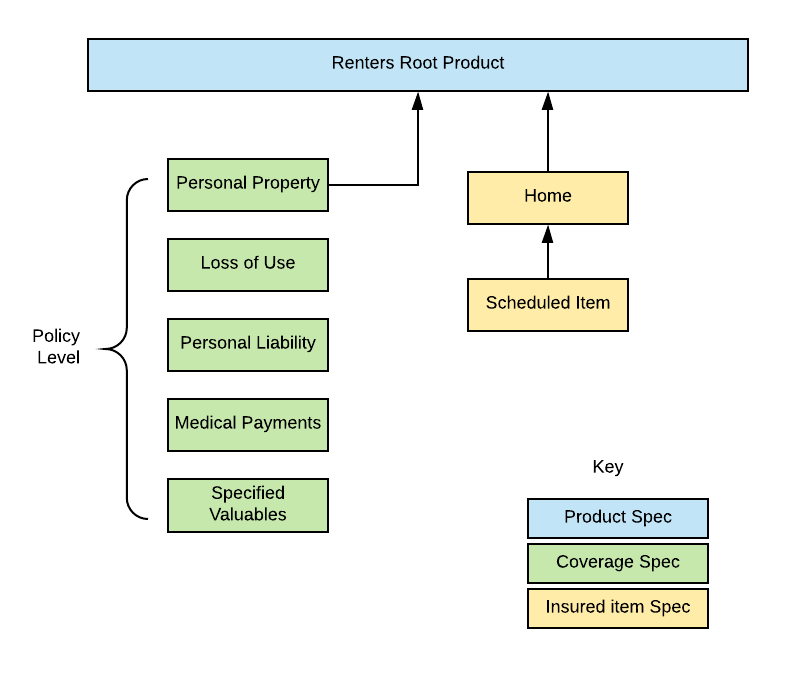
The following sections catalog the components of the Homeowners and Renters product models.
Insured Items
The top-level Insured Item Spec for the Homeowners product model is:
-
Name: Home
-
Product Code: propHome
This item contains all the attributes from the Property Location attribute category.
Values for these attributes are collected from the customer when they're shopping for insurance. Vlocity Insurance uses many of these attributes to rate the Homeowners product.
Each attribute is configured for this insured item spec on the right pane of this page. Click each attribute name to see its configuration on the right pane. Scroll down to see if the Rating checkbox is selected. If it's selected, this attribute is used to rate the insurance product.
Many of these attributes correspond to user inputs in the quote OmniScript and quote UI.
The top-level Insured Item Spec for the Renters product model is:
-
Name: Home
-
Product Code: propHomeRental
Values for these attributes are collected from the customer when they're shopping for insurance. Vlocity Insurance uses many of these attributes to rate the Renters product.
Each attribute is configured for this insured item spec on the right pane of this page. Click each attribute name to see its configuration on the right pane. Scroll down to see if the Rating checkbox is selected. If it's selected, this attribute is used to rate the insurance product.
Many of these attributes correspond to user inputs in the quote OmniScript and quote UI.
The child Insured Item Spec associated to both the propHome and propHomeRental Insured Item Specs for both the Homeowners and Renters product models is:
-
Name: Scheduled Item
-
Product Code: propItem
It contains attributes from the Property Item attribute category.
To learn more about insured item specs, see Child Specs for Root Products.
Coverages
Coverage specs define the required and optional coverages on an insurance product. On the Product page, the Product Record Type at the top left of the page = Coverage Spec.

Both the Homeowners and the Renters product models use the same coverage specs.
The Homeowners product model contains the following coverage specs:
Coverage Spec Name |
Product Code |
Required/Optional |
|---|---|---|
Dwelling |
propDWLLG |
Required |
Other Structures |
propOS |
Required |
Personal Property |
propPERSPROP |
Required |
Loss of Use |
propUSGLSS |
Required |
Personal Liability |
propLIAB |
Required |
Medical Payments |
propMEDPAY |
Required |
Specified Valuables |
propSVAL |
Optional |
Building Ordinance |
propBLDORD |
Optional |
Sewer Backup |
propSEWER |
Optional |
The Renters product model contains the following coverage specs:
Coverage Spec Name |
Product Code |
Required/Optional |
|---|---|---|
Personal Property |
propPERSPROP |
Required |
Loss of Use |
propUSGLSS |
Required |
Personal Liability |
propLIAB |
Required |
Medical Payments |
propMEDPAY |
Required |
Specified Valuables |
propSVAL |
Optional |
To learn more about coverage specs, see Child Specs for Root Products.
Root Products
The root product spec is the container for the Homeowners and Renters product models. The system uses the data stored in this product model in downstream business processes, including quoting, issuing policies, and adjudicating claims.
Both the Homeowners root product spec and the Renters root product spec are structure the same way.
The Scheduled Item insured item spec is a child of the Home insured item spec. This makes Scheduled Item a grandchild of the Homeowner root product and of the Renter root product. This hierarchy creates a parent > children > grandchildren product structure. This means that a customer can add multiple scheduled items to their home.
The Homeowners and Renters root products contain a number of coverages, all of which are associated with the root product. This structure makes Homeowners and Renters single instance product models. This means that whenever a quote is rated out for this product, if multiple homes are included, each has the same level of coverage.
But with this structure, we're expecting that our customers will insure only one home or rental per policy.
To learn about how to set up root product specs, see Root Product Specs.
Attributes
All the attributes used in the Homeowners and Renters product models and the insured item spec, and coverage specs are defined in the Vlocity Attribute Designer. Attributes are arranged into Attribute Categories.
Want to see a complete list of the attributes used in the Homeowners and Renters product models? Visit the Property Attribute Catalog.
In the Vlocity Attribute Designer, basic information is defined for all attributes, such as name and attribute code.
For specific limit and deductible attributes that we use to describe policy terms, more information is defined:
-
Attribute Class
-
Attribute Scope
-
Applicable Actions
-
Applicable Item
-
Value Type
Attributes that have these fields set are called power attributes. Power attributes are defined for policy terms so that the claims system can track them.
To learn more about power attributes, including when to use them and how to set them up, see Policy Terms as Power Attributes.
The attribute's value data type, available values, default selected value, rating status, and other specifics are configured on the insured item spec, insured party spec, coverage spec, or root product spec.
For example, this attribute configuration comes from the
Optional Coverage Rules
The Homeowners product includes optional coverage rules.
On the Specified Valuables coverage spec, two optional coverage rules have been set up:
-
Eligibility Rule
When this rule evaluates to true, Vlocity makes this coverage available to a customer in a quote flow.
-
Default Selected Rule
When this rule evaluates to true, this optional coverage is selected by default.
To learn how to create your own optional coverage rules, see Optional Coverage Rules.
Rules
The Homeowners product model includes a few rules. The Renters product model does not have any rules set on them.
Attribute Rules
The Homeowners product includes the following attribute rules:
Attribute Code with Rule |
Rule Type |
Spec It's On |
Override* |
|---|---|---|---|
ptLimitOS |
Set Value |
Other Structures coverage spec |
Yes |
ptLimitCTS |
Set Value |
Personal Property coverage spec |
Yes |
ptLimitUSGLSS |
Set Value |
Loss of Use coverage spec |
Yes |
* If an attribute rule has Override = Yes, that means the rule was set on the instance of the child spec that's attached to the root product spec. That means that the instance of the child spec on the root product spec overrides the child spec.
To learn about how child spec inheritance and overrides work, see Insurance Product Inheritance.
Simulate Rating the Product
The Simulate tab on the root product spec has the ratings set up to simulate rating the Homeowners and Renters product models. To learn about how we set these up, see Property Rating.
