You are here:
Insurance Quote Record Header
This component shows brokers a snapshot of data about the quote they're looking at. This info can help them get a quick idea of the status of the quote, including the quote status and the date the quote expires.
-
FlexCard: insQuoteHeader
-
LWC: cfInsQuoteHeader
-
Master Label: Insurance Quote Record Header

-
A Google Map reference to the location of the account.
-
The name of this quote.
-
The account name attached to this quote.
-
The expiration date of this quote.
-
The opportunity name attached to the quote.
-
The total premium quoted.
-
The quote number of this quote.
-
Status of this quote.
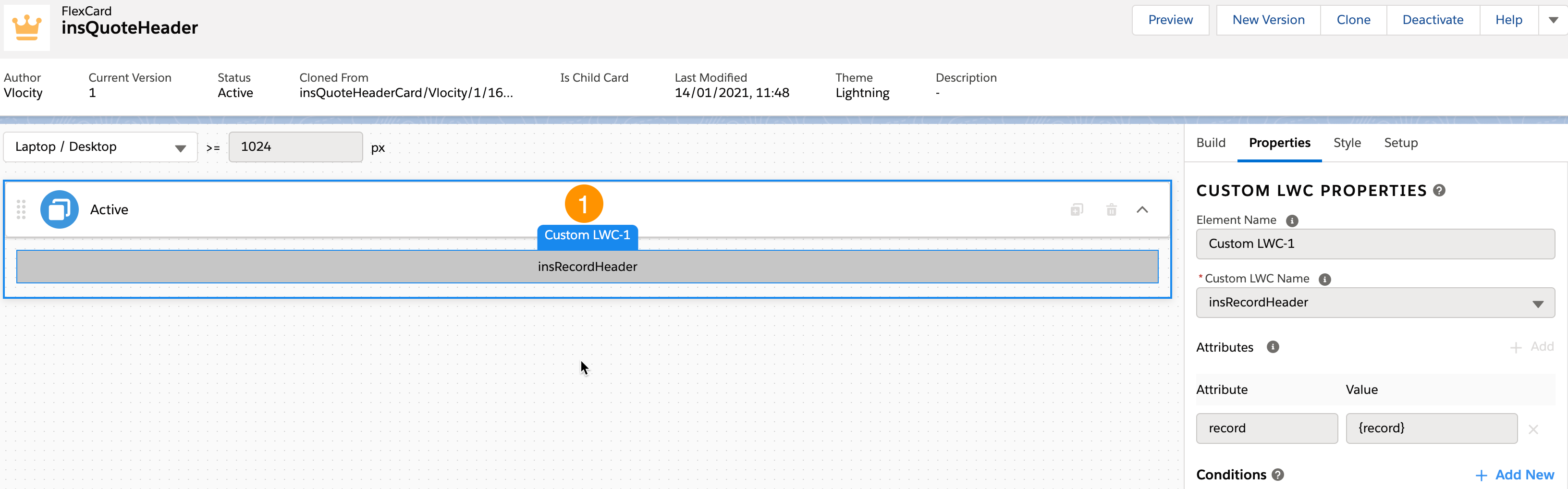
FlexCard Structure
-
insRecordHeader Custom LWC
This LWC structures data pulled from the record by the data source and adds the weather component from Google.
Data Sources Called by this Component
This component calls an Integration Procedure named InsRecordHeaderQuote_getDetails.
If you want to change what data is pulled into the Insurance Quote Record Header, you can open and make changes to this Integration Procedure.
This Integration Procedure comes out of the box with Vlocity Insurance.
The JSON output of this Integration Procedure looks like this:
{
    "recordImage": "https://url.to/companylogo.jpg",
    "recordName": "Edge Communications",
    "fallbackIcon": "standard:account",
    "backgroundImage": "https://maps.googleapis.com/maps/api/staticmap?center=Salesforce%20Tower&size=400x300&key=API_KEY",
    "fields": {
        "Address": "123 Front St. San Francisco, CA 94040",
        "Lead Agent": "Aaron Smith",
        "Client Phone": "(512) 757-6000",
        "Total Premium": "$3,100.00",
        "Total Commission": "$425.00"
    },
    "status": {
        "value": "Active",
        "fontColor": "#0070d2",
        "backgroundColor": "#b0c4df"
    }
}