You are here:
Rating Procedure for Commercial Auto
To rate the Commercial Auto insurance product, we use this Integration procedure:
-
Type/SubType - Rating/CommercialAuto
-
Integration Procedure Name - CommercialAutoRating
Here's what the actual CommercialAutoRating Integration Procedure looks like:
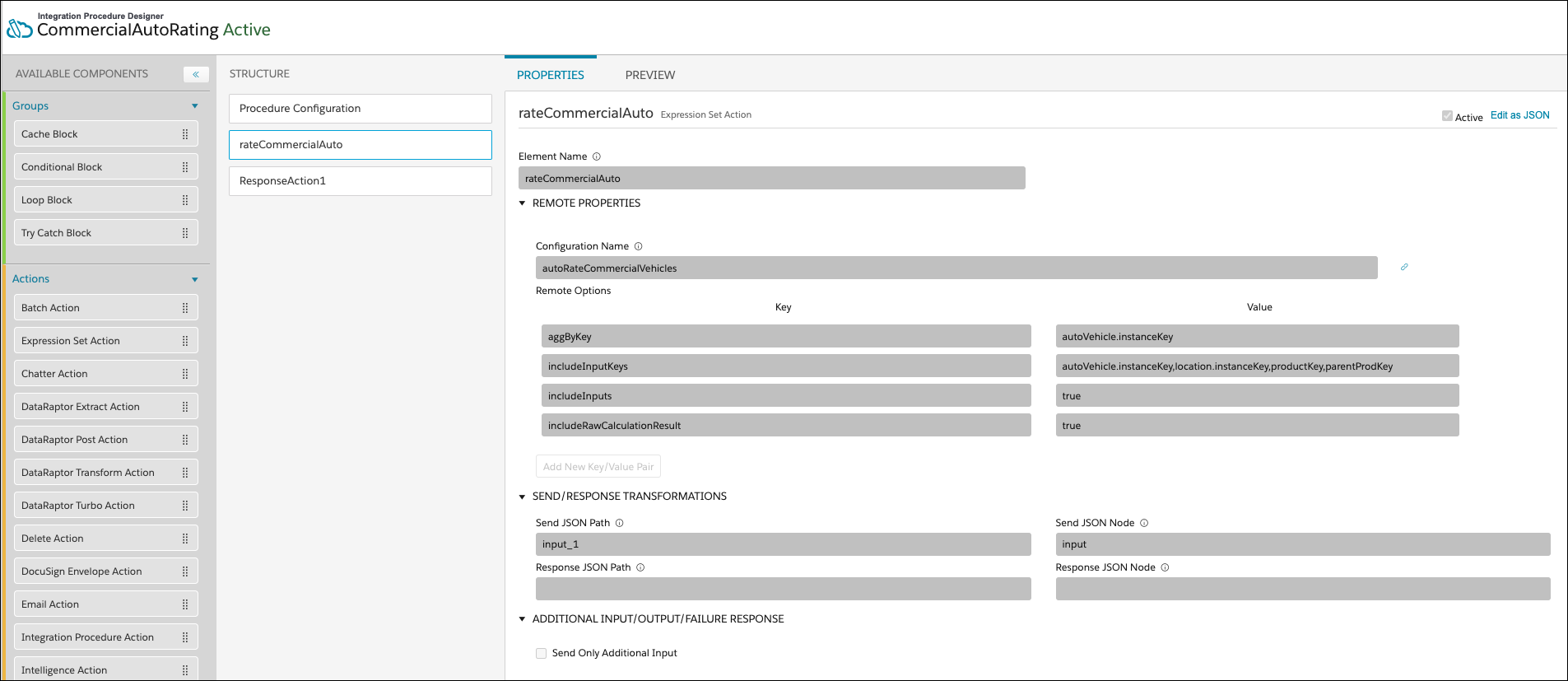
While you'll create your own integration procedure to rate your auto insurance products, you can look at and test out the structure of this one to see how it works. You can model your own Integration Procedure on this one if it works for you.
The Integration Procedure comprises of
rateCommercialAuto expression set action that
rates vehicles by calling the
autoRateCommercialVehicles expression set.
The following remote options are set:
-
Key: includeInputKeys
Value: autoVehicle.instanceKey,location.instanceKey,productKey,parentProdKey
What it does: This option specifies the keys to include from the input set into the output sets of the calculation results. These keys are later used to identify the correct set of calculation results by the aggByKey option as well as in the subsequent steps of this Integration Procedure.
-
Key: includeInputs
Value: true
What it does: Turns on the code that pulls the instance keys specified by the includeInputKeys option.
-
Key: aggByKey
Value: autoVehicle.instanceKey
What it does: Uses the autoVehicle.instance key InputKey in the calculation results sets to determine the sets to run aggregation steps on.
We expect that you'll create your own expression sets to rate vehicles
for your auto insurance products. You can use
autoRateCommercialVehicles as a model, and make
changes to it so you can see how expression sets work.
-
Does a matrix lookup on the value of the car.
-
Does a matrix lookup on the car symbol.
-
Does a matrix lookup on the year of the car.
-
Does a matrix lookup to see if the car uses alternative fuel.
-
Does a matrix lookup to see whether the car has stability controls.
-
Does a matrix lookup to see whether the car has anti-theft protection.
-
Does a matrix lookup to see whether the car has anti-lock brakes.
-
Calculates the Bodily Injury & Property Damage.
-
Calculates the Uninsured Motorist.
-
Calculates the Medical payments.
-
Calculates the CCD.
-
Calculates the Collision.
-
Does a matrix lookup for the Collision deductible.
-
Does a matrix lookup for the Uninsured Motorist.
-
Does a matrix lookup for the Medical payment limit.
-
Does a matrix lookup for a Bodily Injury & Property Damage.
-
Does a matrix lookup to get the CCD deductible.
-
Calculates the Bodily Injury & Property Damage coverage premium.
-
Calculates the premium for Uninsured Motorist coverage.
-
Calculates the Medical payments premium.
-
Calculates the premium for CCD coverage.
-
Calculates the premium for Collision coverage.
-
Calculates the premium for Rental Car coverage.
-
Calculates the Commercial Auto premium.
To learn how to work with expression sets, see Expression Sets.

Before activating your expression set, run simulations with default and custom test input variables. Different decision matrices or sub expression versions called in an expression set version can have different start date time and end date time values. Test different versions by changing the Effective Date value. If the expression set doesn't work as expected, edit the elements and resimulate. When you're satisfied, activate the expression set. For more information, see Simulate and Activate Your Expression Set Version.
autoRateCommercialVehicles includes an aggregation
step that calculate aggregated premiums per vehicle. This step
calculates the sum of all the Commercial Auto premiums calculated from
each run of the calculation steps.
