You are here:
Create Sharing Rules for Rating Procedure Components
If you use calculation procedures or expression sets in product ratings, ensure that quoting works for partner users who issue quotes using the Broker Portal. Create sharing rules that give partner users read-only access to the objects used by rating procedures.
For example, set up sharing rules based on record owner or create other types of sharing rules that grant partner users read-only access to:
-
Attribute Assignments
-
Vlocity Attribute Category
-
Vlocity Calculation Matrices
-
Vlocity Calculation Procedures
-
Decision Matrices
-
Expression Sets
- From Setup (Setup gear icon), in the Quick Find box, enter Sharing Settings, and then select Sharing Settings.
- In the Manage sharing settings for object list, scroll down and select Attribute Assignment.
- In the Attribute Assignment Sharing Rules related list, click New.
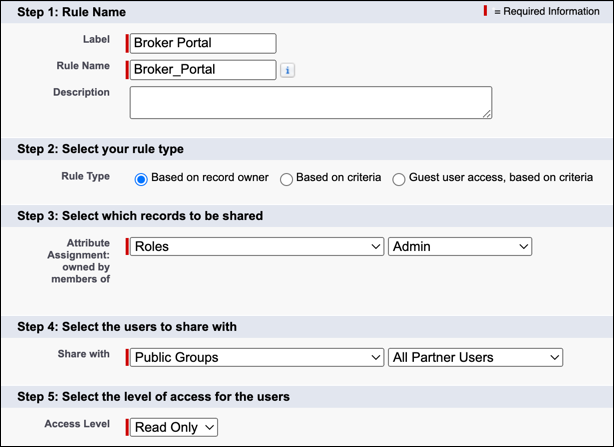
- Enter the label and rule name. Optionally, enter a description.
-
Select a rule type, which records to share, and users to share records with.
For example, if you select the Based on record owner rule type:
-
For records to be shared, select records owned by members of the Admin role.
-
For users to share with, select all partner users in public groups.
-
- For Access Level, select Read Only.
- Click Save.
- Repeat these steps for Vlocity Attribute Category, Vlocity Calculation Matrix, Vlocity Calculation Procedure, Decision Matrices, and Expression Sets objects.
