You are here:
Required Output in a Rating Integration Procedure
The output of your rating Integration Procedure needs to follow the same structure as expression set output.

If you use a third-party rating engine, you transform the rating data received from it into the structure of expression set output.
Here's an example of the output JSON from an expression set.
{
  "output": [
    {
      "calculationResults": [
        {
          "totalPremium": 1752.24,
          "premEmployeeAuto__premEmployeeAuto": 51,
          "premRentalCar__premRentalCar": 52,
          "premSignage": 30.65,
          "premElectronicMedia": 42.25,
          "premValuePapers": 26.5,
          "premAR": 6.9,
          "premEmpFraud": 43.94,
          "premTenantLiability__premTenantLiab": 98,
          "premGenLiab__premGenlLiab": "356",
          "basePremium": 1045,
          "rateBusProperty__ratePersonalProperty": 867,
          "rateSICCategory__rateBase": 603,
          "bopDeductible__factorDeductible": 0.95,
          "ratePropertyValue__factorPropertyValue": 1.1,
          "bopBldgSprinkler__factorSprinkler": 0.75,
          "bopBldgFrame__factorFrame": 0.971,
          "bopBldgAge__factorBldgAge": 1.05,
          "bopPoints__factorPoints": 0.89,
          "ID": "input"
        }
      ],
      "aggregationResults": {}
    }
  ]
}
Aggregation rating data must be in its own node, which includes the aggregate values. Put calculation results in a list of values that represent the prices for each insured item rated.
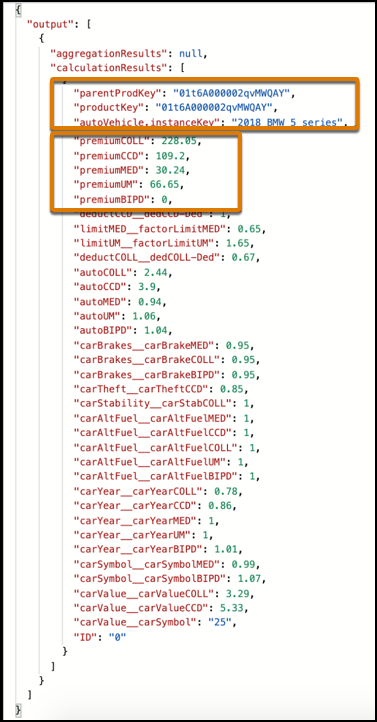
The output of the Integration Procedure must be structured like this:
-
The
productKeyandparentProdKeymust be included, the same as for all calculation result nodes.The service calling the rating procedure can have more than one product rated at root and/or child level. These two keys put the correct rating with the right product at the right level.
-
For multi-instance products, each instance of a rated product (that has a unique instance key) must include the rating (price) in that instance's node.
-
Prices calculated across multiple instances must be in the aggregate node.
This example highlights the parentKey, parentProdKey, and instance key, along with calculated premiums for coverages.